








我是轻易不说微软的代码有Bug的,因为往往在说了以后发现其实是自己错了。不过这次真的找不出自己哪儿错了,就大胆说一次吧。
先说明一下使用场景,使用Silverlight ToolKit中提供的AutoCompleteBox作为员工输入控件。代码如下:
AutoCompleteBoxDemo.xaml代码:
<UserControl x:Class="AutoCompleteBoxSample.AutoCompleteBoxDemo"
    xmlns="http://schemas.microsoft.com/winfx/2006/xaml/presentation"
    xmlns:x="http://schemas.microsoft.com/winfx/2006/xaml"
    xmlns:Controls="clr-namespace:System.Windows.Controls;assembly=System.Windows.Controls.Input"
    Width="400" Height="300">
    <StackPanel Orientation="Horizontal" Margin="30" VerticalAlignment="Center" >
        <TextBlock VerticalAlignment="Center">Employee:</TextBlock>
        <Controls:AutoCompleteBox  x:Name="acb" Width="160" SelectionChanged="OnSelectionChanged">
            <Controls:AutoCompleteBox.ItemTemplate>
                <DataTemplate>
                    <StackPanel Orientation="Horizontal">
                        <TextBlock Text="{Binding Code}"></TextBlock>
                        <TextBlock Text="-"></TextBlock>
                        <TextBlock Text="{Binding Name}"></TextBlock>
                    </StackPanel>
                </DataTemplate>
            </Controls:AutoCompleteBox.ItemTemplate>
        </Controls:AutoCompleteBox>
        <TextBlock VerticalAlignment="Center" Margin="10,0,0,0" >You select:</TextBlock>
        <TextBlock Name="txbName" VerticalAlignment="Center"></TextBlock>
    </StackPanel>
</UserControl>
AutoCompleteBoxDemo.xaml.cs代码:
using System.Windows.Controls;

namespace AutoCompleteBoxSample
{
    public partial class AutoCompleteBoxDemo : UserControl
    {
        public AutoCompleteBoxDemo()
        {
            InitializeComponent();

            EmployeeBll bll = new EmployeeBll();
            this.acb.ItemsSource = bll.EmployeeList;
        }

        private void OnSelectionChanged(object sender, SelectionChangedEventArgs e)
        {
            Employee employee = this.acb.SelectedItem as Employee;
            this.txbName.Text = employee == null ? "" : employee.Code;
        }
    }
}
Employee.cs代码:
using System.Collections.Generic;

namespace AutoCompleteBoxSample
{
    public class Employee
    {
        public string Code { get; set; }
        public string Name { get; set; }
        public int Age { get; set; }

        public override string ToString()
        {
            return Name;
        }
    }

    public class EmployeeBll
    {
        public EmployeeBll()
        {
            this.employeeList = new List<Employee>();
            this.employeeList.Add(new Employee { Code = "001", Name = "Mike", Age = 16 });
            this.employeeList.Add(new Employee { Code = "002", Name = "Mike", Age = 18 });
            this.employeeList.Add(new Employee { Code = "003", Name = "Rose", Age = 20 });

        }

        private List<Employee> employeeList;

        public List<Employee> EmployeeList
        {
            get { return this.employeeList; }
        }
    }
}
真是不巧,三个员工中竟然有其中两个重名。
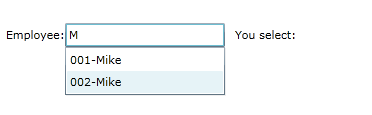
现在我运行程序,开始输入了。输入M后,AutoCompleteBox控件下拉列表中正确的显示出匹配的内容,如下图所示:
然后,我用鼠标选择了002-Mike。通过名为txbName的TextBlock展示出来的选择结果却显示我选择了001(如果对选择过程进行跟踪的话,会发现确实首先选中了002,但SelectionChanged事件很快被再次激发,选中项变成了001),如下图所示:
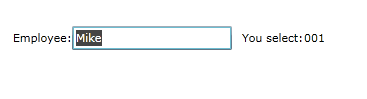
通过查看AutoCompleteBox的源码,发现在其中的UpdateTextCompletion方法中用代码片段1重新获取了与文本匹配的选中项,并在重新获取的选中项与当前选中项不一致时改写了当前选中项(见代码片段2)。由于TryGetMatch方法在获取与文本匹配的项时找到第一个匹配项便立即返回,因此当ItemsSource中项的ToString方法的结果不能唯一确定某一个项时(或者为AutoCompleteBox指定ValueMemberPath且ItemsSource中项的该属性值不能唯一确定某一个项时),便会出现以上所描述的问题。
UpdateTextCompletion方法代码片段1:
newSelectedItem = TryGetMatch(text, _view, AutoCompleteSearch.GetFilter(AutoCompleteFilterMode.EqualsCaseSensitive));
UpdateTextCompletion方法代码片段2:
// Update the selected item property

if (SelectedItem != newSelectedItem)
{
    _skipSelectedItemTextUpdate = true;
}
SelectedItem = newSelectedItem;
结束语:或许这种用法不是AutoCompleteBox开发人员的本意?但现实中这种情况还是普遍存在的,不知该不该算是AutoCompleteBox控件的一个Bug。
此内容由惯性聚合(RSS阅读器)自动聚合整理,仅供阅读参考。 原文来自 — 版权归原作者所有。