





先决条件
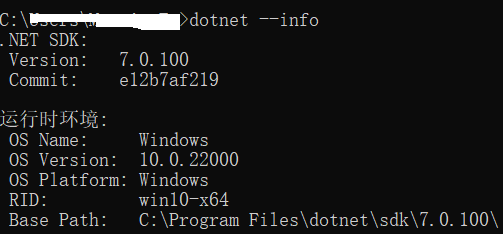
请确保安装了 .NET Core 第6 或 7 版本,我这安装的是 7.
一. 领域建模方式
Entity Framework (非 Core)支持以下三种建模方式。但 Entity Framework Core 仅支持第一种也就是 Code First。
1. Code First
POCO:Plain Old CLR Object。内在含义是指那些没有从任何类继承、也没有实现任何接口,更没有被其它框架侵入的对象。
EF 4.0 之前的对象需要从 EntityObject 基类继承,4.0 开始引入了 POCO 数据模型。POCO 要尽可能简单,可以包含属性和方法,但方法不能实现持久化逻辑。
使用 Code First 模型可以完全以面向对象的方式工作。这是最受欢迎的领域建模方式,没有自动生成的难以管理的代码,只需要定义映射,别的交给 EF 处理。
2. Model First
使用实体设计器在 .edmx 中创建模型实体及其关系和继承层次结构,然后创建数据库。
优点是可视化,缺点是无法控制代码和数据库,因为代码是自动生成的,如果在 POCO 中添加了自定义的代码,模型变动后自动生成会覆盖掉代码修改,解决办法是得使用 T4 模板(不太了解)或者使用部分类。
3. Database First
如果有现有数据库,或者 DBA 设计好了数据库,那么可以使用这种方式。
缺点是代码是自动生成的,这个和第二种方式一样的。
二. 安装 EF 包
具体下载的包取决于你使用的数据库,EF Core 通过使用“数据库提供程序”支持不同的数据库系统。 每个系统都有自己的数据库提供程序,提供程序都是以 NuGet 包的形式提供。

在 VS2022 中新建一个控制台程序,然后右键项目,选择“管理 NUGet 程序包”。

在 Nuget 管理页面填写“Entity Framework”并搜索,因为我使用的数据库是 SQL Server,因此这里选择“Microsoft.EntityFrameworkCore.SqlServer”,下载这个包时会下载相应的依赖。

这样就不用纠结搜索出来这么多选项需要安装哪些了,安装后可以查看相关依赖。可以参见:https://learn.microsoft.com/zh-cn/ef/core/get-started/overview/install。

三. 模型
对于 EF Core,使用模型执行数据访问。 模型由实体类和表示数据库会话的上下文对象构成。
 1   public class Blog
 2     {
 3         public int BlogId { get; set; }
 4
 5         public string Url { get; set; }
 6
 7         public int Rating { get; set; }
 8
 9         public List<Post> Posts { get; set; }
10
11         public string toString()
12         {
13             return $"BlogId: {this.BlogId}, Url: {this.Url}";
14         }
15     }
 1   public class Post
 2     {
 3         public int PostId { get; set; }
 4
 5         public string Title { get; set; }
 6
 7         public string Content { get; set; }
 8
 9
10         public int BlogId { get; set; }
11
12         public Blog Blog { get; set; }
13     }
数据库上下文类型。
 1   public class BloggingContext : DbContext
 2     {
 3         public DbSet<Blog> Blogs { get; set; }
 4
 5         public DbSet<Post> Posts { get; set; }
 6
 7
 8         protected override void OnConfiguring(DbContextOptionsBuilder optionsBuilder)
 9         {
10             optionsBuilder.UseSqlServer(
11                 @"Server=(localdb)\mssqllocaldb;Database=Blogging;Trusted_Connection=True");
12         }
13     }
四. 创建数据库
我们上面创建了模型,接下来使用迁移来创建数据库。这里需要借助一些工具,有关的两个工具集如下:
1).NET Core 命令行接口 (CLI) 工具可用于 Windows、Linux 或 macOS。 这些命令以 dotnet ef 开头。
将 dotnet ef 安装为全局工具或本地工具。 大多数开发人员偏向于使用以下命令将 dotnet ef 安装为全局工具:
dotnet tool install --global dotnet-ef

更新工具使用以下命令:dotnet tool update
2)包管理器控制台 (PMC) 工具在 Windows 上的 Visual Studio 中运行。 这些命令以动词开头,例如 Add-Migration、Update-Database。
获取适用于 EF Core 的包管理器控制台工具,需要安装 Microsoft.EntityFrameworkCore.Tools 包。
Install-Package Microsoft.EntityFrameworkCore.Tools
完整的迁移命令过程如下:
1)安装 dotnet ef,上面已提及。
dotnet tool install --global dotnet-ef
2)安装命令行 EF Core 开发的工具套件。
dotnet add package Microsoft.EntityFrameworkCore.Design
这个命令需要在项目文件内执行,否则会报错。

3)这个我暂时没查到作用是什么。。同样需要在项目文件内执行。
dotnet ef migrations add InitialCreate

4)迁移。
dotnet ef database update
运行报了一个错误,“证书链是由不受信任的颁发机构颁发的”。

查询了错误,发现是和客户端驱动程序升级后默认行为的改变有关(https://learn.microsoft.com/zh-cn/troubleshoot/sql/connect/certificate-chain-not-trusted?tabs=ole-db-driver-19)。
如果最近将 SQL Server Native Client 11.0 (Provider=SQLNCLI11) 应用程序升级为使用 Microsoft OLE DB Driver 19 for SQL Server (Provider=MSOLEDBSQL19) ,则可能会收到类似于以下
消息的错误消息:
[Microsoft OLE DB Driver 19 for SQL Server]:客户端无法建立连接
[Microsoft OLE DB Driver 19 for SQL Server]:SSL 提供程序:证书链由不受信任的颁发机构颁发。

原因
如果这两个条件都为 true,则会发生这些错误:
1. SQL Server实例的 Force 加密设置设置为“否”。
2. 客户端连接字符串未显式指定加密属性的值,或者未在 DSN 中显式设置或更新 加密 选项。

由于客户端驱动程序的默认行为发生更改,因此会发生错误。 旧版客户端驱动程序旨在假定默认情况下数据加密为 OFF 。 默认情况下,新驱动程序假定此设置为 ON 。 由于数据加密设置为 ON,因此驱动程序尝试验
证服务器的证书并失败。
解决方案给出了 3 种。
解决方案 1:使用 Microsoft OLE DB Driver for SQL Server 18.x。 可以从Microsoft OLE DB Driver for SQL Server的发行说明下载驱动程序。

解决方案 2:如果应用程序连接字符串属性已指定用于数据设置的加密/使用加密的“是”或“必需”值,请将值更改为“否”或“可选”。 例如, 对 Data=Optional 使用加密。 如果连接字符串未为 “加密”/“使用数据加
密”指定任何值,请向连接字符串添加 “Data 的使用加密”=“可选 ”。 有关详细信息,请参阅加密 和证书验证。

解决方案 3: 添加 ;Trust Server Certificate=true 到连接字符串。 这将强制客户端在不进行验证的情况下信任证书。
我采用了最简单的第 3 种,然后就成功了。

查询数据库,发现已经新建了数据库和表。

五. 增删改查
 1   static void Main(string[] args)
 2         {
 3             using(var dbContext = new BloggingContext())
 4             {
 5                 var blogs = dbContext.Blogs;
 6
 7                 Console.WriteLine("Inserting a new blog");
 8                 dbContext.Blogs.Add(new Blog { Url = "http://blogs.msdn.com/adonet" });
 9                 dbContext.SaveChanges();
10                 Console.WriteLine("Inserting complete.");
11                 Console.WriteLine();
12
13                 Console.WriteLine("Querying for a blog");
14                 var blog = dbContext.Blogs.OrderBy(b => b.BlogId).FirstOrDefault();
15                 Console.WriteLine(blog.toString());
16                 Console.WriteLine();
17
18                 Console.WriteLine("Updating the blog and adding a post");
19                 blog.Url = "https://devblogs.microsoft.com/dotnet";
20                 dbContext.SaveChanges();
21                 blog = dbContext.Blogs.OrderBy(b => b.BlogId).First();
22                 Console.WriteLine("Updating complete.");
23                 Console.WriteLine(blog.toString());
24                 Console.WriteLine();
25
26
27                 Console.WriteLine("Delete the blog");
28                 dbContext.Remove(blog);
29                 dbContext.SaveChanges();
30                 Console.WriteLine("Delete complete.");
31             }
32         }
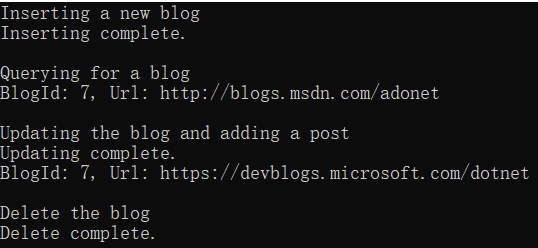
以上代码执行了增删改查所有操作,操作结果如下:
此内容由惯性聚合(RSS阅读器)自动聚合整理,仅供阅读参考。 原文来自 — 版权归原作者所有。