


惯性聚合 高效追踪和阅读你感兴趣的博客、新闻、科技资讯
阅读原文 在惯性聚合中打开

推荐订阅源

酷 壳 – CoolShell
酷 壳 – CoolShell
H
Hacker News: Front Page
P
Palo Alto Networks Blog
T
ThreatConnect
Apple Machine Learning Research
博客园_首页
T
True Tiger Recordings
P
Privacy & Cybersecurity Law Blog
B
Blog
IT之家
IT之家
Last Week in AI
Last Week in AI
F
Full Disclosure
Hacker News: Ask HN
Hacker News: Ask HN
C
Comments on: Blog
Microsoft Azure Blog
C
Cybersecurity and Infrastructure Security Agency CISA
Microsoft Security Blog
博客园 - 【当耐特】
N
News and Events Feed by Topic
NISL@THU
NISL@THU
腾讯CDC
雷峰网
雷峰网
Security Latest
Security Latest
李成银的技术随笔
M
Microsoft Research Blog - Microsoft Research
L
LangChain Blog
L
Lohrmann on Cybersecurity
cs.CL updates on arXiv.org
C
Check Point Blog
Y
Y Combinator Blog
Recent Announcements
博客园 - Franky
N
News | PayPal Newsroom
V
V2EX
A
About on SuperTechFans
The Register - Security
月光博客
月光博客
奇客Solidot–传递最新科技情报
奇客Solidot–传递最新科技情报
Google Online Security Blog
MyScale Blog
MyScale Blog
Cisco Talos Blog
Cisco Talos Blog
Vercel News
Vercel News
WordPress大学
WordPress大学
C
Cyber Attacks, Cyber Crime and Cyber Security
The Hacker News
The Hacker News
IntelliJ IDEA : IntelliJ IDEA – the Leading IDE for Professional Development in Java and Kotlin | The JetBrains Blog
爱范儿
爱范儿
A
Arctic Wolf
L
LINUX DO - 最新话题
freeCodeCamp Programming Tutorials: Python, JavaScript, Git & More

博客园 - Anders Cui

jieba.NET与Lucene.Net的集成 jieba中文分词的.NET版本:jieba.NET 迷人的斐波那契数 - Anders Cui 趣题一则:交替放置的碟子 趣题一则:冯·诺依曼邻居问题 - Anders Cui 趣题一则:寻找那扇门 HashSet的实现(下) HashSet的实现(上) 趣题一则:如何快速过桥? 制作自己的wikibook 玩儿一下Word Search Puzzle 整数的展开 离散数学拾趣(三):集合的子集有多少个 - Anders Cui 找零钱的两种方法 离散数学拾趣(二):逻辑难题 离散数学拾趣(一) 关于命名中的数量和人称 扩展方法浅谈 意外之喜
最近遭遇的两个VS配置
Anders Cui · 2009-12-15 · via 博客园 - Anders Cui

2009-12-15 21:44  Anders Cui  阅读(1421)  评论()    收藏  举报

1. 一直比较习惯使用英文版的VS,因为其界面会比较一致,不像中文版会有夹生的感觉。但是最近想学习下SQL Server 2008,由于下载的是中文版,安装完毕后,它顺便把VS 2008也变成中文的了,还不吱一声。

本来想就这么着吧,但是每次打开VS都会不爽一下,于是想切换回英文界面。网上有人说再安装下SP1就好,结果不行。于是打开那熟悉的Tools –> Options,发现在Environment –> International Settings这一项设置下就好了。

vs2008-lan-setting

这一次我的界面被切换了,让我想起了:一字话今年(2009年)

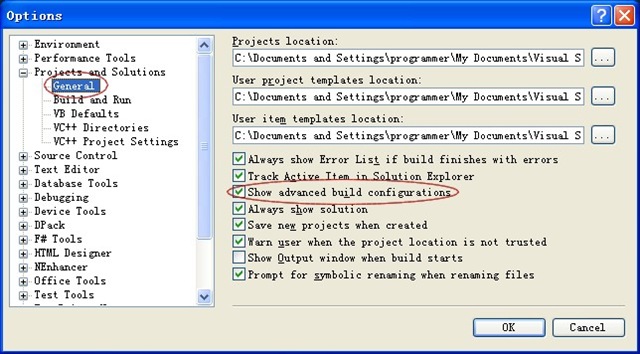
2. 前段时间有两个同事新装了系统,它们的VS 2008的Build菜单下,找不到Configuration Manager菜单项,于是没法对项目的生成模式进行设置。这个其实也可以在Options中配置:Projects and Solutions –> General –> Show advanced build configurations.
vs2008-build-config

不管怎么说,VS 2008的可配置内容还是很全面的:)