









此绑定使用TCP传输协议,不具交互性,只适用于 WCF 到 WCF 的通信。
此绑定的传输安全性的实现:
l 安全模式Message
这种模式WCF中都一样,都是使用WS-*通过对SOAP消息本身进行加密、签名等等的处理来保证安全性。Message模式不依赖于传输协议。服务端需要指定服务端证书,用来加密服务端和客户端相互传送的消息。
l Transport – 客户端windows验证
使用windows security保证消息的安全,使用windows credential进行身份验证。
这种方式不需要服务端证书。
至于windows security的实现安全的原理我还不明白,这部分尚待了解。
l Transport – 客户端其他验证方式
使用TLS over TCP实现传输安全性,需要服务端证书。
一般大家对SSL比较熟悉,对TLS可能要陌生些,其实可以说TLS协议可以看作跟SSL协议后续版本。1994年,netscape为了在internet上进行安全的数据传输,开发了的SSL协议,后来标准化组织把SSL标准化了,稍作修改改名叫TLS,在一般的使用意义上,这两个协议差别不大,就是在保证消息完整性的散列算法上使用了不同的算法。
TLS over TCP 直接建立在TCP协议上,通过传输层TCP协议实现安全性。
netTCPBinding绑定是直接使用TCP协议,不走HTTP,所以不能使用IIS宿主。这部分的测试实例采用自宿主的服务端console应用,基于代码的方式。
测试环境
l 服务端:
服务器名:win2008
操作系统:Windows server 2008
开发环境:visual studio 2008
运行环境:.net framework 3.5
Web服务器: IIS 7.0
浏览器:IE 7.0
l 客户端:
服务端机器同时充当测试客户端机器,同时准备了一台win2003的机器做测试客户端:
计算机名:win2003base2
操作系统:Windows server 2003
运行环境:.net framework 3.5
浏览器:IE 7.0
共用测试WCF服务类
所有测试都是用同样的服务端contract和实现这个contract的service:
[ServiceContract(Namespace = "http://chnking.com")]
public interface IGetIdentity
{
[OperationContract]
string Get(string ClientIdentity);
}
public class GetIdentity : IGetIdentity
{
public string Get(string ClientIdentity)
{
return ("服务端Identity 是'" + ServiceSecurityContext.Current. PrimaryIdentity.Name +
"'\n\r客户端Identity是 '" + ClientIdentity + "'");
}
}
代码很简单,一个contract提供了一个Get方法,接收一个string参数,返回一个string参数。在后面的测试中,客户端把客户端安全上下文的Identity发送到服务端,服务端返回服务端安全上下文的Identity给客户端。
这部分的测试代码:NetTcpBinding_None.rar
netTCPBinding绑定默认的安全模式是Transport,提供传输层的安全性,但是也提供None安全模式的选择,None安全模式不提供任何安全性和身份验证。
这种方式的安全性:
| 完整性 | 不提供 |
| 保密性 | 不提供 |
| 服务端身份身份验证 | 不提供 |
| 客户端身份验证 | 无,并忽略客户端验证的其他方式设置,固定为None |
本例采用全代码方式,不使用配置文件。
服务端代码:
internal static void Main()
{
NetTcpBinding myBinding = new NetTcpBinding();
myBinding.Security.Mode = SecurityMode.None;
myBinding.Security.Transport.ClientCredentialType = TcpClientCredentialType.None;
Uri baseAddress = new Uri("net.tcp://localhost:8056/WCFService/");
myServiceHost = new ServiceHost(typeof(GetIdentity), baseAddress);
ServiceEndpoint myServiceEndpoint = myServiceHost.AddServiceEndpoint
(typeof(IGetIdentity), myBinding, "GetIdentity");
ServiceMetadataBehavior behavior = new ServiceMetadataBehavior();
behavior.HttpGetEnabled = true;
behavior.HttpGetUrl = new Uri("http://localhost:8057/mex");
myServiceHost.Description.Behaviors.Add(behavior);
myServiceHost.Open();
Console.WriteLine("Service started!");
Console.ReadLine();
myServiceHost.Close();
}
客户端代码:
static void Main(string[] args)
{
NetTcpBinding myBinding = new NetTcpBinding();
myBinding.Security.Mode = SecurityMode.None;
myBinding.Security.Transport.ClientCredentialType = TcpClientCredentialType.None;
EndpointAddress ea = new EndpointAddress("net.tcp://localhost:8056/WCFService/GetIdentity");
GetIdentityClient gc = new GetIdentityClient(myBinding, ea);
//为使用TcpTrace跟踪消息设置的TcpTrace监听端口
ClientViaBehavior myClientViaBehavior = new ClientViaBehavior
(new Uri("net.tcp://localhost:8055/WCFService/GetIdentity"));
gc.Endpoint.Behaviors.Add(myClientViaBehavior);
//执行代理类Get方法
string result = gc.Get(WindowsIdentity.GetCurrent().Name);
Console.WriteLine(result);
Console.ReadLine();
}
客户端设置了ClientVia的Vehavior,设置8055为监听端口,8056为实际端口,同时运行TcpTrace来跟踪通讯数据,客户端运行结果:

TCPTrace工具抓客户端和服务端的通讯数据:

从TcpTrace的截获的通讯数据可以看出:
l netTCPBinding绑定采用binary编码。
l netTCPBinding的None安全模式不对消息加密,从截获的数据可以看到返回的消息中文本部分是明文。
这部分的测试代码: NetTcpBinding_Transport_Windows.rar
netTCPBinding绑定的Transport安全模式,提供传输层的安全性,客户端Windows验证,此时将采用windows security在传输层来保证消息的安全性。
这种方式的安全性:
| 完整性 | 由windows security提供 |
| 保密性 | 由windows security提供 |
| 服务端身份身份验证 | Windows集成验证 |
| 客户端身份验证 | 客户端Windows credential通过Windows继承验证客户端身份 |
本例采用全代码方式,不使用配置文件。代码部分是在前面None安全模式代码基础上在服务端和客户端的代码中将安全模式改为Transport,客户端验证方式改为Windows即可。
myBinding.Security.Mode = SecurityMode.Transport;
myBinding.Security.Transport.ClientCredentialType = TcpClientCredentialType.Windows;
客户端运行结果:
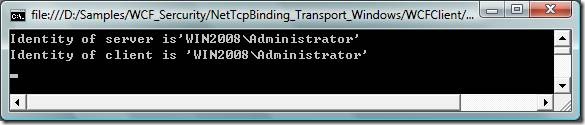
TCPTrace工具抓客户端和服务端的通讯数据:

从TcpTrace的截获的通讯数据可以看出:
l netTCPBinding绑定式采用binary编码。
l netTCPBinding的Transport安全模式对消息加密,从截获的数据可以看到返回的消息中也看不到明文。
这部分的测试代码: NetTcpBinding_Transport_None.rar
netTCPBinding绑定的Transport安全模式,客户端None验证,此时将采用TLS协议在传输层来保证消息的安全性。
这种方式的安全性:
| 完整性 | 由TLS提供 |
| 保密性 | 由TLS提供 |
| 服务端身份身份验证 | 服务端证书提供 |
| 客户端身份验证 | 没有 |
TLS跟SSL一样,需要设置服务端证书。
这里用Makecert.exe工具生成证书,使用下面的命令:
makecert -sr localmachine -ss My -n CN=win2008 -sky exchange -pe -r
这是服务端证书,win2008是服务端的机器名。
如果做过前面BasicHttpBinding的测试,这个服务端证书就应该已经有了。
internal static ServiceHost myServiceHost = null;
internal static void Main()
{
NetTcpBinding myBinding = new NetTcpBinding();
myBinding.Security.Mode = SecurityMode.Transport;
myBinding.Security.Transport.ClientCredentialType = TcpClientCredentialType.None;
Uri baseAddress = new Uri("net.tcp://win2008:8056/WCFService/");
myServiceHost = new ServiceHost(typeof(GetIdentity), baseAddress);
ServiceEndpoint myServiceEndpoint = myServiceHost.AddServiceEndpoint
(typeof(IGetIdentity), myBinding, "GetIdentity");
//设置服务端证书
myServiceHost.Credentials.ServiceCertificate.SetCertificate("CN=win2008");
ServiceMetadataBehavior behavior = new ServiceMetadataBehavior();
behavior.HttpGetEnabled = true;
behavior.HttpGetUrl = new Uri("http://win2008:8057/mex");
myServiceHost.Description.Behaviors.Add(behavior);
myServiceHost.Open();
Console.WriteLine("Service started!");
Console.ReadLine();
myServiceHost.Close();
}
static void Main(string[] args)
{
NetTcpBinding myBinding = new NetTcpBinding();
myBinding.Security.Mode = SecurityMode.Transport;
myBinding.Security.Transport.ClientCredentialType = TcpClientCredentialType.Certificate;
EndpointAddress ea = new EndpointAddress("net.tcp://win2008:8056/WCFService/GetIdentity");
GetIdentityClient gc = new GetIdentityClient(myBinding, ea);
//设置不验证服务端证书有效性
gc.ClientCredentials.ServiceCertificate.Authentication.CertificateValidationMode =
System.ServiceModel.Security.X509CertificateValidationMode.None;
//为使用TcpTrace跟踪消息设置的TcpTrace监听端口
ClientViaBehavior myClientViaBehavior = new ClientViaBehavior
(new Uri("net.tcp://win2008:8055/WCFService/GetIdentity"));
gc.Endpoint.Behaviors.Add(myClientViaBehavior);
//执行代理类Get方法
string result = gc.Get(WindowsIdentity.GetCurrent().Name);
Console.WriteLine(result);
Console.ReadLine();
}
客户端运行结果:

TCPTrace工具抓客户端和服务端的通讯数据:

从TcpTrace的截获的通讯数据可以看出:
l netTCPBinding绑定式采用binary编码。
l netTCPBinding的Transport安全模式对消息加密,从截获的数据可以看到返回的消息中也看不到明文。
这部分的测试代码: NetTcpBinding_Transport_Certificate.rar
netTCPBinding绑定的Transport安全模式,客户端Certificate验证,此时将采用TLS协议在传输层来保证消息的安全性。
这种方式的安全性:
| 完整性 | 由TLS提供 |
| 保密性 | 由TLS提供 |
| 服务端身份身份验证 | 服务端证书提供 |
| 客户端身份验证 | 客户端证书提供 |
TLS跟SSL一样,需要设置服务端证书。
同时客户端验证设置为Certificate,就需要提供客户端证书以验证客户端身份。
所有这里需要在服务端和客户端分别安装证书。
这里用Makecert.exe工具生成证书,使用下面的命令:
makecert -sr localmachine -ss My -n CN=win2008 -sky exchange -pe -r
这是服务端证书,win2008是服务端的机器名。
如果做过前面BasicHttpBinding的测试,这个服务端证书就应该已经有了。
makecert -sr currentuser -ss My -n CN=TestClient -sky exchange -pe -r
这是客户端证书。
internal static ServiceHost myServiceHost = null;
internal static void Main()
{
NetTcpBinding myBinding = new NetTcpBinding();
myBinding.Security.Mode = SecurityMode.Transport;
myBinding.Security.Transport.ClientCredentialType = TcpClientCredentialType.Certificate;
Uri baseAddress = new Uri("net.tcp://win2008:8056/WCFService/");
myServiceHost = new ServiceHost(typeof(GetIdentity), baseAddress);
ServiceEndpoint myServiceEndpoint = myServiceHost.AddServiceEndpoint
(typeof(IGetIdentity), myBinding, "GetIdentity");
//设置服务端证书
myServiceHost.Credentials.ServiceCertificate.SetCertificate("CN=win2008");
//设置不验证客户端证书的有效性
myServiceHost.Credentials.ClientCertificate.Authentication.CertificateValidationMode =
System.ServiceModel.Security.X509CertificateValidationMode.None;
ServiceMetadataBehavior behavior = new ServiceMetadataBehavior();
behavior.HttpGetEnabled = true;
behavior.HttpGetUrl = new Uri("http://win2008:8057/mex");
myServiceHost.Description.Behaviors.Add(behavior);
myServiceHost.Open();
Console.WriteLine("Service started!");
Console.ReadLine();
myServiceHost.Close();
}
static void Main(string[] args)
{
NetTcpBinding myBinding = new NetTcpBinding();
myBinding.Security.Mode = SecurityMode.Transport;
myBinding.Security.Transport.ClientCredentialType = TcpClientCredentialType.Certificate;
EndpointAddress ea = new EndpointAddress("net.tcp://win2008:8056/WCFService/GetIdentity");
GetIdentityClient gc = new GetIdentityClient(myBinding, ea);
//设置客户端证书
gc.ClientCredentials.ClientCertificate.SetCertificate("CN=TestClient",
StoreLocation.CurrentUser, StoreName.My);
//设置不验证服务端证书有效性
gc.ClientCredentials.ServiceCertificate.Authentication.CertificateValidationMode =
System.ServiceModel.Security.X509CertificateValidationMode.None;
//为使用TcpTrace跟踪消息设置的TcpTrace监听端口
ClientViaBehavior myClientViaBehavior = new ClientViaBehavior
(new Uri("net.tcp://win2008:8055/WCFService/GetIdentity"));
gc.Endpoint.Behaviors.Add(myClientViaBehavior);
//执行代理类Get方法
string result = gc.Get(WindowsIdentity.GetCurrent().Name);
Console.WriteLine(result);
Console.ReadLine();
}

由于客户端是Certificate身份验证,到了服务端 ServiceSecurityContext.Current.WindowsIdentity.Name获得的是证书的subject name和证书指纹。
有时需要把客户端证书映射为服务端的windows用户,这样可以使用windows权限控制客户端在服务端的权限。
在本例的情况,可以设置客户端证书跟服务端windows用户的映射,首先在服务端的代码或配置文件中设置允许客户端证书到服务端windows用户的映射。
代码中将客户端验证MapClientCertificateToWindowsAccount设为True:
myServiceHost.Credentials.ClientCertificate.Authentication.MapClientCertificateToWindowsAccount = true;
配置文件中将服务端Behavior的客户端证书验证MapClientCertificateToWindowsAccount设为True:
<serviceBehaviors>
<behavior>
<serviceCredentials>
<clientCertificate>
<authentication certificateValidationMode="None" mapClientCertificateToWindowsAccount="True" />
</clientCertificate>
</serviceCredentials>
</behavior>
</serviceBehaviors>
然后根据不同的服务端不同的宿主分别设置映射,分两种情况:
l 宿主为IIS 7.0
在IIS中设置客户端证书到windows用户的映射,可以一对一的映射,也可以多对一的映射,具体参考文章:IIS 7 Walkthrough: One to One Client Certificate Mapping Configuration
l 宿主为console应用或服务
这是直接在操作系统上把客户端的证书与windows用户作映射,这必须是要在安装了Active Directory的服务器上做。
具体步骤参考文章:Map certificates to user accounts
此内容由惯性聚合(RSS阅读器)自动聚合整理,仅供阅读参考。 原文来自 — 版权归原作者所有。