






大家知道,biztalk中可以在orchestration调用外部用户代码进行功能扩展,调用外部方法可以把消息作为参数传给外部方法,当然也可能需要外部方法返回一个消息到orchestration。
对于schema类型的消息,在用户代码中直接构造一个XmlDocument的对象返回即可,类似这样:
public static XmlDocument GetXmlDocumentTemplate()
{
String LOCATION = @"C:\MyTemplateLocation\MyMsgTemplate.xml";
XmlDocument doc = new XmlDocument();
doc.Load(LOCATION);
return doc;
}
但是,如果需要返回的是多部分消息,事情就没这么简单了。
首先,XLANGMessage类没有new构造方法,你不能这样新建一个XLANGMessage消息:
XLANGMessage myXLANGMessage = new XLANGMessage();
Biztalk文档中提供了构造XLANGMessage的方法:
public static XLANGMessage XLANGMessageTest(XLANGMessage inMessage)
{
XmlDocument XmlVariable = new XmlDocument();
XmlVariable.LoadXml("<Root>Test</Root>");
XLANGMessage outMessage = XmlVariable;
Return outMessage
}
不幸的是,这个方法行不通,在编译的时候就提示:
Cannot implicitly convert type 'System.Xml.XmlDocument' to 'Microsoft.XLANGs.BaseTypes.XLANGMessage'
如果不死心,改成这样:
XLANGMessage outMessage = (XLANGMessage)XmlVariable;
编译后,这样提示:
Cannot convert type 'System.Xml.XmlDocument' to 'Microsoft.XLANGs.BaseTypes.XLANGMessage'
改一下代码,改成这样:
public static XLANGMessage XLANGMessageTest(XLANGMessage inMessage)
{
XmlDocument XmlVariable = new XmlDocument();
XmlVariable.LoadXml("<Root>Test</Root>");
XLANGMessage outMessage = null;
outMessage[0].LoadFrom(XmlVariable);
Return outMessage
}
这样,编译时能通过了,但是运行时出错,提示outMessage不是对象的实例。
看来,在用户代码中构造XLANGMessage消息不是一般的困难,怎么都在用户代码中构造不出XLANGMessage。
在用户代码中构造XLANGMessage如此难,可是如果在orchestration中使用过XLANGMessage,就会觉得在orchestration里构造一个XLANGMessage好像不是什么难事,那我们变通一下,从orchestraion传一个构造好的XLANGMessage到用户代码,用户代码中修改这个XLANGMessage然后返回就是了。
设计一个简单的例子:
从一个文件夹中读取一个文件,里面有简单的内容:chnking
消息进入orchestration后,orchestration将这个消息传送到外部用户代码,在用户代码中新建一个XLANGMessage,内容为接收进来消息后面加上“Output”字符串,返回orchestration,把这个新建的XLANGMessage消息输出到一个file,这个文件的内容应该为:chnking Output
首先设计一个orchestration:
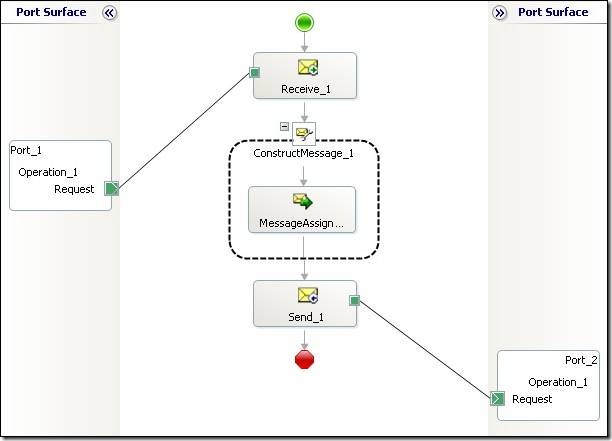
设计两个多部分消息,一个是输入消息MultipartType_In,一个是处理后返回要输出的消息MultipartType_Out,这两个多部分消息都只包含一个part,类型为XmlDocument。
构造消息的消息赋值形状中的表达式:
//在orchestraion中构造XLANGMessage消息就是这么简单
Msg_Out.MessagePart_Body = new System.Xml.XmlDocument();
Helper.MultiMsg.XLANGMessageTest(Msg_In,Msg_Out);
先在orchestration里用Msg_Out.MessagePart_Body = new System.Xml.XmlDocument(); 构造一个包含XmlDocument类型part的XLANGMessage消息,传送到外部Helper.MultiMsg.XLANGMessageTest方法,外部方法修改了这个消息后返回。
外部方法的代码:
/// <summary>
/// 接收一个XLANGMessage,并新建一个XLANGMessage,并返回
/// </summary>
/// <param name="inMessage">接收需要处理的XLANGMessage消息</param>
/// <param name="outMessage">实际返回的XLANGMessage消息</param>
public static void XLANGMessageTest(XLANGMessage inMessage, XLANGMessage outMessage)
{
//获得输入XLANGMessage的part的数据流
XLANGPart xlp = inMessage[0];
Stream sourceStrm = (Stream)xlp.RetrieveAs(typeof(Stream));
//将数据流转成字符串
byte[] streamByte = new byte[sourceStrm.Length];
sourceStrm.Position = 0;
sourceStrm.Read(streamByte, 0, (int)(sourceStrm.Length));
string sourceStr = System.Text.Encoding.UTF8.GetString(streamByte);
//简单处理过程,在输入消息的字符串上加上点内容,然后转成MemoryStream,
//然后载入到输出消息的part
sourceStr = sourceStr + " Output";
byte[] outbyte = System.Text.Encoding.UTF8.GetBytes(sourceStr);
MemoryStream outputStrm = new MemoryStream(outbyte, 0, outbyte.Length, false, true);
outputStrm.Position = 0;
outMessage[0].LoadFrom(outputStrm);
}
测试源代码:MultiPartMsgTest.rar
此内容由惯性聚合(RSS阅读器)自动聚合整理,仅供阅读参考。 原文来自 — 版权归原作者所有。