


惯性聚合 高效追踪和阅读你感兴趣的博客、新闻、科技资讯
阅读原文 在惯性聚合中打开

推荐订阅源

酷 壳 – CoolShell
酷 壳 – CoolShell
H
Hacker News: Front Page
P
Palo Alto Networks Blog
T
ThreatConnect
Apple Machine Learning Research
博客园_首页
T
True Tiger Recordings
P
Privacy & Cybersecurity Law Blog
B
Blog
IT之家
IT之家
Last Week in AI
Last Week in AI
F
Full Disclosure
Hacker News: Ask HN
Hacker News: Ask HN
C
Comments on: Blog
Microsoft Azure Blog
C
Cybersecurity and Infrastructure Security Agency CISA
Microsoft Security Blog
博客园 - 【当耐特】
N
News and Events Feed by Topic
NISL@THU
NISL@THU
腾讯CDC
雷峰网
雷峰网
Security Latest
Security Latest
李成银的技术随笔
M
Microsoft Research Blog - Microsoft Research
L
LangChain Blog
L
Lohrmann on Cybersecurity
cs.CL updates on arXiv.org
C
Check Point Blog
Y
Y Combinator Blog
Recent Announcements
博客园 - Franky
N
News | PayPal Newsroom
V
V2EX
A
About on SuperTechFans
The Register - Security
月光博客
月光博客
奇客Solidot–传递最新科技情报
奇客Solidot–传递最新科技情报
Google Online Security Blog
MyScale Blog
MyScale Blog
Cisco Talos Blog
Cisco Talos Blog
Vercel News
Vercel News
WordPress大学
WordPress大学
C
Cyber Attacks, Cyber Crime and Cyber Security
The Hacker News
The Hacker News
IntelliJ IDEA : IntelliJ IDEA – the Leading IDE for Professional Development in Java and Kotlin | The JetBrains Blog
爱范儿
爱范儿
A
Arctic Wolf
L
LINUX DO - 最新话题
freeCodeCamp Programming Tutorials: Python, JavaScript, Git & More

博客园 - shf

很好的网站www.laiwurencai.com 完全图解scrollLeft,scrollWidth,clientWidth,offsetWidth 获取相对途径,滚动图片(网上找的,未经试验,但觉得比较好) 如何分辨别人的网站是伪静态还是纯静态 操作系统添加账号并隐藏 搞不清FastCgi与PHP-fpm之间是个什么样的关系(转载) 研发费用资本化 调节利润 ps中如何用抽出功能扣取头发 加计扣除是什么意思 研发费用调整利润 在ps中画两个同心圆并且把两个同心圆进行任意角度切割 将通讯录导入到摩托罗拉A1800通讯录中 Word2003和2007前几页不显示页码的设置方法 设定某个时间打开某个网页 bat文件加入计划任务scheduled tasks c#后台调用前台js方法 根据端口查找是那个程序正在占用 - shf 独门绝技:一招克死所有病毒(转贴,没有用过) 两个独立静态htm页面间的传值 - shf 一个非常好的效果
windows 2003 Server系统Web上传文件不能超过200K的解决方法
shf · 2011-08-13 · via 博客园 - shf

Windows2003系统下,上传较大的文件时,出现“Request 对象 错误 'ASP 0104 : 80004005'”错误。
    更改win2003的IIS 6.0对asp的上传文件大小为200k限制,aspx的上传程序没有影响。在IIS6.0中,默认设置是特别严格和安全的,最大只能传送 204,800 个字节,这样可以最大限度地减少因以前太宽松的超时和限制而造成的攻击。IIS 6 出于安全考虑, 默认最大请求是200K(也即最大提交数据限额为200KByte,204800Byte)。(在 IIS 6.0 之前的版本中无此限制)

    解决方案

        办法一:

    第一步:修改IIS设置,允许直接编辑配置数据库。先打开,Internet信息服务,如下图:
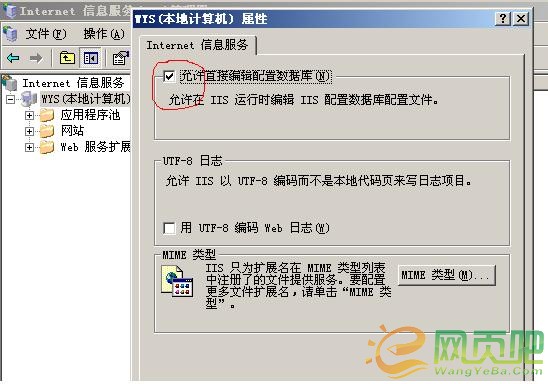
     第二步:先在服务里关闭iis admin service服务,找到windows\system32\inesrv\下的metabase.xml, 打开,找到ASPMaxRequestEntityAllowed 把他修改为需要的值,默认为204800,即200K,如把它修改为51200000(50M)。
    然后重启iis admin service服务。


    办法二:

  新建一个文本文件,内容如下:

  '----------------------------------------------------

  set providerObj=GetObject("winmgmts:/root/MicrosoftIISv2")

  set vdirObj=providerObj.get("IIsWebVirtualDirSetting='W3SVC/1/ROOT'")

  WScript.Echo "Before: " & vdirObj.AspMaxRequestEntityAllowed

  vdirObj.AspMaxRequestEntityAllowed=51200000

  vdirObj.Put_()

  WScript.Echo "Now: " & vdirObj.AspMaxRequestEntityAllowed

  '----------------------------------------------------


  然后保存为.vbs文件,如:vf.vbs

  然后在命令行模式下,执行 cscript 文件路径及文件名,如:

  cscript d:\vf.vbs

  这样ASP上传大小就更改为了上面设置的:51200000字节 (50兆)

 关于win2003上传限制解决方案的补充说明
  到微软站点载了IIS6 Resource Kit Tools(

第二步: 依次打开:开始-程序菜单-IIS Resources-Metabase Explorer,运行Metabase Explorer。
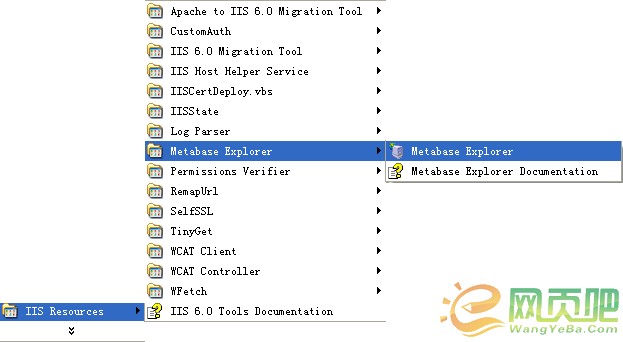
 

第三步: 在出现的窗口中填写相关信息:


第四步: 在程序窗口中选择(local)\LM\W3SVC
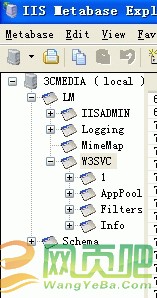
 

第五步: 修改(local)\LM\W3SVC\AspMaxRequestEntityAllowed属性,修改为较大的值,如1G:
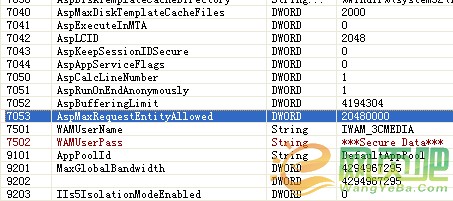


补充:如果你按照


第二步: 此时会出现aspmaxrequestentityallowed对象,鼠标双击。出现:
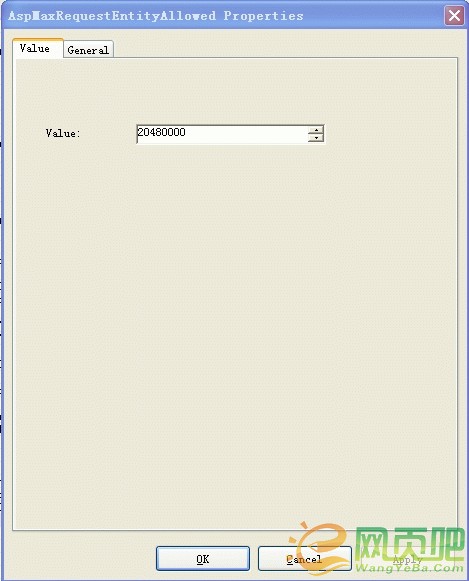
 

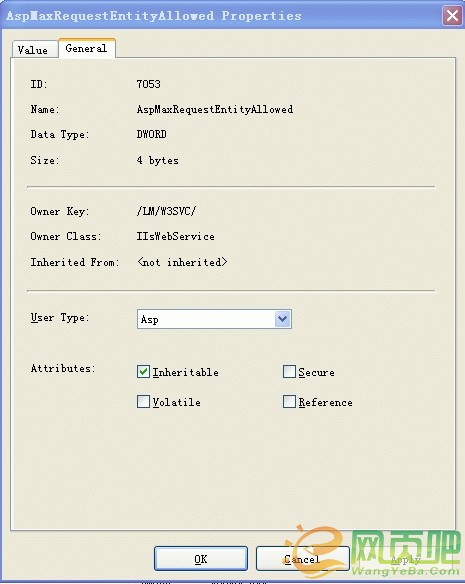
第三步: 点选:general,进行如下设置。
 
本文来源网页吧http://www.wangyeba.com