





几个日夜,无数坑。
背景是:
一开始用ngrok但始终不能成功,后改用Frp,确实比ngrok好很多,但依然无法配置成功https访问。
最终,采用Nginx + Frp的方案,网站无需实现https,SSL在Nginx处用反向代理实现。
GO!
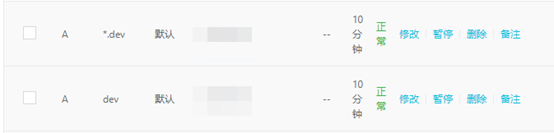
一、域名解析:
二、安装Frp:
参考:
Frps一键安装脚本,带Frpc Windows便捷启动脚本
来自 <https://www.moerats.com/archives/797/>
三、配置Frp:
(1) 服务器端:
用f.sh命令修改,或直接改文件:
# vim /usr/local/frps/frps.ini
主要要改:
vhost_http_port = 8090 #避开nginx要用的80
vhost_https_port = 8443 #其实没什么用,因为靠Nginx来处理https
dashboard_user = admin
dashboard_pwd = admin
token = IamPassword
subdomain_host = dev.aaa.com
如果是直接改的ini文件,保存后别忘了用systemctl restart frps重启服务。
(2)安全组或防火墙配置
Frps.ini文件中配置的端口确保在阿里云的安全组中打开。当然,还包括默认的7000,7500等端口。如果不是云主机,那就是防火墙同样操作。
(3) 客户端
Frpc.ini文件:
[common]
server_addr = 服务器IP
token = IamPassword
server_port = 7000
# protocol = kcp 这个不知道为什么,一开就连不上
log_file = ./frpc.log
log_level = info
log_max_days = 3
[testdevhttp] #注意,这个名称不能重
type = http
local_port = 5000
subdomain = test
# http_user = admin
# http_pwd = admin
……
同样,5000端口要打开妨火墙。
这个时候内网网站就应该监听5000端口,确保http://localhost:5000能打开网站。
执行start.bat打开客户端。
(4)验证:
访问http://服务器IP:7500,能进入管理界面(需要输入dashboard_user和pwd);
访问http://test.dev.aaa.com:8090 能打开网站
四、安装nginx
sudo yum install nginx
vim /etc/nginx/nginx.conf
把server_name _;改成:server_name *.dev.aaa.com;
保存退出。
用sudo nginx -t验证修改正确,然后用
sudo systemctl reload nginx 重载nginx。
确保安全组或防火墙配置的80和443端口是打开的。
此时打开http://*.dev.aaa.com, 应能看到nginx的默认站点。 *可以是任意字符组合。
五、安装Let's Encrypt
参考:
Let's Encrypt 安装配置教程,免费的 SSL 证书
来自 <https://segmentfault.com/a/1190000017194280>
但要注意,把其中:
./certbot-auto certonly -d *.you.cn --manual --preferred-challenges dns --server https://acme-v02.api.letsencrypt.org/directory
替换成:
./certbot-auto --nginx -d *.dev.aaa.com --preferred-challenges dns --server https://acme-v02.api.letsencrypt.org/directory
(是不是certonly要去掉忘了——应该是要去掉,关键是要加上--nginx,去掉--manual)
执行后会有一系列问题,回答即可。关于nginx的,会询问是否全部自动redirect http 为 https,之后会对nginx.conf文件做一系列修改等等。
其中和nginx无关的一些内容可以参考上文。
六、设置反向代理
Vim nginx.conf
看到nginx.conf文件已经发生了很大变化,找到:
server {
server_name *.dev.aaa.com;
root /usr/share/nginx/html;
# Load configuration files for the default server block.
include /etc/nginx/default.d/*.conf;
location / {
#手动添加下面内容:
proxy_pass http://127.0.0.1:8090;
proxy_set_header Host $host;
proxy_set_header X-Real-IP $remote_addr;
proxy_set_header X-Forwarded-For $proxy_add_x_forwarded_for;
proxy_set_header REMOTE-HOST $remote_addr;
add_header X-Cache $upstream_cache_status;expires 12h;
#开启wss(参看https://gblog.sherlocky.com/websocket-jie-he-nginx-shi-xian-yu-ming-ji-wss-xie-yi-fang-wen/):
proxy_http_version 1.1;
proxy_set_header Upgrade $http_upgrade;
proxy_set_header Connection "upgrade";
}
error_page 404 /404.html;
location = /40x.html {
}
error_page 500 502 503 504 /50x.html;
location = /50x.html {
}
listen [::]:443 ssl ipv6only=on; # managed by Certbot
listen 443 ssl; # managed by Certbot
ssl_certificate /etc/letsencrypt/live/dev.aaa.com/fullchain.pem; # managed by Certbot
ssl_certificate_key /etc/letsencrypt/live/dev.aaa.com/privkey.pem; # managed by Certbot
include /etc/letsencrypt/options-ssl-nginx.conf; # managed by Certbot
ssl_dhparam /etc/letsencrypt/ssl-dhparams.pem; # managed by Certbot
}
保存退出。
然后再继续
sudo nginx -t
sudo systemctl reload nginx
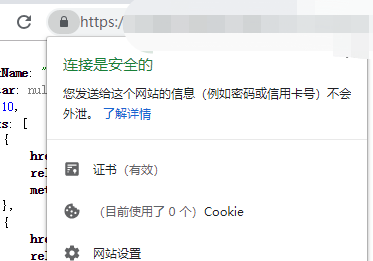
顺利的话,此时再访问站点,就应该能看到帅气的小锁。
七、续签与其他
参看:更新证书:
来自 <https://www.cnblogs.com/peteremperor/p/9994713.html>
更好的安全性方面,参看:
Step 5 — Updating Diffie-Hellman Parameters
来自 <https://www.digitalocean.com/community/tutorials/how-to-secure-nginx-with-let-s-encrypt-on-centos-7>
此内容由惯性聚合(RSS阅读器)自动聚合整理,仅供阅读参考。 原文来自 — 版权归原作者所有。