惯性聚合 高效追踪和阅读你感兴趣的博客、新闻、科技资讯
阅读原文 在惯性聚合中打开

推荐订阅源

P
Privacy International News Feed
I
Intezer
T
Tenable Blog
S
Schneier on Security
Project Zero
Project Zero
G
GRAHAM CLULEY
酷 壳 – CoolShell
酷 壳 – CoolShell
小众软件
小众软件
Know Your Adversary
Know Your Adversary
博客园 - 司徒正美
The Cloudflare Blog
Recent Commits to openclaw:main
freeCodeCamp Programming Tutorials: Python, JavaScript, Git & More
N
News and Events Feed by Topic
博客园 - 叶小钗
宝玉的分享
宝玉的分享
L
LINUX DO - 热门话题
aimingoo的专栏
aimingoo的专栏
S
Secure Thoughts
Forbes - Security
Forbes - Security
T
The Exploit Database - CXSecurity.com
D
Darknet – Hacking Tools, Hacker News & Cyber Security
OSCHINA 社区最新新闻
OSCHINA 社区最新新闻
博客园 - 【当耐特】
罗磊的独立博客
IT之家
IT之家
H
Hacker News: Front Page
I
InfoQ
云风的 BLOG
云风的 BLOG
S
Security Affairs
M
MIT News - Artificial intelligence
GbyAI
GbyAI
Jina AI
Jina AI
Help Net Security
Help Net Security
Engineering at Meta
Engineering at Meta
大猫的无限游戏
大猫的无限游戏
Webroot Blog
Webroot Blog
L
Lohrmann on Cybersecurity
A
About on SuperTechFans
Attack and Defense Labs
The Register - Security
V
V2EX
G
Google Developers Blog
D
DataBreaches.Net
Apple Machine Learning Research
C
Cybersecurity and Infrastructure Security Agency CISA
J
Java Code Geeks
W
WeLiveSecurity
Cloudbric
Cloudbric
T
Tor Project blog

博客园 - 皮皮虾的blog

visual studio 2022 安装net旧版本(net framework4.0和4.5) RxJS中高阶映射操作符的全面讲解:switchMap, mergeMap, concatMap (and exhaustMap) 从0到1: Angular + .NET Core 前后端分离项目Compass的开发过程 rxjs学习 - 2 rxjs学习 Asynchronous programming with async and await Angular 表单介绍 TypeScript null undefine判断 TypeScript 常见方法 VMware虚拟机如何设置CentOS 7 磁盘扩容? MySQL 5.7 配置 MySQL 主从复制相关 Mysql 常用命令 MySQL 5.7 Sleep 连接太多的处理方式 MySQL 5.7 CPU高的定位方法 CentOS 7 MySQL 5.7 主从设置 VMware安装CentOS7后配置静态IP MySQL explain,type分析(转) - 2 MySQL explain,Extra分析(转) - 1
VS2019 设置tab插入空格不好使的解决方法
皮皮虾的blog · 2021-11-13 · via 博客园 - 皮皮虾的blog

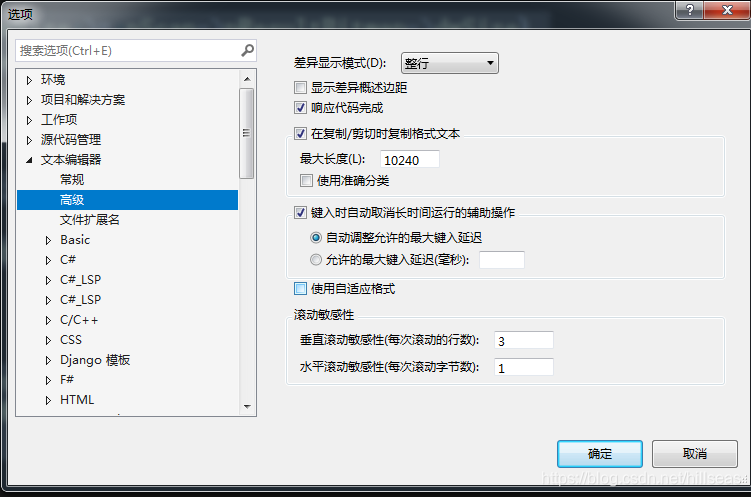
在以往的vs版本中,在工具,选项,文本编辑器,制表符中设置为插入空格,即可将tab功能变为空格。

而在vs2019中这么设置却没有生效。需要修改参数,取消“使用自适应格式”,位置在工具,选项,文本编辑器,高级。