惯性聚合 高效追踪和阅读你感兴趣的博客、新闻、科技资讯
阅读原文 在惯性聚合中打开

推荐订阅源

酷 壳 – CoolShell
酷 壳 – CoolShell
H
Hacker News: Front Page
P
Palo Alto Networks Blog
T
ThreatConnect
Apple Machine Learning Research
博客园_首页
T
True Tiger Recordings
P
Privacy & Cybersecurity Law Blog
B
Blog
IT之家
IT之家
Last Week in AI
Last Week in AI
F
Full Disclosure
Hacker News: Ask HN
Hacker News: Ask HN
C
Comments on: Blog
Microsoft Azure Blog
C
Cybersecurity and Infrastructure Security Agency CISA
Microsoft Security Blog
博客园 - 【当耐特】
N
News and Events Feed by Topic
NISL@THU
NISL@THU
腾讯CDC
雷峰网
雷峰网
Security Latest
Security Latest
李成银的技术随笔
M
Microsoft Research Blog - Microsoft Research
L
LangChain Blog
L
Lohrmann on Cybersecurity
cs.CL updates on arXiv.org
C
Check Point Blog
Y
Y Combinator Blog
Recent Announcements
博客园 - Franky
N
News | PayPal Newsroom
V
V2EX
A
About on SuperTechFans
The Register - Security
月光博客
月光博客
奇客Solidot–传递最新科技情报
奇客Solidot–传递最新科技情报
Google Online Security Blog
MyScale Blog
MyScale Blog
Cisco Talos Blog
Cisco Talos Blog
Vercel News
Vercel News
WordPress大学
WordPress大学
C
Cyber Attacks, Cyber Crime and Cyber Security
The Hacker News
The Hacker News
IntelliJ IDEA : IntelliJ IDEA – the Leading IDE for Professional Development in Java and Kotlin | The JetBrains Blog
爱范儿
爱范儿
A
Arctic Wolf
L
LINUX DO - 最新话题
freeCodeCamp Programming Tutorials: Python, JavaScript, Git & More

博客园 - kuning的程序博客

第一章 第二课 Using Resources 第一章 第一课 Using WPF Control Cmd,powershell 参考 百度WSUS 我也转关于软件测试的文章 了解WMI 英文面试题 据说是微软面试哦 算法 之 万年历 算法 之 哥德巴赫猜想 - kuning的程序博客 C# 理论学习 之 面向对象设计 - kuning的程序博客 C# 理论学习 之 类、组,名称空间 C# 深入学习 之 Winform记录日志 C#深入学习 之 委托和事件 C#数据结构-排序之快速排序法 .Net本地化资源 PHP之安装篇 Sql Server中的行列互换 - kuning的程序博客 再叙2005Web控件(一) - kuning的程序博客 - 博客园
Poket PC 与 sqlserver2000(以上) RDA 方案
kuning的程序博客 · 2007-08-09 · via 博客园 - kuning的程序博客
 

  Poket PC 与 sqlserver2000(以上) RDA 最终实现的效果想必大家都知道了,现在我们讨论下具体实施。

   开发环境:
   Visual Studio 2005.
   Microsoft ActiveSync (我是去微软下载的)
   Sqlce 3.0 (C:\Program Files\Microsoft Visual Studio
                8\SmartDevices\SDK\SQL
                Server\Mobile\v3.0\Sqlce30setupcn.msi )

        1:安装与设置
     服务器上
     1) SQL SERVER2000 或更高版本
     2) Internet Information Server(IIS)
     3) SqlServer200 sql sp3 或 sql sp4.
     (sp3,sp4路径C:\Program Files\Microsoft Visual Studio
                8\SmartDevices\SDK\SQL
                Server\Mobile\v3.0\sql2kcnsp3a.msi)
      4)虚拟目录
       程序Microsoft SQL Server 2005 Mobile Edition\配置 Web 同步向导
       按照提示设置好个虚拟目录。别名:例如MobileWebs 路径c:\
       访问:匿名访问。完成。
       结果发现c:\MobileWebs\自动添加了一个文件sqlcesa30.dll
       在浏览器输入http://localhost/MobileWebs/sqlcesa30.dll
        如果出现下面一行字就OK了。
          SQL Server Mobile Server Agent 3.0
       5)设置虚拟目录访问权限
       在IIS 里点击虚拟目录的属性,将写入,和目录浏览打勾。
       6)SqlServer建库
          在SqlServer中建一个库,建几个表,但是这些要同步的表必须要         有关键字。
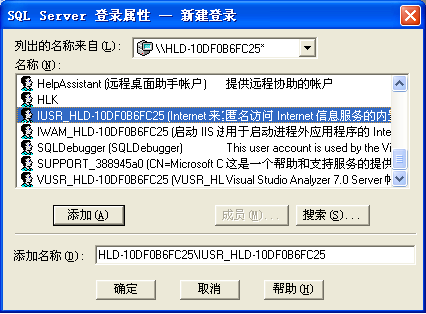
       7)设置SQL Server访问权限
         点击这个库,在安全中添加用户。
        
        
        到此为止所有的设置都基本完成了。
        接下来就是代码了
   2:

private void CreateDatabase()
        {
            
//string dbPathName = @"\MTREDB.sdf";
            if (File.Exists(dbPathName))
                File.Delete(dbPathName);
            
string strCon = "DataSource='" + dbPathName + "';password=";
            SqlCeEngine engin 
= new SqlCeEngine(strCon);
            engin.CreateDatabase();
            engin.Dispose();

         }    

static  string remoteIp = "192.168.0.174";
        
static string remoteDB = "MTREDB";
        
static string user = "sa";
        
static string pwd = "sa";
        
static string dbPathName = @"\MTREDB.sdf";
        
static string localDB = dbPathName;
        
static string localpwd = "";
        
static string table = "driver_table";
        
//string rdaOLEDBconnectString = "Provider=SQLOLEDB; Persist Security Info=false;DataSource=192.168.0.174;Initial Catalog=" + remoteDB + ";";//user id=" + user + ":password=" + pwd+";";
        static string rdaOLEDBconnectString = "Provider=SQLOLEDB;Data Source=192.168.0.174;Initial Catalog=" + remoteDB + ";User Id=sa;Password =sa";
        
static string localConnectString = @"DataSource=" + localDB + ";password=" + localpwd;
        
static string strDataBase = @"DataSource=\MTREDB.sdf";
        SqlCeRemoteDataAccess rda 
= null;private void button2_Click(object sender, EventArgs e)
        {
            
string cardid = this.txtSFZMHM.Text;
            
if (cardid == "")
            {
                MessageBox.Show(
"身份证号码不能为空!");
                
return;
            }

            CreateDatabase();
            rda 

= new SqlCeRemoteDataAccess();
            rda.InternetLogin 
= "";
            rda.InternetPassword 
= "";
            rda.InternetUrl 
= "http://" + remoteIp + "/MobileWebs/sqlcesa30.dll";
            rda.LocalConnectionString 
= localConnectString;
            rda.Pull(table, 
"select top 1 [cardid], [name],[cartype],[testresult],[testcount] from driver_table where cardid='"+cardid+"'", rdaOLEDBconnectString, RdaTrackOption.TrackingOn);
            GetDriverTestResult(cardid);

        }

private void GetDriverTestResult(string cardid)
        {
            SqlCeConnection con 
= new SqlCeConnection(strDataBase);
            SqlCeCommand cmd
=new SqlCeCommand("select * from driver_table where cardid='"+cardid+"'",con);
            
try
            {
                con.Open();
                SqlCeDataReader reader 
= cmd.ExecuteReader();
                
if (reader.Read())
                {
                    
this.txtKSCJ.Text = reader["testcount"].ToString();
                    
this.txtKSCX.Text = reader["cartype"].ToString();
                    
this.txtNAME.Text = reader["name"].ToString();
                }
                
else
                {
                    lbMsg.Text 
= "没有这个考生";
                }
            }
            
catch (Exception ex)
            {
                con.Close();
                MessageBox.Show(ex.Message);
            }
            
finally
            {
                con.Close();

             }

                    }

private void UpdateTestResult(string cardId, string count)
        {
//string strDataBase = @"DataSource=\MTREDB.sdf";
            SqlCeConnection con = new SqlCeConnection(strDataBase);
            con.Open();
//修改现有记录
            string strUpdate = "update driver_table set testCount='" + count + "',testresult='合格' where cardid='" + cardId + "'";

            SqlCeCommand cmd 

= new SqlCeCommand(strUpdate, con);

            cmd.ExecuteNonQuery();

            cmd.Dispose();
            rda.Push(

"driver_table", rdaOLEDBconnectString, RdaBatchOption.BatchingOn);

        }

private void button3_Click(object sender, EventArgs e)
        {
            UpdateTestResult(
this.txtSFZMHM.Text, this.txtKSCJ.Text);
           }

posted on 2007-08-09 18:45  kuning的程序博客  阅读(471)  评论()    收藏  举报