
惯性聚合 高效追踪和阅读你感兴趣的博客、新闻、科技资讯
阅读原文 在惯性聚合中打开

推荐订阅源

aimingoo的专栏
aimingoo的专栏
Google DeepMind News
S
SegmentFault 最新的问题
Project Zero
Project Zero
D
DataBreaches.Net
I
InfoQ
L
Lohrmann on Cybersecurity
OSCHINA 社区最新新闻
OSCHINA 社区最新新闻
酷 壳 – CoolShell
酷 壳 – CoolShell
Stack Overflow Blog
Stack Overflow Blog
The Register - Security
Recorded Future
Recorded Future
Vercel News
Vercel News
博客园 - 司徒正美
freeCodeCamp Programming Tutorials: Python, JavaScript, Git & More
I
Intezer
The Hacker News
The Hacker News
F
Fortinet All Blogs
Microsoft Azure Blog
P
Proofpoint News Feed
Help Net Security
Help Net Security
cs.CV updates on arXiv.org
Application and Cybersecurity Blog
Scott Helme
Scott Helme
T
Threatpost
爱范儿
爱范儿
N
Netflix TechBlog - Medium
D
Docker
云风的 BLOG
云风的 BLOG
C
Cisco Blogs
K
Kaspersky official blog
H
Help Net Security
S
Secure Thoughts
T
Threat Research - Cisco Blogs
钛媒体:引领未来商业与生活新知
钛媒体:引领未来商业与生活新知
S
Security @ Cisco Blogs
Cyberwarzone
Cyberwarzone
N
News and Events Feed by Topic
G
Google Developers Blog
Forbes - Security
Forbes - Security
博客园 - 三生石上(FineUI控件)
博客园 - 叶小钗
B
Blog
Google DeepMind News
Recent Announcements
Simon Willison's Weblog
S
Securelist
P
Privacy International News Feed
Spread Privacy
Spread Privacy
The Last Watchdog
The Last Watchdog

博客园 - lrary

JavaScript经典技巧 - lrary - 博客园 动态添加ASP.NET控件并绑定处理事件一例 - lrary - 博客园 脚本收藏 - lrary - 博客园 一些sql语句的详细解释[转] 特殊的DataGrid的绑定 - lrary - 博客园 检验密码强度的JS类 - lrary - 博客园 数据库设计规范 V2.0 SQL语句特---殊统计(1) DataGrid 多行 DataGrid怎么产生一个分类的题头 AJAX 在.net的应用 sql怎么使用外连接 Asp.NET程序中常用的三十三种代码 检测含有中文字符串的实际长度 根据区位得到汉字拼音首字母(c#) 认识ASP.NET配置文件Web.config Asp.net(C#)实现验证码功能 给Repeater、Datalist和Datagrid增加自动编号列 查找和统计页面上控件
纯脚本搞掂DataGrid表表头不动,表身滚动。(转摘) - lrary - 博客园
lrary · 2006-05-16 · via 博客园 - lrary

纯脚本搞掂DataGrid表表头不动,表身滚动。(转摘)

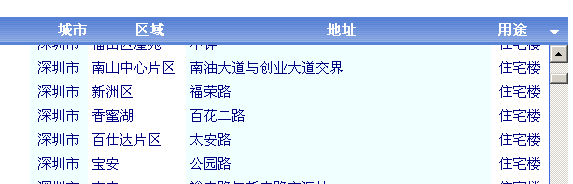
纯脚本搞掂DataGrid表表头不动,表身滚动。

先看效果:

孟子以前也做过这事,不过他的方法前台后台都要弄,还是VB的(^-^),好像也不支持像我的自动生成列的DataGrid,所以还是自己动手,纯脚本搞掂,其实很简单,就几行:

  function ScrollDataGrid() 


var tb = document.getElementById("tbHeader"); 
            
var dg = document.getElementById("dgSearchResult"); 
             
            
if(dg!= null
            
{     
                
var dv = document.getElementById("dvBody"); 
                
var th = dg.rows[0]; 
                
for(var i = 0 ; i < th.cells.length;i++
                    th.cells[i].width 
= th.cells[i].clientWidth; 
                
var tr = th.cloneNode(true); 
                 
                
//tr.applyElement(tb); 
                tb.createTHead(); 
                
var tbh = tb.tHead; 
                tbh.appendChild(tr); 
                tr 
= tbh.rows[0]; 
                
var td = tr.insertCell(); 
                td.style.width 
= 19
                td.width 
= 19
                td.innerHTML 
= tr.cells[0].innerHTML; 
                th.style.display 
= 'none'; 
                
if(dg.scrollHeight < 300 ) 
                    dv.style.height 
= dg.scrollHeight * 1 + 2
                 
                 
            }


<table width="100%" border="0" id="tbHeader" cellpadding="4" cellspacing="0"> 
                                        
</table> 
                                        
<div style="OVERFLOW-Y: scroll; HEIGHT: 300px" id="dvBody"> 
                                            
<asp:datagrid id="dgSearchResult" style="BORDER-COLLAPSE: collapse" runat="server" Width="100%" CellPadding="4" DataKeyField="编号" BorderWidth="1px" BorderStyle="Solid" BorderColor="RoyalBlue" GridLines="None"> 
                                                
<SelectedItemStyle ForeColor="SlateGray"></SelectedItemStyle> 
                                                
<ItemStyle VerticalAlign="Middle"></ItemStyle> 
                                                
<HeaderStyle HorizontalAlign="Center"></HeaderStyle> 
                                                
<Columns> 
                                                    
<asp:ButtonColumn Text="选择" HeaderText="&lt;font face=webdings&gt;6&lt;/font&gt;" CommandName="Delete"> 
                                                        
<HeaderStyle Wrap="False" Width="40px"></HeaderStyle> 
                                                        
<ItemStyle Wrap="False" HorizontalAlign="Center"></ItemStyle> 
                                                        
<FooterStyle Wrap="False"></FooterStyle> 
                                                    
</asp:ButtonColumn> 
                                                
</Columns> 
                                            
</asp:datagrid></div> 
 

posted on 2006-05-16 09:36  lrary  阅读(419)  评论(0)    收藏  举报