


IOS官方的Object-C有例子,但是OC的代码。Moving Content That Is Located Under the Keyboard
效果如下图:
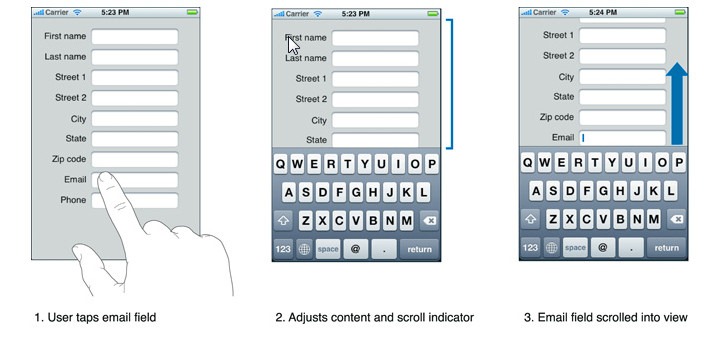
实现方法:
1.定义一个所有ViewControl的基类,命名为ViewControllerBase,ViewControl继承ViewControllerBase
代码如下:
1: public class ViewControllerBase : UIViewController
2: { 3: NSObject _keyboardObserverWillShow; 4: NSObject _keyboardObserverWillHide; 5: 6: public ViewControllerBase()
7: { 8: }9: public ViewControllerBase(IntPtr handle) : base(handle)
10: { 11: 12: } 13: 14: public override void ViewDidLoad()
15: {16: //设置键盘事件处理程序
17: RegisterForKeyboardNotifications(); 18: } 19: 20: protected virtual void RegisterForKeyboardNotifications()
21: { 22: _keyboardObserverWillShow = NSNotificationCenter.DefaultCenter.AddObserver 23: (UIKeyboard.WillShowNotification, KeyboardWillShowNotification); 24: 25: _keyboardObserverWillHide = NSNotificationCenter.DefaultCenter.AddObserver 26: (UIKeyboard.WillHideNotification, KeyboardWillHideNotification); 27: } 28: 29: protected virtual void UnregisterKeyboardNotifications()
30: { 31: NSNotificationCenter.DefaultCenter.RemoveObserver(_keyboardObserverWillShow); 32: NSNotificationCenter.DefaultCenter.RemoveObserver(_keyboardObserverWillHide); 33: } 34: 35: protected virtual UIView KeyboardGetActiveView()
36: {37: return this.View.FindFirstResponder();
38: } 39: 40: protected virtual void KeyboardWillShowNotification(NSNotification notification)
41: { 42: UIView activeView = KeyboardGetActiveView();43: if (activeView == null)
44: return;
45: 46: UIScrollView scrollView = activeView.FindSuperviewOfType(this.View, typeof(UIScrollView)) as UIScrollView;
47: if (scrollView == null)
48: return;
49: 50: RectangleF keyboardBounds = UIKeyboard.BoundsFromNotification(notification); 51: 52: UIEdgeInsets contentInsets = new UIEdgeInsets(0.0f, 0.0f, keyboardBounds.Size.Height, 0.0f);
53: scrollView.ContentInset = contentInsets; 54: scrollView.ScrollIndicatorInsets = contentInsets; 55: 56: RectangleF viewRectAboveKeyboard = new RectangleF(this.View.Frame.Location,
57: new SizeF(this.View.Frame.Width, this.View.Frame.Size.Height - keyboardBounds.Size.Height));
58: 59: RectangleF activeFieldAbsoluteFrame = activeView.Superview.ConvertRectToView(activeView.Frame, this.View);
60: 61: if (!viewRectAboveKeyboard.Contains(activeFieldAbsoluteFrame))
62: {63: PointF scrollPoint = new PointF(0.0f,
64: activeFieldAbsoluteFrame.Location.Y + activeFieldAbsoluteFrame.Height 65: + scrollView.ContentOffset.Y - viewRectAboveKeyboard.Height);66: scrollView.SetContentOffset(scrollPoint, true);
67: } 68: } 69: 70: protected virtual void KeyboardWillHideNotification(NSNotification notification)
71: { 72: UIView activeView = KeyboardGetActiveView();73: if (activeView == null)
74: return;
75: 76: UIScrollView scrollView = activeView.FindSuperviewOfType(this.View, typeof(UIScrollView)) as UIScrollView;
77: if (scrollView == null)
78: return;
79: 80: double animationDuration = UIKeyboard.AnimationDurationFromNotification(notification);
81: UIEdgeInsets contentInsets = new UIEdgeInsets(0.0f, 0.0f, 0.0f, 0.0f);
82: UIView.Animate(animationDuration, delegate
83: { 84: scrollView.ContentInset = contentInsets; 85: scrollView.ScrollIndicatorInsets = contentInsets; 86: }); 87: } 88: }2.定义UIView的扩展方法
代码如下:
1: public static class ViewExtensions
2: {3: public static UIView FindFirstResponder(this UIView view)
4: {5: if (view.IsFirstResponder)
6: {7: return view;
8: }9: foreach (UIView subView in view.Subviews)
10: { 11: var firstResponder = subView.FindFirstResponder();12: if (firstResponder != null)
13: return firstResponder;
14: }15: return null;
16: } 17: 18: public static UIView FindSuperviewOfType(this UIView view, UIView stopAt, Type type)
19: {20: if (view.Superview != null)
21: {22: if (type.IsAssignableFrom(view.Superview.GetType()))
23: {24: return view.Superview;
25: } 26: 27: if (view.Superview != stopAt)
28: return view.Superview.FindSuperviewOfType(stopAt, type);
29: } 30: 31: return null;
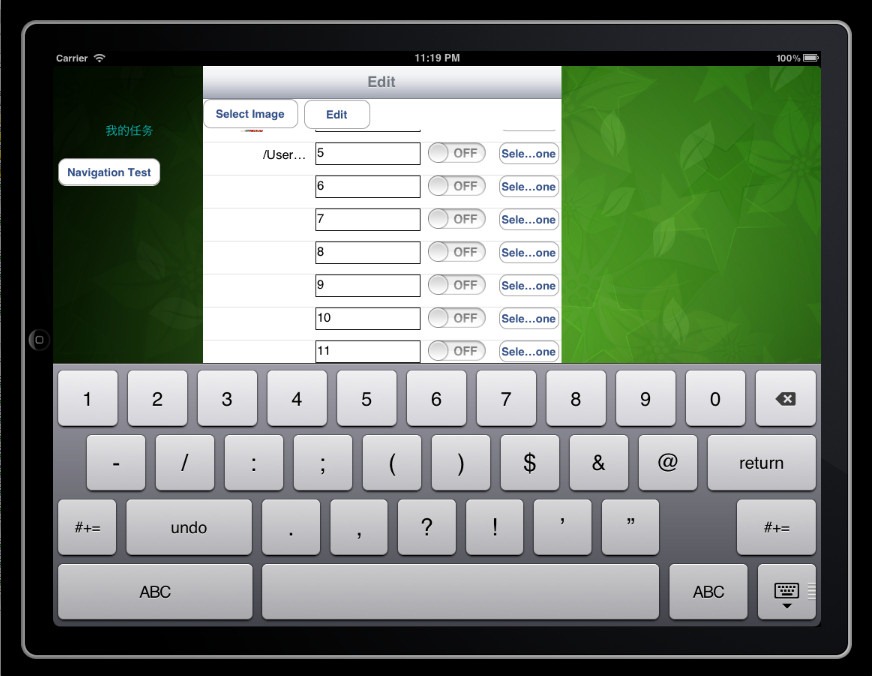
32: } 33: }实现的效果:

作者:Bruce Lee
出处:http://www.cnblogs.com/BruceLee521
本博原创文章版权归博客园和本人共有,欢迎转载,但未经作者同意必须保留此段声明,且在文章页面明显位置给出作者名称和原文连接,否则保留追究法律责任的权利。
此内容由惯性聚合(RSS阅读器)自动聚合整理,仅供阅读参考。 原文来自 — 版权归原作者所有。