






大家都知道,在Silverlight 2应用程序中,每个应用程序将生成一个xap文件,每一个xap文件中只能设置一个起始的用户控件。如果我们有多个用户控件,需要在不同的ASP.NET页面中加载,最简单的方法莫过于针对多个用户控件分别建立对应的Silverlight项目,但这种方式有很多的缺点,如我们的样式文件需要在多个项目中进行拷贝。
本文将介绍利用初始化参数进行用户控件的切换这一技巧。
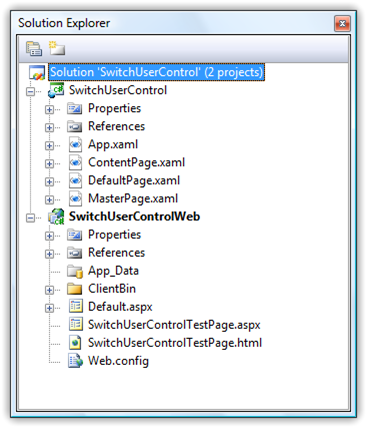
现在建立一个项目结构如下图所示,在Silverlight项目中我们有个三个用户控件:ContentPage、DefaultPage、MasterPage,需要在不同的ASP.NET页面加载时显示不同的用户控件。
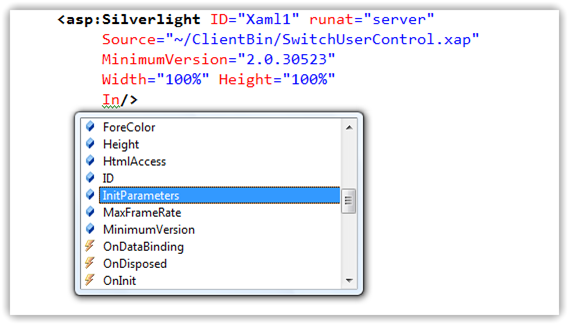
要实现这个功能并不是什么难事,我们完全可以使用InitParams这个属性,如下图所示:
或者在HTML中通过param指定InitParameters:
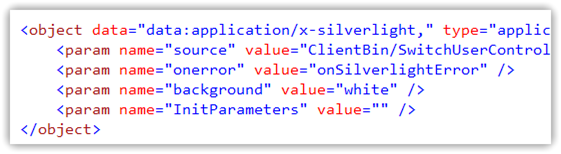
该属性是一个Dictionary<string,string>类型的,我们可以在其中设置一系列的键-值对初始化参数,用逗号“,”分割开。所以我们的思路非常简单,就是在ASP.NET页面或者HTML中通过InitParameters指定起始用户控件,然后在Application_Startup事件中获取参数,并设置RootVisual。
如下面这段代码,我们设置一个初始化参数InitPage为ContentPage:
<asp:Silverlight ID="Xaml1" runat="server"
     Source="~/ClientBin/SwitchUserControl.xap"
     MinimumVersion="2.0.30523"
     Width="100%" Height="100%"
     InitParameters="InitPage=ContentPage"/>
然后在Application_Startup根据参数不同设置不同的RootVisual:
private void Application_Startup(object sender, StartupEventArgs e)
{
    if (!e.InitParams.ContainsKey("InitPage"))
    {
        this.RootVisual = new DefaultPage();
        return;
    }
    switch (e.InitParams["InitPage"])
    {
        case "MasterPage":
            this.RootVisual = new MasterPage();
            break;
        case "ContentPage":
            this.RootVisual = new ContentPage();
            break;
        default:
            this.RootVisual = new DefaultPage();
            break;
    }
}
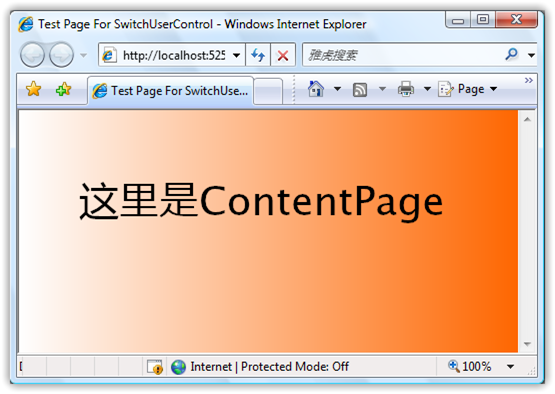
现在运行程序后,可以看到起始用户控件为ContentPage,如下图所示:
上面这种方式虽然达到了我们的目的,但是switch语句代码实在不怎么优雅,如果有几十个用户控件,那就得有几十个分支。既然我们在初始话参数中设置了起始用户控件名,为什么不直接使用反射呢?在Silverlight 2中,对于反射提供了很好的支持,所以我们的代码可以修改如下:
private void Application_Startup(object sender, StartupEventArgs e)
{
    if (!e.InitParams.ContainsKey("InitPage"))
    {
        this.RootVisual = new DefaultPage();
        return;
    }

    Assembly assembly = Assembly.GetExecutingAssembly();
    String rootName = String.Format("SwitchUserControl.{0}", e.InitParams["InitPage"]);
    UIElement rootVisual = assembly.CreateInstance(rootName) as UIElement;
    this.RootVisual = rootVisual;
}
现在代码看起来好多了,即便有再多的用户控件也不用再修改此处的代码。但是大家一定要注意一个问题,就是要合理的划分Silverlight项目,不要把所有的用户控件都放在一个项目里面,避免xap文件过大。在后面我还会写一篇文章来谈谈如何合理的划分Silverlight项目结构,以及如何调用其它xap文件中的用户控件。
此内容由惯性聚合(RSS阅读器)自动聚合整理,仅供阅读参考。 原文来自 — 版权归原作者所有。