




主要实现:
用的 easyui 1.3.2
实现多个复选框列,各列互不影响。能够实现全选。主要部门用红色标记了的。
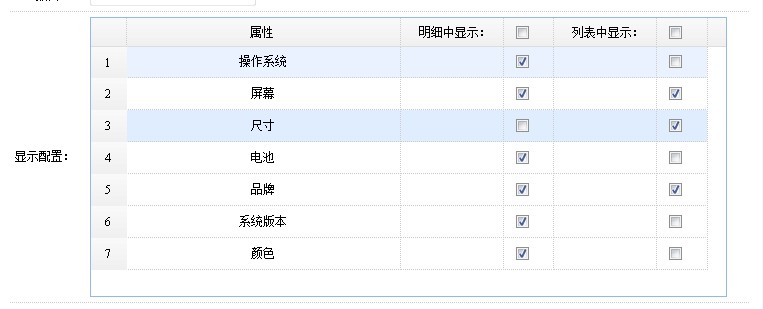
easyui datagrid 初始化:
<script>
  function initTableGMAL() {
        $("#dg_gmal").datagrid({
            url: "/Manager/PublishManager/ashx/MALOP.ashx?action=search",
            idField: 'MAL_ID', fit: false, fitColumns: true, singleSelect: true,
            width: 637, height: 280,
            rownumbers: true, nowrap: true, pagination: false,
            checkOnSelect: false, selectOnCheck: false,
            columns: [[

                { field: 'MAL_ZHName', title: '属性', width: 200, align: 'center' }
                ,
                { field: 'op1', title: ' 明细中显示:', width: 70, align: 'right' },
                {
                    field: 'op11', title: '<input id=\"detailcheckbox\" type=\"checkbox\"  >', width: 30,
                    formatter: function (value, rec, rowIndex) {
                        return "<input type=\"checkbox\"  name=\"PD\" value=\"" + rec.MAL_ID + "\" >";
                    }
                },

                { field: 'op2', title: '列表中显示:', width: 70, align: 'right' },
                {
                    field: 'op22', title: '<input id=\"listcheckbox\" type=\"checkbox\"  >', width: 30,
                    formatter: function (value, rec, rowIndex) {
                        return "<input type=\"checkbox\"  name=\"PL\"   value=\"" + rec.MAL_ID + "\" >";
                    }


                }
            ]],
            onLoadSuccess: function () {

                $("#detailcheckbox").unbind();
                $("#listcheckbox").unbind();

                $("input[name='PL']").unbind().bind("click", function () {
                    //总记录数
                    var totolrows = $("input[name='PL']").length;
                    //选中的记录数
                    var checkrows = $("input[name='PL']:checked").length;
                    //全选
                    if (checkrows == totolrows) {
                        $("#listcheckbox").attr("checked", 'checked');
                    }
                    else {
                        $("#listcheckbox").removeAttr("checked");
                    }


                    $("#pllist").val("");
                    var items = $("input[name='PL']:checked");
                    var result = "";
                    $.each(items, function (index, item) {

                        result = result + "|" + item.value;

                    });
                    $("#pllist").val(result);


                });
                $("input[name='PD']").unbind().bind("click", function () {

                    //总记录数
                    var totolrows = $("input[name='PD']").length;
                    //选中的记录数
                    var checkrows = $("input[name='PD']:checked").length;

                    if (checkrows == totolrows) {
                        $("#detailcheckbox").attr("checked", 'checked');
                    }
                    else {
                        $("#detailcheckbox").removeAttr("checked");
                    }

                    $("#pdlist").val("");
                    var items = $("input[name='PD']:checked");
                    var result = "";
                    $.each(items, function (index, item) {

                        result = result + "|" + item.value;

                    });
                    $("#pdlist").val(result);

                });

                //全选
                $("#detailcheckbox").click(function () {
                    if ($(this).attr('checked') == 'checked') {
                        $("input[name='PD']").attr("checked", 'checked');
                    } else {
                        $("input[name='PD']").removeAttr("checked");
                    }

                    $("#pdlist").val("");
                    var items = $("input[name='PD']:checked");
                    var result = "";
                    $.each(items, function (index, item) {

                        result = result + "|" + item.value;

                    });
                    $("#pdlist").val(result);
                });
                $("#listcheckbox").click(function () {
                    if ($(this).attr('checked') == 'checked') {
                        $("input[name='PL']").attr("checked", 'checked');
                    } else {
                        $("input[name='PL']").removeAttr("checked");
                    }

                    $("#pllist").val("");
                    var items = $("input[name='PL']:checked");
                    var result = "";
                    $.each(items, function (index, item) {

                        result = result + "|" + item.value;

                    });
                    $("#pllist").val(result);
                });

            }
        });
    }
</script>
保存选中的行:
<div style="padding: 15px; overflow: hidden">
    <form id="f_package_general" method="post">

        <table class="tableForm" style="width: 100%; margin-left: 2px;">

            <tr>
                <td style="width: 80px;">显示配置:</td>
                <td colspan="3" style="height: 280px;">
                    <table id="dg_gmal">
                    </table>
                </td>
            </tr>
        </table>
        <input type="hidden" id="pdlist" name="pdlist" value="">
        <input type="hidden" id="pllist" name="pllist" value="">

    </form>
</div>
此内容由惯性聚合(RSS阅读器)自动聚合整理,仅供阅读参考。 原文来自 — 版权归原作者所有。