





大家应该知道,微软的URLRewrite能够对URL进行重写,但是也只能对域名之后的部分进行重写,而不能对域名进行重写,如:可将 http://www.abc.com/1234/ 重写为 http://www.abc.com/show.aspx?id=1234 但不能将
http://1234.abc.com 重写为 http://www.abc.com/show.aspx?id=1234。
要实现这个功能,前提条件就是
www.abc.com 是泛解析的,再就是要修改一下URLRewriter了。
总共要修改2个文件
1.BaseModuleRewriter.cs
 protected virtual void BaseModuleRewriter_AuthorizeRequest(object sender, EventArgs e)
 {
{
 HttpApplication app = (HttpApplication) sender;
Rewrite(app.Request.Path, app);
 }
}
改为
protected virtual void BaseModuleRewriter_AuthorizeRequest(object sender, EventArgs e)
{
HttpApplication app = (HttpApplication) sender;
Rewrite(app.Request.Url.AbsoluteUri, app);
}
就是将 app.Request.Path 替换成了 app.Request.Url.AbsoluteUri
2.ModuleRewriter.cs
for(int i = 0; i < rules.Count; i++)
{
// get the pattern to look for, and Resolve the Url (convert ~ into the appropriate directory)
string lookFor = "^" + RewriterUtils.ResolveUrl(app.Context.Request.ApplicationPath, rules[i].LookFor) + "$";
// Create a regex (note that IgnoreCase is set )
)
Regex re = new Regex(lookFor, RegexOptions.IgnoreCase);
// See if a match is found
if (re.IsMatch(requestedPath))
 {
{
// match found - do any replacement needed
string sendToUrl = RewriterUtils.ResolveUrl(app.Context.Request.ApplicationPath, re.Replace(requestedPath, rules[i].SendTo));
// log rewriting information to the Trace object
app.Context.Trace.Write("ModuleRewriter", "Rewriting URL to " + sendToUrl);
// Rewrite the URL
RewriterUtils.RewriteUrl(app.Context, sendToUrl);
break; // exit the for loop
 }
}
}
改为
for(int i = 0; i < rules.Count; i++)
{
// get the pattern to look for, and Resolve the Url (convert ~ into the appropriate directory)
string lookFor = "^" + rules[i].LookFor + "$";
// Create a regex (note that IgnoreCase is set)
Regex re = new Regex(lookFor, RegexOptions.IgnoreCase);
// See if a match is found
if (re.IsMatch(requestedPath))
{
// match found - do any replacement needed
string sendToUrl = RewriterUtils.ResolveUrl(app.Context.Request.ApplicationPath, re.Replace(requestedPath, rules[i].SendTo));
// log rewriting information to the Trace object
app.Context.Trace.Write("ModuleRewriter", "Rewriting URL to " + sendToUrl);
// Rewrite the URL
RewriterUtils.RewriteUrl(app.Context, sendToUrl);
break; // exit the for loop
}
}
将
string lookFor = "^" + RewriterUtils.ResolveUrl(app.Context.Request.ApplicationPath, rules[i].LookFor) + "$";
改成了
string lookFor = "^" + rules[i].LookFor + "$";
完成这2处改动之后重新编译项目,将生成的dll复制到bin目录下。
再就是写web.config里的重写正则了
<RewriterRule>
<LookFor>http://(\d+)\.abc\.com</LookFor>
<SendTo>/show.aspx?id=$1</SendTo>
</RewriterRule>
好了大功告成,你在IE地址栏输入
http://1234.abc.com,就可以看到http://www.abc.com/show.aspx?id=1234
的结果了
若你在实际应用中碰到了问题,请查看文章 "修改UrlRewrite以对域名进行重写"需要注意的问题 ,希望能够帮助你!
附:
URLRewriter 的相关资料http://www.microsoft.com/china/msdn/library/webservices/asp.net/URLRewriting.mspx
本文背景:
http://jzywh.cnblogs.com/archive/2005/09/29/246650.html
网上很多朋友看到我这篇文章,按照我的方法做了,但是还是没有得到想要的效果,其实有些问题需要注意一下,我上篇文章也只是提出了解决这一问题的办法的最核心的内容,有些朋友可能在实际运用中可能会碰到一些问题其实可以根据自己的经验作出相应处理应该可以解决,我在这里帮大家列出几点以帮助大家快速解决问题。
1.域名解析问题
输入了域名
http://1234.abc.com,浏览器提示找不到网页。首先,你应该确认你的域名是否支持泛域名解析,就是让所有的二级,三级域名都指向你的server。其次,要保证你的站点是服务器上的默认站点,就是80端口主机头为空的站点即可以直接用IP可以访问的http://1234.abc.com,要么要提示你的站点的错误信息,要么会正确的执行你定义的URLRewrite,要么显示你的站点的首页。
2.不能执行重写的问题
如果你确认你的域名解析是正确的,但是还是不能重写,访问
http://1234.abc.com会提示路径"/"找不到...,
如果是这样的话,你先添加 ASPNET_ISAPI的通配符应用程序映射(这一步是必需的,Sorry!没有在上篇文章中提出来)。
操作方法:IIS站点属性 ->主目录 -> 配置
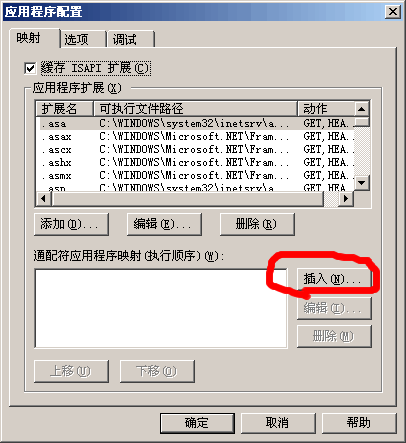
点击插入按键
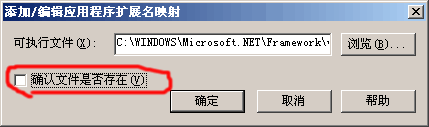
选择或输入C:\WINDOWS\Microsoft.NET\Framework\v1.1.4322\aspnet_isapi.dll
取消"确认文件是否存在"前的钩.
确定
在来访问
http://1234.abc.com 应该是没有问题了。
3. 默认首页失效,因为把请球直接交给asp.net处理,IIS定义的默认首页将会失效,出现这种情形:
访问
http://www.abc.com 不能访问首页,而通过http://1234.abc.com/default.aspx可以访问。
为解决这个问题,请自己在Web.Config中设置 lookfor / to /default.aspx 或 index.aspx ..的重写,完全可以解决问题。
OK,我列出了应该会普遍出现的问题的解决方法,如果你出现了我这里没有列出的问题而你自己又不能解决的,请在此回复提问或者给我发邮件或者加我QQ.
此内容由惯性聚合(RSS阅读器)自动聚合整理,仅供阅读参考。 原文来自 — 版权归原作者所有。