惯性聚合 高效追踪和阅读你感兴趣的博客、新闻、科技资讯
阅读原文 在惯性聚合中打开

推荐订阅源

J
Java Code Geeks
F
Fortinet All Blogs
云风的 BLOG
云风的 BLOG
MyScale Blog
MyScale Blog
D
DataBreaches.Net
Stack Overflow Blog
Stack Overflow Blog
A
About on SuperTechFans
Google DeepMind News
Microsoft Security Blog
腾讯CDC
The GitHub Blog
The GitHub Blog
Jina AI
Jina AI
B
Blog RSS Feed
I
InfoQ
N
Netflix TechBlog - Medium
T
The Blog of Author Tim Ferriss
Microsoft Azure Blog
Recent Announcements
GbyAI
GbyAI
H
Help Net Security
L
LangChain Blog
M
MIT News - Artificial intelligence
Y
Y Combinator Blog
aimingoo的专栏
aimingoo的专栏

博客园 - 井泉

http多线程下载断点续传 抓屏(转) 投票程序2 图像识别 Using The Office 2007 OCR Component in C# 投票程序 - 井泉 - 博客园 httptunnel WebBrowser页面与WinForm交互技巧 ICallbackEventHandler实现无刷新回调 创建完全可编辑的 DataGrid [Oracle]对数据库字段使用默认值 VS2005中使用C#的新特性:可空类型 如何通过需要验证的邮件服务器发送邮件? DataGrid/DataList,你会用了吗? 作者- heone 用ASP.NET建立一个在线RSS新闻聚合器 ASP.NET程序中常用的三十三种代码 Effective C# 在ASP.NET中实现AJAX 101代码示例 net2.0类库 C# 3.0语言详解之基本的语言增强 打印小结
(转)使用VS.Net IDE调试JavaScript
井泉 · 2007-11-19 · via 博客园 - 井泉

请按照如下步骤进行:

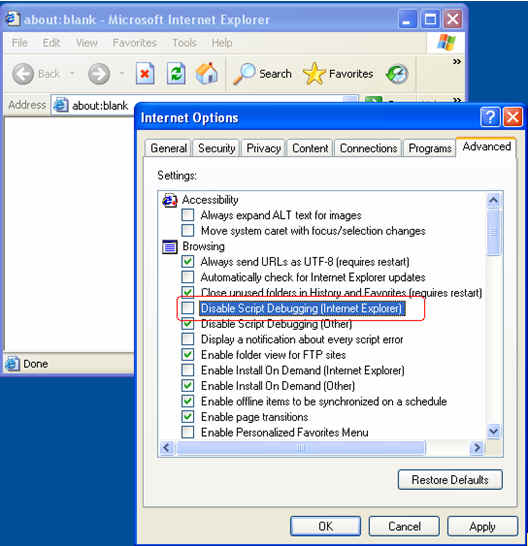
(1)     打开IE --> Internet Options -- > Advanced ; 去掉”Disable Script Debugging” 上的选项

(2)      打开需要调试的页面



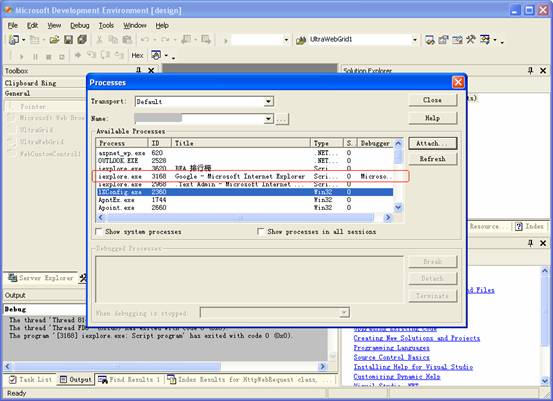
(3)      启动VS.Net IDE, 选择 TOOLS-Debug Process (Ctrl + Alt + P). 选择需要调试的IE进程。

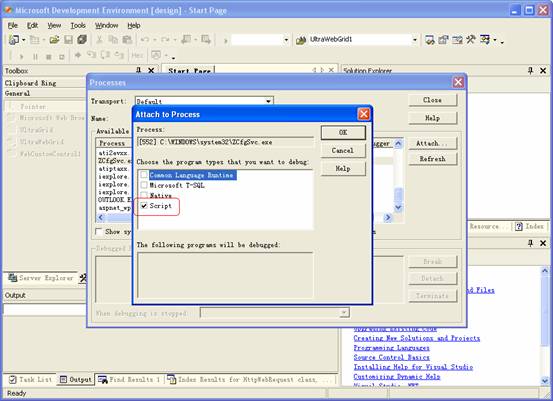
(4)      点击Attach按钮,选择Script选项; 再OK关掉对话框


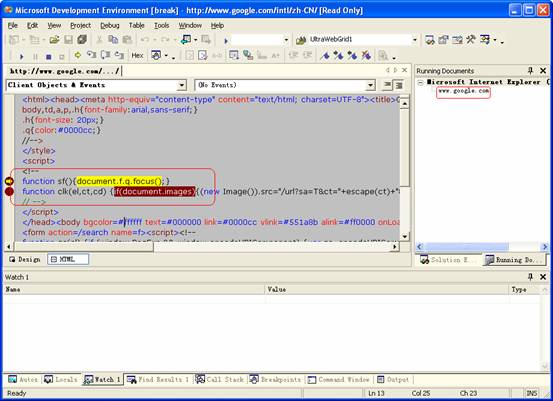
(5)      选择IDE菜单 DEBUGàWindowsàRunning Documents (Ctrl + Alt + N)
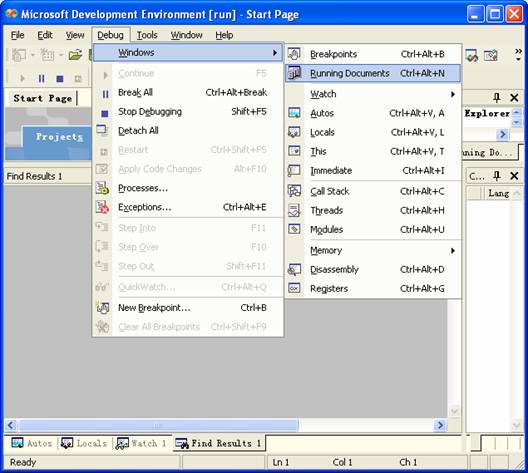

(6)      选择需要调试的Javascript并设置断点

(7)      回到IE页面,运行与JavaScript有关的功能,就会中断到断点上。这时可以观察相关的参数,就和其他VS.Net程序一样。