








有段时间没有写文章了。
一直以来,微信的热门是看得到的,很多人都需要与微信的api对接。
今天我这里就分享全套的企业微信api接口的代码。
关于微信api,网上已经有很多实现的了。
但是我今天之所以还写这个,是因为网上基本上找不到面向对象的api接口实现的编程,几乎都是“面向过程”的。
本文章的代码,也许能带给你极大的方便,以及非常方便的扩展和应用。
1.如下图,在你的业务逻辑层中,将本文章附件的Weixin代码文件夹整套放进去

2.在你的页面中,类似于下图,插入下面的代码即可实现调用。
下图例子是以“创建成员”的请求为例子写的。
创建成员的API说明:http://qydev.weixin.qq.com/wiki/index.php?title=%E7%AE%A1%E7%90%86%E6%88%90%E5%91%98#.E5.88.9B.E5.BB.BA.E6.88.90.E5.91.98
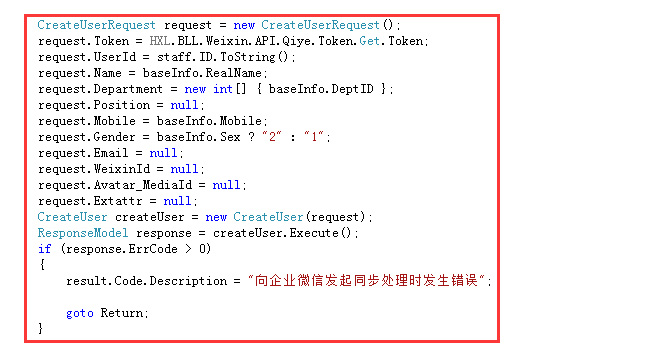
3.到这里就完成了调用了。其它的api方式请依样画葫芦
4.附上整套源文件代码,猛击才能下载
5.文件中有个代码是发起http请求的。该文件不在源包中。
在这里贴出代码,请直接复制即可
using System;
using System.Collections.Generic;
using System.IO;
using System.Linq;
using System.Net;
using System.Text;
using System.Threading.Tasks;

namespace HXL.Common.Helper
{
    public static class Http
    {
        public static string Get(string url)
        {
            HttpWebRequest request = (HttpWebRequest)WebRequest.Create(url);
            request.Method = "GET";
            request.ContentType = "text/html;charset=UTF-8";
            //request.ContentType = "text/html;charset=gb2312";

            HttpWebResponse response = (HttpWebResponse)request.GetResponse();
            Stream responseStream = response.GetResponseStream();
            StreamReader streamReader = new StreamReader(responseStream, Encoding.GetEncoding("utf-8"));
            string retString = streamReader.ReadToEnd();
            streamReader.Close();
            responseStream.Close();

            return retString;
        }

        /// <summary>
        /// 用于发送微信post请求
        /// 其中data是格式化后的json格式。值形如:{"name":"21312","parentid":1,"order":11,"id":19}
        /// </summary>
        /// <param name="url"></param>
        /// <param name="data"></param>
        /// <returns></returns>
        public static string HttpPost(string url, string data)
        {
            string retString = string.Empty;

            byte[] byteArray = Encoding.UTF8.GetBytes(data);
            HttpWebRequest request = (HttpWebRequest)WebRequest.Create(url);
            request.Method = "POST";
            request.ContentType = "x-www-form-urlencoded";
            request.ContentLength = byteArray.Length;
            Stream dataStream = request.GetRequestStream();
            dataStream.Write(byteArray, 0, byteArray.Length);
            dataStream.Close();

            HttpWebResponse response = (HttpWebResponse)request.GetResponse();
            Stream myResponseStream = response.GetResponseStream();
            StreamReader myStreamReader = new StreamReader(myResponseStream, Encoding.GetEncoding("utf-8"));
            retString = myStreamReader.ReadToEnd();
            myStreamReader.Close();
            myResponseStream.Close();

            return retString;
        }
    }
}
此内容由惯性聚合(RSS阅读器)自动聚合整理,仅供阅读参考。 原文来自 — 版权归原作者所有。