惯性聚合 高效追踪和阅读你感兴趣的博客、新闻、科技资讯
阅读原文 在惯性聚合中打开

推荐订阅源

F
Fortinet All Blogs
Attack and Defense Labs
V2EX - 技术
V2EX - 技术
O
OpenAI News
S
Secure Thoughts
H
Heimdal Security Blog
Application and Cybersecurity Blog
Schneier on Security
H
Hacker News: Front Page
S
Security Affairs
Exploit-DB.com RSS Feed
cs.CV updates on arXiv.org
Vercel News
Vercel News
Microsoft Security Blog
cs.CL updates on arXiv.org
P
Proofpoint News Feed
The Register - Security
GbyAI
GbyAI
Cloudbric
Cloudbric
MongoDB | Blog
MongoDB | Blog
D
Darknet – Hacking Tools, Hacker News & Cyber Security
K
Kaspersky official blog
Forbes - Security
Forbes - Security
Y
Y Combinator Blog
C
CXSECURITY Database RSS Feed - CXSecurity.com
Scott Helme
Scott Helme
Hacker News - Newest:
Hacker News - Newest: "LLM"
The Cloudflare Blog
Recorded Future
Recorded Future
人人都是产品经理
人人都是产品经理
Cyberwarzone
Cyberwarzone
C
CERT Recently Published Vulnerability Notes
Webroot Blog
Webroot Blog
C
Cyber Attacks, Cyber Crime and Cyber Security
L
LangChain Blog
T
Tor Project blog
Microsoft Azure Blog
博客园_首页
Hacker News: Ask HN
Hacker News: Ask HN
Blog — PlanetScale
Blog — PlanetScale
奇客Solidot–传递最新科技情报
奇客Solidot–传递最新科技情报
B
Blog RSS Feed
N
News and Events Feed by Topic
阮一峰的网络日志
阮一峰的网络日志
I
Intezer
V
V2EX
T
Tailwind CSS Blog
SecWiki News
SecWiki News
NISL@THU
NISL@THU
C
Check Point Blog

博客园 - 安安

macOS 10.13允许任何来源开启方法 mac系统如何处理来自身份不明的开发者 依赖注入 与 控制反转 捷波朗 jabra BT3030 蓝牙耳机 罗技 UE3100 蓝牙耳机使用 代理服务器 Eclipse快捷键 Html5的表单 host asp.net程序的小型IIS msdn windows 电驴资源(转) Zookeeper .Net Client 使用 ContOS Linux下VNC Server远程桌面配置详细 搭建自己的NuGet服务器 Windows 下 Zookeeper 启动脚本 Zookeeper安装 实现CentOS 中的单窗口打开文件夹 运行jar程序批处理bat程序编写 设置Eclipse的Maven库 maven jetty的eclipse 插件
Windows与Linux拷贝数据
安安 · 2012-10-19 · via 博客园 - 安安

方法一:
使用Putty里面的PSCP.EXE进行拷贝
下载地址
http://www.chiark.greenend.org.uk/~sgtatham/putty/download.html
下载putty.exe 和 pscp.exe
将pscp.exe放到C:\WINDOWS\system32目录下,可以在任何地方调用。

在windows命令行下输入:
pscp c:\t\pscp.exe root@192.168.140.199:/tmp/

到linux文件夹下看到文件了
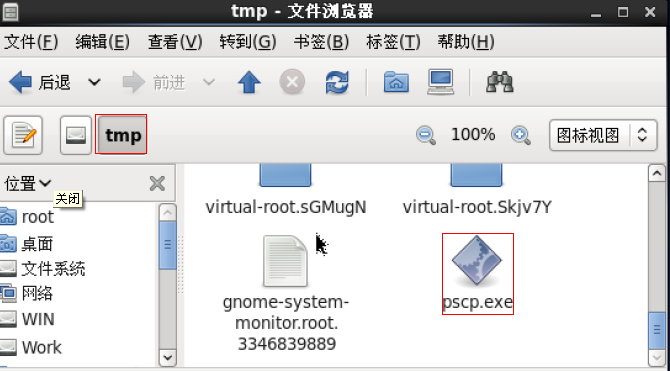
拷贝目录 将c盘下t目录文件夹下所有文件都拷贝到 /tmp/中

pscp -r c:\t\ root@192.168.140.199:/tmp/

从linux拷贝到windows要在windows下安装ssh软件

1. cygwin

http://www.cygwin.com/

2. 共享软件 WinSSHD 5.55 
http://www.onlinedown.net/soft/26503.htm

在 liunx下输入 :
scp -r /home/ administrator@192.168.140.91:/d:\data\

参数说明:

http://www.greensoftcode.net/techntxt/2011123013156405056827

方法二:
使用Linux的操作界面进行拷贝:

1. 首先知道要连接的windows机器的IP地址
2. 在Linux的【位置】-【连接到服务器】-【服务器类型】中选择【Windows共享】
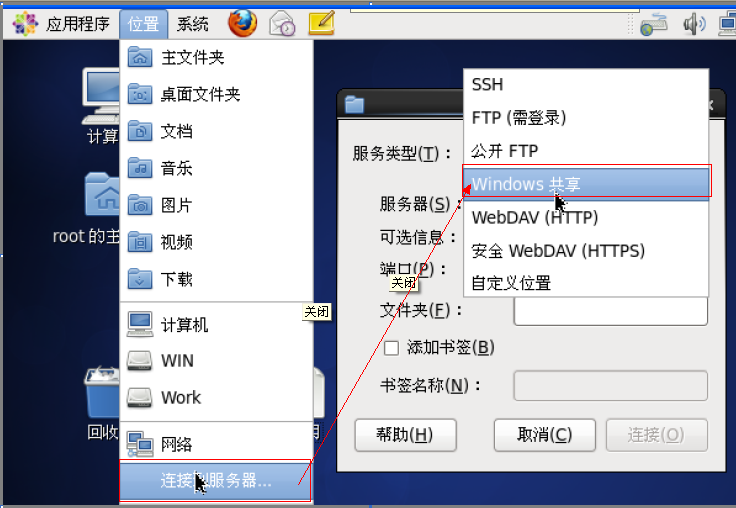
   

3. 在【服务器】中输入你Windows的IP地址,点击【连接】
   

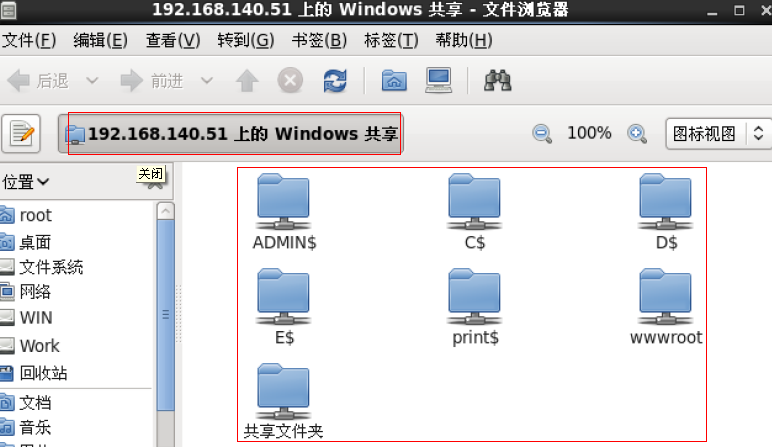
4. 访问到的Windows下的所有共享文件