








    public class ExcelNPOIUnit
    {
        public static void SetCell(IWorkbook workbook, ISheet sheet,
             IRow row, int createCellIndex, object cellContent, CellType cellType, HorizontalAlignment alignment)
        {
            IDataFormat celldataformat = workbook.CreateDataFormat();
            IFont font = workbook.CreateFont();
            font.FontName = "Calibri";

            ICell cell = row.FirstOrDefault(n => n.ColumnIndex == createCellIndex);
            if (cell == null)
                cell = row.CreateCell(createCellIndex);

            cell.CellStyle.SetFont(font);
            cell.CellStyle.BorderLeft = BorderStyle.Thin;
            cell.CellStyle.BorderRight = BorderStyle.Thin;
            cell.CellStyle.BorderTop = BorderStyle.Thin;
            cell.CellStyle.BorderBottom = BorderStyle.Thin;

            //在这里设置会影响全部单元格
            //cell.CellStyle.Alignment = alignment;

            double tmp = -1;
            if (cellType == CellType.Numeric && double.TryParse(cellContent.ToString(), out tmp))
            {
                //必须在这里这样设置,才能对当前单元格有效
                ICellStyle cellstyle = workbook.CreateCellStyle();
                cellstyle.CloneStyleFrom(cell.CellStyle);
                cellstyle.DataFormat = HSSFDataFormat.GetBuiltinFormat("#,##0");
                cellstyle.Alignment = alignment;
                cell.CellStyle = cellstyle;

                cell.SetCellValue(tmp);
            }
            else
            {
                //必须在这里这样设置,才能对当前单元格有效
                ICellStyle cellstyle = workbook.CreateCellStyle();
                cellstyle.CloneStyleFrom(cell.CellStyle);
                cellstyle.Alignment = alignment;
                cell.CellStyle = cellstyle;
                cell.SetCellValue(cellContent.ToString());
            }
        }

        public static void SaveSheet(string fullname, ISheet sheet)
        {
            using (FileStream writefile = new FileStream(fullname, FileMode.Create, FileAccess.Write))
            {
                sheet.Workbook.Write(writefile);
            }
        }
        public static IWorkbook GetWorkbook(string fullname)
        {
            IWorkbook workbook = null;

            if (fullname.ToLower().EndsWith(".xls"))
            {
                using (FileStream fs = new FileStream(fullname, FileMode.Open, FileAccess.Read))
                {
                    workbook = new HSSFWorkbook(fs);
                }
            }
            else
            {
                using (FileStream fs = new FileStream(fullname, FileMode.Open, FileAccess.Read))
                {
                    workbook = new XSSFWorkbook(fs);
                }
            }

            return workbook;
        }

    }
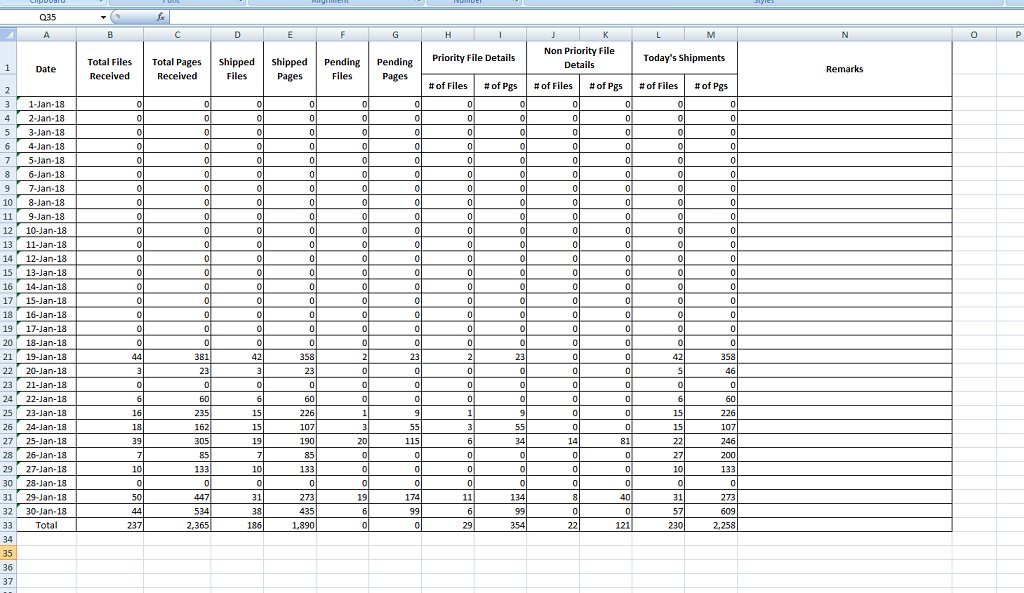
var wk = ExcelNPOIUnit.GetWorkbook(logname);
var sheet = wk.GetSheet("Sheet1");
int rowindex = 2;
int cellindex = 0;
foreach (var item in list)
{
IRow row = sheet.CreateRow(rowindex);
ExcelNPOIUnit.SetCell(wk, sheet, row, cellindex++, item.CreateDate, CellType.String, HorizontalAlignment.Center);
ExcelNPOIUnit.SetCell(wk, sheet, row, cellindex++, item.TotalFilesReceived, CellType.Numeric, HorizontalAlignment.Right);
ExcelNPOIUnit.SetCell(wk, sheet, row, cellindex++, item.TotalPagesReceived, CellType.Numeric, HorizontalAlignment.Right);
ExcelNPOIUnit.SetCell(wk, sheet, row, cellindex++, item.ShippedFiles, CellType.Numeric, HorizontalAlignment.Right);
ExcelNPOIUnit.SetCell(wk, sheet, row, cellindex++, item.ShippedPages, CellType.Numeric, HorizontalAlignment.Right);
ExcelNPOIUnit.SetCell(wk, sheet, row, cellindex++, item.PendingFiles, CellType.Numeric, HorizontalAlignment.Right);
ExcelNPOIUnit.SetCell(wk, sheet, row, cellindex++, item.PendingPages, CellType.Numeric, HorizontalAlignment.Right);
ExcelNPOIUnit.SetCell(wk, sheet, row, cellindex++, item.NofFiles_Priority, CellType.Numeric, HorizontalAlignment.Right);
ExcelNPOIUnit.SetCell(wk, sheet, row, cellindex++, item.NoofPgs_Priority, CellType.Numeric, HorizontalAlignment.Right);
ExcelNPOIUnit.SetCell(wk, sheet, row, cellindex++, item.NoofFiles_NoPriority, CellType.Numeric, HorizontalAlignment.Right);
ExcelNPOIUnit.SetCell(wk, sheet, row, cellindex++, item.NoofPgs_NoPriority, CellType.Numeric, HorizontalAlignment.Right);
ExcelNPOIUnit.SetCell(wk, sheet, row, cellindex++, item.NoofFiles_Today, CellType.Numeric, HorizontalAlignment.Right);
ExcelNPOIUnit.SetCell(wk, sheet, row, cellindex++, item.NoofPgs_Today, CellType.Numeric, HorizontalAlignment.Right);
ExcelNPOIUnit.SetCell(wk, sheet, row, cellindex++, item.Remarks, CellType.Numeric, HorizontalAlignment.Left);
rowindex++;
cellindex = 0;
}
ExcelNPOIUnit.SaveSheet(logname, sheet);
此内容由惯性聚合(RSS阅读器)自动聚合整理,仅供阅读参考。 原文来自 — 版权归原作者所有。