惯性聚合 高效追踪和阅读你感兴趣的博客、新闻、科技资讯
阅读原文 在惯性聚合中打开

推荐订阅源

P
Proofpoint News Feed
博客园 - 聂微东
Application and Cybersecurity Blog
MyScale Blog
MyScale Blog
罗磊的独立博客
H
Help Net Security
L
LangChain Blog
T
Threat Research - Cisco Blogs
量子位
S
Securelist
Last Week in AI
Last Week in AI
L
Lohrmann on Cybersecurity
T
The Exploit Database - CXSecurity.com
P
Privacy International News Feed
The Hacker News
The Hacker News
Vercel News
Vercel News
D
Darknet – Hacking Tools, Hacker News & Cyber Security
C
Cybersecurity and Infrastructure Security Agency CISA
T
The Blog of Author Tim Ferriss
T
Threatpost
Security Latest
Security Latest
P
Palo Alto Networks Blog
Microsoft Security Blog
NISL@THU
NISL@THU
F
Full Disclosure
WordPress大学
WordPress大学
cs.AI updates on arXiv.org
Stack Overflow Blog
Stack Overflow Blog
C
Check Point Blog
Hacker News - Newest:
Hacker News - Newest: "LLM"
酷 壳 – CoolShell
酷 壳 – CoolShell
H
Heimdal Security Blog
J
Java Code Geeks
Recorded Future
Recorded Future
Hugging Face - Blog
Hugging Face - Blog
G
GRAHAM CLULEY
Know Your Adversary
Know Your Adversary
K
KPMG report finds enterprise disconnect between AI and its ROI | CIO
阮一峰的网络日志
阮一峰的网络日志
U
Unit 42
B
Blog RSS Feed
月光博客
月光博客
C
Cisco Blogs
V
Visual Studio Blog
D
DataBreaches.Net
H
Hacker News: Front Page
博客园 - 叶小钗
N
News and Events Feed by Topic
爱范儿
爱范儿
A
Arctic Wolf

博客园 - YCOE

MongoDB异常关闭引起的CPU占用 linux php 安装openssl备忘 yum Segmentation fault 错误处理 FullCalendar的二次开发、扩展 记一次笔记本CPU性能骤降 [原创]狂想--QQ构架 [原创]基于jquery.Jcrop的头像编辑器 [原创][C#] 如何将String类型转换成任意基本类型 [原创]Annotation之ElementType.PACKAGE 短信切割算法 Log4net的使用 C# Unrecognized configuration section system.serviceModel 发现Google浏览器(Chrome)的一个JavaScript Bug DWR死锁问题解决 [原创]DWR+OSGi整合v2.0 [原创]DWR与OSGi的整合 [转载]使用java.text包格式化数字和日期 Hibernate merge方法 MySQL数据库使用Innodb数据库类型(工具生成Hibernate+Spring代码)
storytlr -- 安装体验
YCOE · 2010-06-08 · via 博客园 - YCOE

Storytlr是一个开源的微博和Lifestreaming平台。支持单用户和多用户两种模式。Lifestreaming一种在线记录个人日常活动 的网络应用,它能够聚合一个人的网络在线内容,比如博客日志,在社会性网络上面的更新,在线相册,聊天内容甚至只是一些喜欢的网站链接等等。 Storytlr当前支持的网站应用包括: Delicious、Digg、Disqus、Flickr、Google Reader、Identi.ca/Laconi.ca、Last.fm favorites、Picasa、Qik、RSS Feeds、Seesmic、StumbleUpon、Tumblr、Twitpic pictures in Twitter tweets、Twitter、Vimeo、Youtube收藏。

官方网站:http://storytlr.org

原来的官方地址被关了:http://storytlr.com/

下载地址:http://code.google.com/p/storytlr

 话说Storytlr的安装还真是不人性化!

本人在Window下测试的,程序还有错误,汗

1. 下载、解压到本地目录

2. 配置本地站点

  a. 配置本地DNS,用记事本打开C:/windows/system32/drivers/etc/hosts,添加一行记录: 127.0.0.1 www.localhost

      注意,这里请用www的二级域名,不明白为什么 Storytlr的程序里面为什么要这样限制,如果直接用localhost的话会一片空白!

  b.在apache中创建一个虚拟主机。具体方法不多说,自个百度去...

  c.服务器配置完成

3. 创建数据库,将压缩包内\storytlr-0.9.3.rc2\protected\install\database.sql 的脚本执行一次,创建数据表及数据

4. 打开根目录的index.php文件,找到:$root = dirname(__FILE__);在下一行添加define('ROOT',$root);后面有用

5. 打开\storytlr-0.9.3.rc2\protected\library\Zend\Loader.php,找到registerAutoload方法,第一行注册掉,真不明白为什么一进来就抛个错误出去...再汗一个

6. 打开\storytlr-0.9.3.rc2\protected\application\Bootstrap.php文件,找到setupCache方法,找到$path = "/tmp"; 这个目录在Window下会找不到的,改为:$path = ROOT.DIRECTORY_SEPARATOR."tmp";

7. 复制\storytlr-0.9.3.rc2\protected\config\config.ini.sample 为 \storytlr-0.9.3.rc2\protected\config\config.ini

8. 打开config.ini文件,根据你的环境修改里面的几个参数

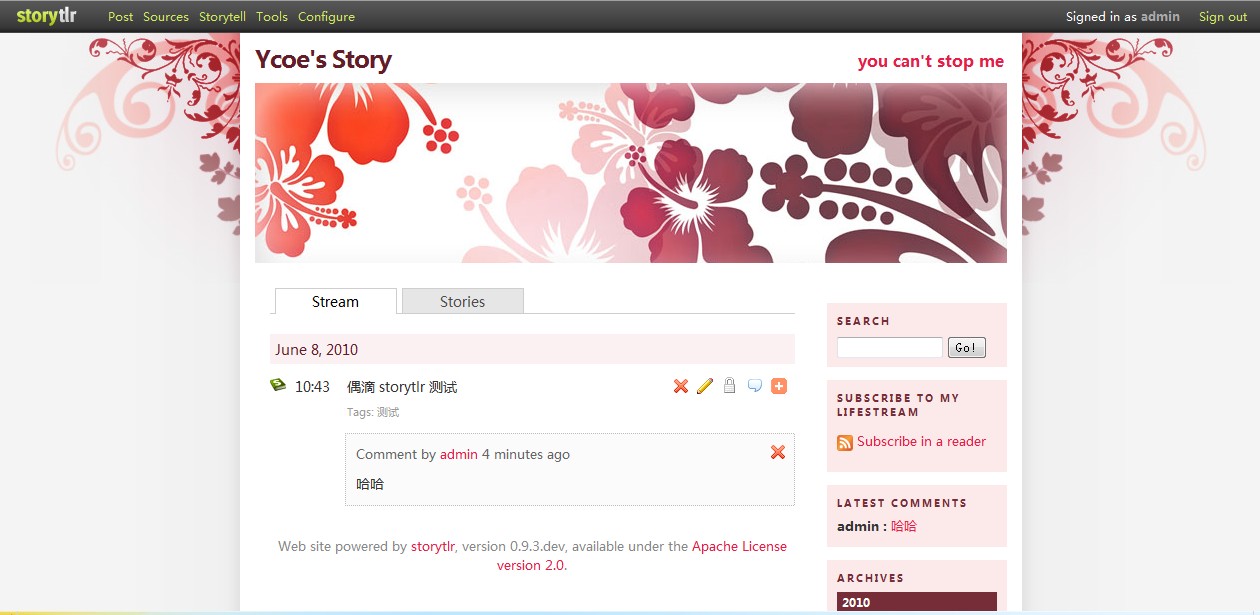
以上就完成了 storytlr的部署,打开 http://www.localhost/

使用admin登录,密码:storytlr

 不过呢,感觉这个系统的聚合其它网络行为的功能还是不错滴,还有它的换肤,感觉做得不错。

应用也做成插件式的,扩展和用户体验都还不错。

说下它不太好的,就是几个功能界面切换得太突然了,好像进入了几个网站一样,变化太大,这点感觉有待改进。