




自从安装了WIN7并试用了腾讯的概念版QQ后,心中总是对登录界面那漂浮的白云、来回摆动的绿叶感兴趣,惊叹于WPF的强大(特别是动画实现)。实在忍不住了,决定试着自己开发一个“类似”的东东。
声明一下下:本文章本着学习技术的目的,部分素材来自腾讯QQ概念版本(有些是导出的图片素材、有些则是本人截图后进行的图片处理),严禁任何人用于商业用途,否则后果自负。
先把我制作的效果秀一下:


XAML代码如下:
 代码
代码
<Window
xmlns="http://schemas.microsoft.com/winfx/2006/xaml/presentation"
xmlns:x="http://schemas.microsoft.com/winfx/2006/xaml"
xmlns:d="http://schemas.microsoft.com/expression/blend/2008" xmlns:mc="http://schemas.openxmlformats.org/markup-compatibility/2006" mc:Ignorable="d"
x:Class="WpfQQ.LoginWindow"
x:Name="Window"
Title="QQ"
Width="369" Height="292" WindowStyle="None"
Background="{x:Null}" AllowsTransparency="True" MouseLeftButtonDown="Window_MouseLeftButtonDown" WindowStartupLocation="CenterScreen" Icon="/WpfQQ;component/Images/logo32.ico">
<Window.Resources>
<Storyboard x:Key="StoryboardCloud" RepeatBehavior="Forever">
<DoubleAnimationUsingKeyFrames Storyboard.TargetProperty="(UIElement.RenderTransform).(TransformGroup.Children)[3].(TranslateTransform.X)" Storyboard.TargetName="image2">
<EasingDoubleKeyFrame KeyTime="0" Value="0"/>
<EasingDoubleKeyFrame KeyTime="0:0:15" Value="153"/>
<EasingDoubleKeyFrame KeyTime="0:0:20" Value="190"/>
</DoubleAnimationUsingKeyFrames>
<DoubleAnimationUsingKeyFrames Storyboard.TargetProperty="(UIElement.Opacity)" Storyboard.TargetName="image2">
<EasingDoubleKeyFrame KeyTime="0:0:15" Value="1"/>
<EasingDoubleKeyFrame KeyTime="0:0:20" Value="0.05"/>
</DoubleAnimationUsingKeyFrames>
<DoubleAnimationUsingKeyFrames Storyboard.TargetProperty="(UIElement.Opacity)" Storyboard.TargetName="txtUserName">
<EasingDoubleKeyFrame KeyTime="0:0:15" Value="1"/>
</DoubleAnimationUsingKeyFrames>
<ColorAnimationUsingKeyFrames Storyboard.TargetProperty="(Panel.Background).(SolidColorBrush.Color)" Storyboard.TargetName="txtUserName">
<EasingColorKeyFrame KeyTime="0" Value="#FFF3F5F5"/>
<EasingColorKeyFrame KeyTime="0:0:15" Value="#FFF3F5F5"/>
</ColorAnimationUsingKeyFrames>
</Storyboard>
<!--定义按钮样式-->
<Style x:Key="buttonTemplate" TargetType="Button" >
<!--修改模板属性-->
<Setter Property="Template">
<Setter.Value>
<!--控件模板-->
<ControlTemplate TargetType="Button">
<!--只有Grid才能装下这么多Child-->
<Grid Background="Yellow">
<!--带特效的底层背景-->
<Border x:Name="back" Opacity="0.8" CornerRadius="2">
<Border.BitmapEffect>
<OuterGlowBitmapEffect Opacity="0.8" GlowSize="0" GlowColor="Red" />
</Border.BitmapEffect>
<Ellipse Width="49" Height="49">
<Ellipse.Fill>
Red
</Ellipse.Fill>
</Ellipse>
<!--按钮呈圆形-->
</Border>
<Ellipse x:Name="outerCircle" Width="50" Height="50">
<Ellipse.Fill>
<LinearGradientBrush StartPoint="0,0" EndPoint="0,1">
<GradientStop Offset="0" Color="DarkOliveGreen"/>
<GradientStop Offset="1" Color="Azure"/>
</LinearGradientBrush>
</Ellipse.Fill>
</Ellipse>
<Ellipse Width="40" Height="40">
<Ellipse.Fill>
<LinearGradientBrush StartPoint="0,0" EndPoint="0,1">
<GradientStop Offset="0" Color="White"/>
<GradientStop Offset="1" Color="Transparent"/>
</LinearGradientBrush>
</Ellipse.Fill>
</Ellipse>
<!--按钮内容-->
<Border>
<TextBlock x:Name="content" HorizontalAlignment="Center" VerticalAlignment="Center" Text="{TemplateBinding Content}">
</TextBlock>
</Border>
</Grid>
<!--触发器-->
<ControlTemplate.Triggers>
<Trigger Property="Button.IsMouseOver" Value="True">
<Trigger.EnterActions>
<BeginStoryboard>
<Storyboard>
<DoubleAnimation To="10" Duration="0:0:0.2" Storyboard.TargetName="back" Storyboard.TargetProperty="(Border.BitmapEffect).(OuterGlowBitmapEffect.GlowSize)" />
<ColorAnimation To="#4FFF" BeginTime="0:0:0.2" Duration="0:0:0.2" Storyboard.TargetName="outerCircle" Storyboard.TargetProperty="(Ellipse.Fill).(LinearGradientBrush.GradientStops)[0].(GradientStop.Color)" />
<ColorAnimation To="#3FFF" BeginTime="0:0:0.2" Duration="0:0:0.2" Storyboard.TargetName="outerCircle" Storyboard.TargetProperty="(Ellipse.Fill).(LinearGradientBrush.GradientStops)[1].(GradientStop.Color)" />
</Storyboard>
</BeginStoryboard>
</Trigger.EnterActions>
<Trigger.ExitActions>
<BeginStoryboard>
<Storyboard>
<DoubleAnimation Duration="0:0:0.2" Storyboard.TargetName="back" Storyboard.TargetProperty="(Border.BitmapEffect).(OuterGlowBitmapEffect.GlowSize)" />
<ColorAnimation Duration="0:0:0.2" Storyboard.TargetName="outerCircle" Storyboard.TargetProperty="(Ellipse.Fill).(LinearGradientBrush.GradientStops)[0].(GradientStop.Color)" />
<ColorAnimation Duration="0:0:0.2" Storyboard.TargetName="outerCircle" Storyboard.TargetProperty="(Ellipse.Fill).(LinearGradientBrush.GradientStops)[1].(GradientStop.Color)" />
</Storyboard>
</BeginStoryboard>
</Trigger.ExitActions>
</Trigger>
<Trigger Property="Button.IsPressed" Value="True">
<Setter Property="RenderTransform">
<Setter.Value>
<ScaleTransform ScaleX=".9" ScaleY=".9"/>
</Setter.Value>
</Setter>
<Setter Property="RenderTransformOrigin" Value=".5,.5"/>
</Trigger>
</ControlTemplate.Triggers>
</ControlTemplate>
</Setter.Value>
</Setter>
</Style>
<Storyboard x:Key="StoryboardLeaf" RepeatBehavior="Forever">
<DoubleAnimationUsingKeyFrames Storyboard.TargetProperty="(UIElement.RenderTransform).(TransformGroup.Children)[2].(RotateTransform.Angle)" Storyboard.TargetName="image1">
<EasingDoubleKeyFrame KeyTime="0" Value="0"/>
<EasingDoubleKeyFrame KeyTime="0:0:2" Value="13"/>
<EasingDoubleKeyFrame KeyTime="0:0:4" Value="0"/>
</DoubleAnimationUsingKeyFrames>
<DoubleAnimationUsingKeyFrames Storyboard.TargetProperty="(UIElement.RenderTransform).(TransformGroup.Children)[2].(RotateTransform.Angle)" Storyboard.TargetName="image">
<EasingDoubleKeyFrame KeyTime="0" Value="0"/>
<EasingDoubleKeyFrame KeyTime="0:0:2" Value="13"/>
<EasingDoubleKeyFrame KeyTime="0:0:4" Value="0"/>
</DoubleAnimationUsingKeyFrames>
</Storyboard></Window.Resources>
<Window.Triggers>
<EventTrigger RoutedEvent="FrameworkElement.Loaded">
<BeginStoryboard Storyboard="{StaticResource StoryboardCloud}"/>
<BeginStoryboard Storyboard="{StaticResource StoryboardLeaf}"/>
</EventTrigger>
</Window.Triggers>
<Grid x:Name="LayoutRoot" Width="370" Height="370">
<Grid.ColumnDefinitions>
<ColumnDefinition Width="0.935*"/>
<ColumnDefinition Width="0.065*"/>
</Grid.ColumnDefinitions>
<Image x:Name="image5" HorizontalAlignment="Left" Height="53" Source="sun2.png" Stretch="Fill" VerticalAlignment="Top" Width="105" RenderTransformOrigin="0.5,0.5" Margin="-3,-2,0,0">
<Image.RenderTransform>
<TransformGroup>
<ScaleTransform/>
<SkewTransform/>
<RotateTransform/>
<TranslateTransform/>
</TransformGroup>
</Image.RenderTransform>
</Image>
<Image x:Name="image3" Margin="-2,43,6,81" Source="loginbody.png" Stretch="Fill" RenderTransformOrigin="0.5,0.5" Grid.ColumnSpan="2" Width="366" Height="246">
<Image.RenderTransform>
<TransformGroup>
<ScaleTransform/>
<SkewTransform/>
<RotateTransform/>
<TranslateTransform/>
</TransformGroup>
</Image.RenderTransform>
</Image>
<Image x:Name="image2" Height="50" Margin="-14,7,170.11,0" Source="cloud.png" Stretch="Fill" VerticalAlignment="Top" RenderTransformOrigin="0.5,0.5">
<Image.RenderTransform>
<TransformGroup>
<ScaleTransform/>
<SkewTransform/>
<RotateTransform/>
<TranslateTransform/>
</TransformGroup>
</Image.RenderTransform>
</Image>
<Image x:Name="image4" Height="82" Margin="16,17,0,0" Source="yezi2.png" Stretch="Fill" VerticalAlignment="Top" RenderTransformOrigin="0.5,0.5" Grid.ColumnSpan="2">
<Image.RenderTransform>
<TransformGroup>
<ScaleTransform/>
<SkewTransform/>
<RotateTransform/>
<TranslateTransform/>
</TransformGroup>
</Image.RenderTransform>
</Image>
<Image x:Name="image1" HorizontalAlignment="Left" Height="35.368" Margin="75,51,0,0" Source="yezi3.png" Stretch="Fill" VerticalAlignment="Top" Width="37" RenderTransformOrigin="1.135,-1.103">
<Image.RenderTransform>
<TransformGroup>
<ScaleTransform/>
<SkewTransform/>
<RotateTransform/>
<TranslateTransform/>
</TransformGroup>
</Image.RenderTransform>
</Image>
<Button x:Name="button" Content="X" Template="{StaticResource temp_b_top_close}" HorizontalAlignment="Right" Height="22" Margin="0,67.368,-3.89,0" VerticalAlignment="Top" Width="22" RenderTransformOrigin="0.5,0.5" Click="button_Click">
<Button.RenderTransform>
<TransformGroup>
<ScaleTransform/>
<SkewTransform/>
<RotateTransform/>
<TranslateTransform/>
</TransformGroup>
</Button.RenderTransform>
</Button>
<TextBox x:Name="txtUserName" Margin="75,121,62.11,0" TextWrapping="Wrap" Text="" BorderThickness="0" Height="18" VerticalAlignment="Top" Background="#FFF3F5F5" />
<Button Content="登 录" Margin="0,0,48.11,111.5" Height="30" Click="Button_Click" VerticalAlignment="Bottom" d:LayoutOverrides="Height" HorizontalAlignment="Right" Width="122"/>
<Button x:Name="RegButton" Content="注册新帐号" Margin="61,0,0,111" HorizontalAlignment="Left" Width="74" Height="30" VerticalAlignment="Bottom" d:LayoutOverrides="Height" Click="RegButton_Click"/>
<CheckBox Content="CheckBox" HorizontalAlignment="Right" Height="21" Margin="0,0,105.11,149.5" VerticalAlignment="Bottom" Width="21"/>
<Image x:Name="image" Height="65" Margin="133,63,145.11,0" Source="yezi3.png" Stretch="Fill" VerticalAlignment="Top" RenderTransformOrigin="0.5,0.5">
<Image.RenderTransform>
<TransformGroup>
<ScaleTransform/>
<SkewTransform/>
<RotateTransform/>
<TranslateTransform/>
</TransformGroup>
</Image.RenderTransform>
</Image>
<Button x:Name="button_mini" Content="X" Template="{StaticResource temp_b_mini_close}" HorizontalAlignment="Right" Height="22" Margin="0,68.368,14.11,0" VerticalAlignment="Top" Width="22" RenderTransformOrigin="0.5,0.5" Click="button_mini_Click">
<Button.RenderTransform>
<TransformGroup>
<ScaleTransform/>
<SkewTransform/>
<RotateTransform/>
<TranslateTransform/>
</TransformGroup>
</Button.RenderTransform>
</Button>
<PasswordBox x:Name="txtPassWord" Margin="75,170.5,74.11,181.5" Width="196.84" BorderThickness="0" Background="#FFF3F5F5">
<PasswordBox.BorderBrush>
<LinearGradientBrush EndPoint="0,20" MappingMode="Absolute" StartPoint="0,0">
<GradientStop Color="#FFABADB3" Offset="0.05"/>
<GradientStop Color="#FFE2E3EA" Offset="0.07"/>
<GradientStop Color="#FFF3F5F5" Offset="1"/>
</LinearGradientBrush>
</PasswordBox.BorderBrush>
</PasswordBox>
</Grid>
</Window>
随后放出DEMO......感谢关注
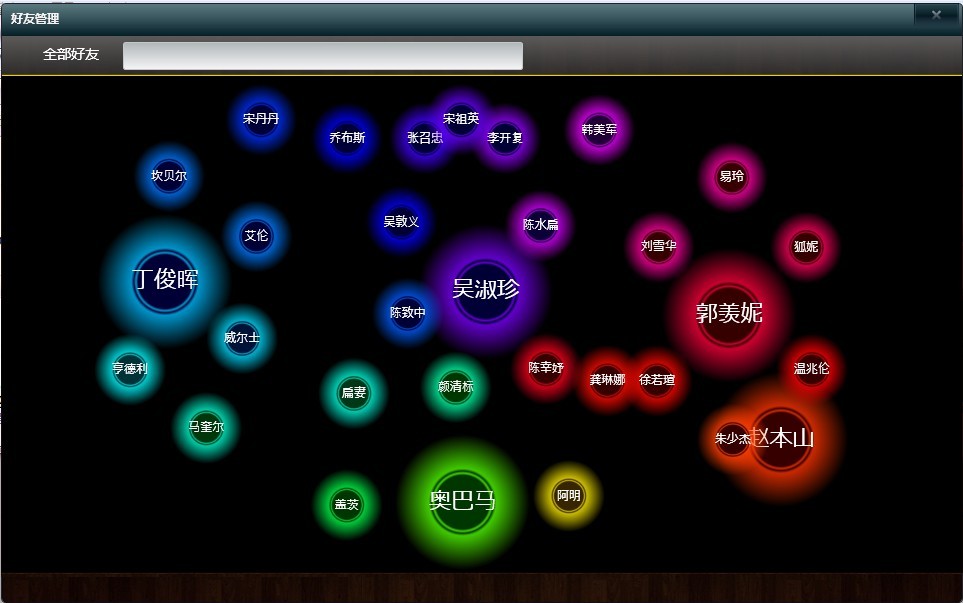
放一个好友管理效果吧
此内容由惯性聚合(RSS阅读器)自动聚合整理,仅供阅读参考。 原文来自 — 版权归原作者所有。