惯性聚合 高效追踪和阅读你感兴趣的博客、新闻、科技资讯
阅读原文 在惯性聚合中打开

推荐订阅源

Google DeepMind News
S
Security Affairs
阮一峰的网络日志
阮一峰的网络日志
L
LangChain Blog
Microsoft Azure Blog
雷峰网
雷峰网
Recent Announcements
WordPress大学
WordPress大学
The GitHub Blog
The GitHub Blog
博客园_首页
The Cloudflare Blog
M
MIT News - Artificial intelligence
博客园 - 【当耐特】
MyScale Blog
MyScale Blog
S
SegmentFault 最新的问题
P
Proofpoint News Feed
Y
Y Combinator Blog
Jina AI
Jina AI
博客园 - 聂微东
A
About on SuperTechFans
Blog — PlanetScale
Blog — PlanetScale
博客园 - 司徒正美
G
Google Developers Blog
云风的 BLOG
云风的 BLOG
F
Full Disclosure
CTFtime.org: upcoming CTF events
Microsoft Security Blog
爱范儿
爱范儿
T
Tailwind CSS Blog
J
Java Code Geeks
Vercel News
Vercel News
钛媒体:引领未来商业与生活新知
钛媒体:引领未来商业与生活新知
Stack Overflow Blog
Stack Overflow Blog
罗磊的独立博客
小众软件
小众软件
酷 壳 – CoolShell
酷 壳 – CoolShell
T
The Blog of Author Tim Ferriss
cs.AI updates on arXiv.org
博客园 - 三生石上(FineUI控件)
W
WeLiveSecurity
PCI Perspectives
PCI Perspectives
Attack and Defense Labs
Exploit-DB.com RSS Feed
cs.CV updates on arXiv.org
宝玉的分享
宝玉的分享
IT之家
IT之家
Hacker News: Ask HN
Hacker News: Ask HN
The Register - Security
T
The Exploit Database - CXSecurity.com
T
Threat Research - Cisco Blogs

博客园 - CoderDream

[设计模式]单例模式 [设计模式]模板模式 Windows8下通过IPv4地址访问Tomcat Maven 版 JPA 最佳实践 Android项目实战手机安全卫士(02) Android项目实战手机安全卫士(01) 推荐十一个很酷的实用网站 类 ObjectOutputStream的writeObject()方法的中英文对照 2006.08.21网摘 20060818网摘 20060702 长沙职位信息 20060702 网摘 20060630 网摘 Eclipse 入门与提高 第01章 基础知识 今天答辩, 第二阶段(标准阶段)已经过去了! 只剩下最后4个月了! 亿阳信通股份有限公司 J2EE软件设计工程师 上海掌上灵通咨询有限公司 Java软件开发工程师 20060519网摘
RESTful最佳实践之基于 jersey 的增删改查
CoderDream · 2014-12-05 · via 博客园 - CoderDream

jersey-rest-demo 增删改查

项目地址:https://github.com/CoderDream/jersey-rest-demo

源代码:http://download.csdn.net/detail/xuxiheng/8227849

查找

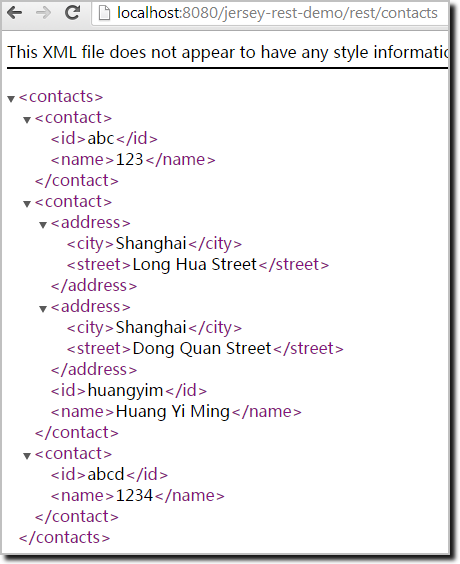
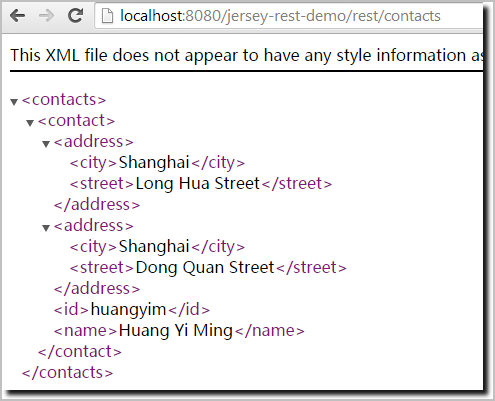
  1. 直接访问


    地址:http://localhost:8080/jersey-rest-demo/rest/contacts/
    Image
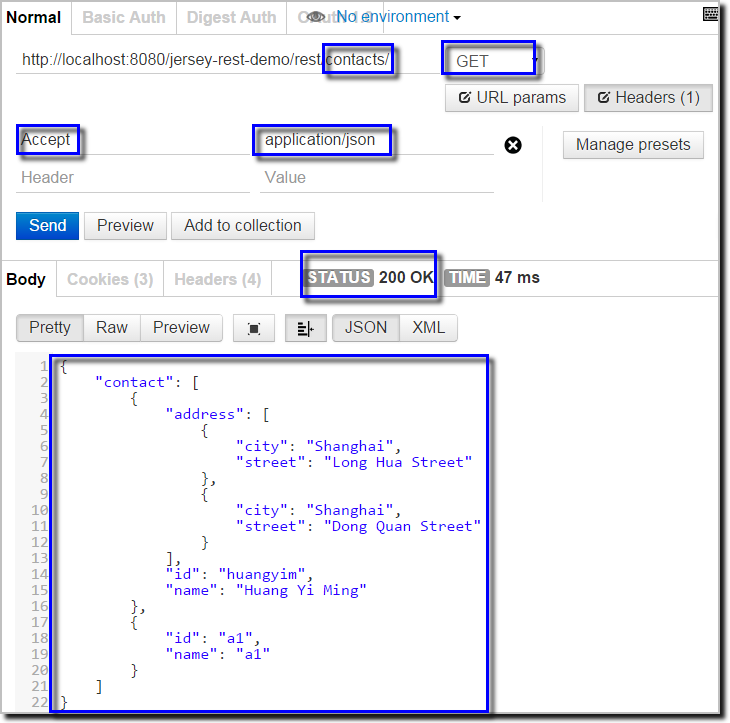
  2. PostMan访问


    地址:http://localhost:8080/jersey-rest-demo/rest/contacts/

    查找所有的记录:

    方法
    GET

    语法

    http://localhost:8080/jersey-rest-demo/rest/contacts

    链接
    http://localhost:8080/jersey-rest-demo/rest/contacts

    Header参数
    Accept : application/json

    返回的json
    {
        "contact": [
            {
                "address": [
                    {
                        "city": "Shanghai",
                        "street": "Long Hua Street"
                    },
                    {
                        "city": "Shanghai",
                        "street": "Dong Quan Street"
                    }
                ],
                "id": "huangyim",
                "name": "Huang Yi Ming"
            },
            {
                "id": "a1",
                "name": "a1"
            }
        ]
    }
    Image(9)

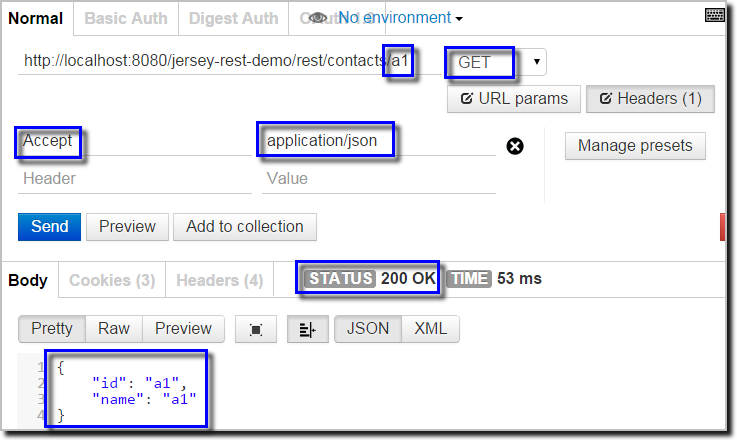
    查找指定ID的记录:

    方法
    PUT

    语法

    http://localhost:8080/jersey-rest-demo/rest/contacts/{contactId}

    链接
    http://localhost:8080/jersey-rest-demo/rest/contacts/abc

    Header参数
    Content-Type : application/json

    返回的json

    {
        "id": "a1",
        "name": "a1"
    }
    Image(10)


新增

  1. 通过页面添加:


    新增:http://localhost:8080/jersey-rest-demo/pages/new_contact.jsp
    Image(2)
    查询:http://localhost:8080/jersey-rest-demo/rest/contacts
    Image(3)
  2. 通过Chrome的插件PostMan


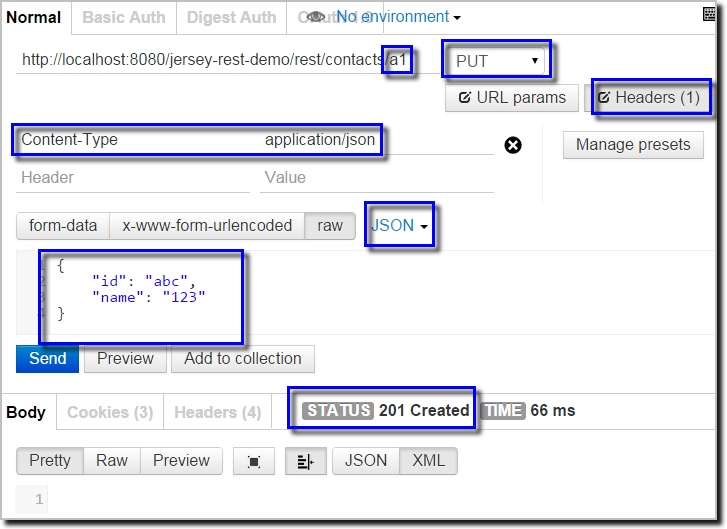
    实例1(只包含id和name):

    方法
    PUT

    语法

    http://localhost:8080/jersey-rest-demo/rest/contacts/{contactId}

    链接
    http://localhost:8080/jersey-rest-demo/rest/contacts/abc

    Header参数
    Content-Type : application/json

    请求的json

    {
        "id": "abc",
        "name": "123"
    }
    Image(4)

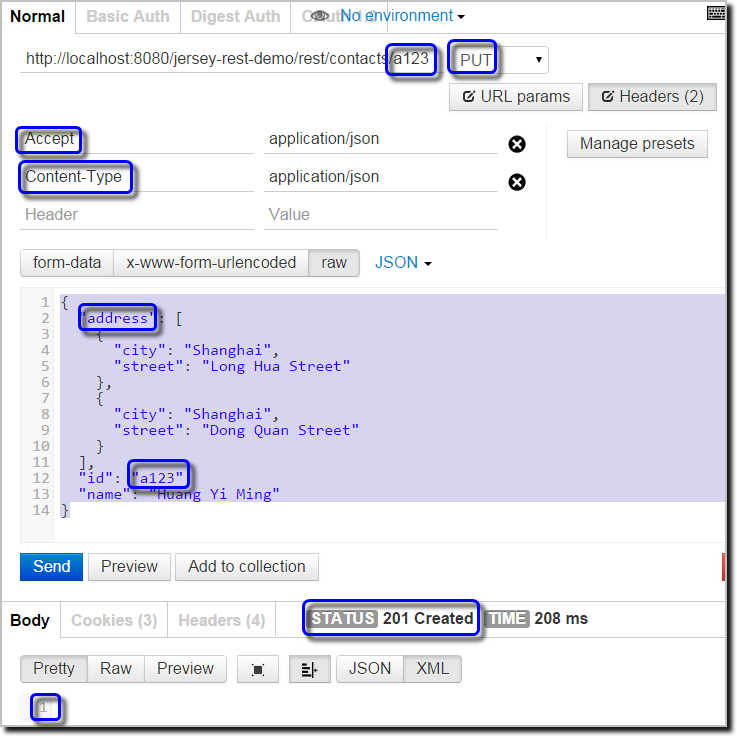
    实例2(包含id、name和address列表):

    方法
    PUT

    语法

    http://localhost:8080/jersey-rest-demo/rest/contacts/{contactId}

    链接
    http://localhost:8080/jersey-rest-demo/rest/contacts/a123

    Header参数
    Content-Type : application/json

    请求的json
    {
      "address": [
        {
          "city": "Shanghai",
          "street": "Long Hua Street"
        },
        {
          "city": "Shanghai",
          "street": "Dong Quan Street"
        }
      ],
      "id": "a123",
      "name": "Huang Yi Ming"  
    }
    Image(11)


修改

  1. 修改记录

    方法
    PUT

    语法

    http://localhost:8080/jersey-rest-demo/rest/contacts/{contactId}

    链接
    http://localhost:8080/jersey-rest-demo/rest/contacts/abc

    Header参数
    Content-Type : application/json

    请求的json
    {
        "id": "abc",
        "name": "12345"
    }

    Image(5)

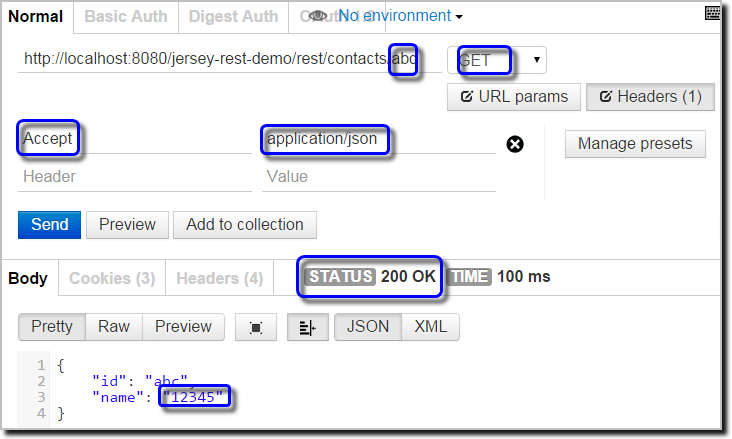
  2. 查看更新后的结果

    方法

    GET

    语法

    http://localhost:8080/jersey-rest-demo/rest/contacts/{contactId}

    链接

    http://localhost:8080/jersey-rest-demo/rest/contacts/abc

    Header参数

    Accept : application/json

    返回的json

    {
        "id": "abc",
        "name": "12345"
    }
    Image(6)


删除

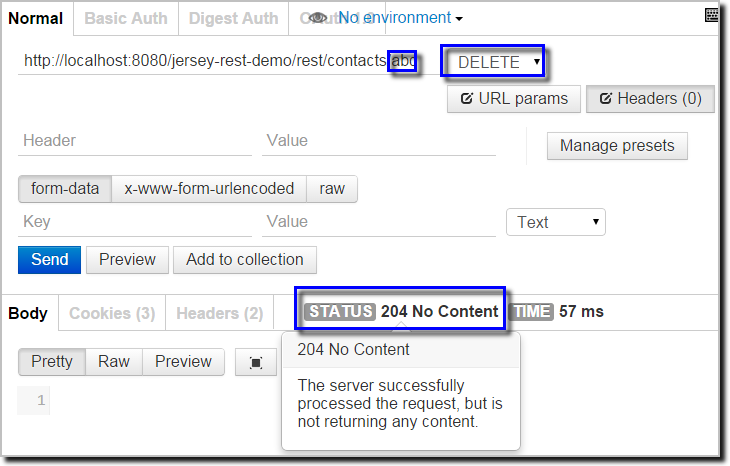
  1. 删除记录

    方法
    DELETE

    语法

    http://localhost:8080/jersey-rest-demo/rest/contacts/{contactId}

    链接
    http://localhost:8080/jersey-rest-demo/rest/contacts/abc

    Header参数
    Content-Type : application/json
    Image(7)

  2. 删除后查看结果


    方法

    GET

    语法

    http://localhost:8080/jersey-rest-demo/rest/contacts/{contactId}

    链接

    http://localhost:8080/jersey-rest-demo/rest/contacts/abc

    Header参数

    Accept : application/json

    Image(8)


参考文档

  1. 在Eclipse中使用Jersey和Tomcat构建RESTful WebService及其调用