








曾几何时,当你码神附体,一路披荆斩棘的完成代码后,带着“一码在手,天下我有”的傲然环顾之时,却发现单元测试、API文档、Demo实例陆续向你砸来,顿时有木有一种冰水挑战后的感觉。而这时你应该:哟哟,快使用SmartDoc;
SmartDoc, 一个基于NodeJS的自动化文档生成工具,她拥有明眸的双眼(yuidoc引擎),华丽的外衣(bootstrap 3风格),灵巧的双手(demo生成,codemirror代码编辑,jasmine接口兼容);拥有她,相信你一定会仰天长啸:"小伙伴们再也不用担心我的API了。“
最近有不少朋友问我SmartJS的一些API,我使用YUIDoc和bootstrap2的那个主题全部整理了一遍,但发现只有API没有具体例子也比较难懂,而且没有几个人会看单元测试。遂起念,将文档、单元测试、demo整合提供完整的生成方案,这就有了SmartDoc。
具有以下特点:
   * 基于Bootstrp3构建,排版和样式美化
   * 支持html和js的Demo生成,与查看
   * 提供在线的demo编辑页面(类似于jsfiddler)
   * 同步jasmine的expect接口,使得单元测试与example的代码能够复用
   * 可以配置化增强 - 项目信息配置;Document页面导航配置;demo依赖库配置
   * 提供全局api查询和导航过滤功能,筛选更加便利
   * 提供grunt插件 - grunt-contrib-smartdoc
界面讲解
全局过滤通过右侧全局过滤,可以快速检索所有的API,点击可以跳转到API页面并定位到对于的位置;支持全键盘操作

源代码展示
点击代码位置的链接,就可以进入源代码展示页面

Example演示页面点击Example区域的Edit Code按钮开启代码编辑页面,如下:
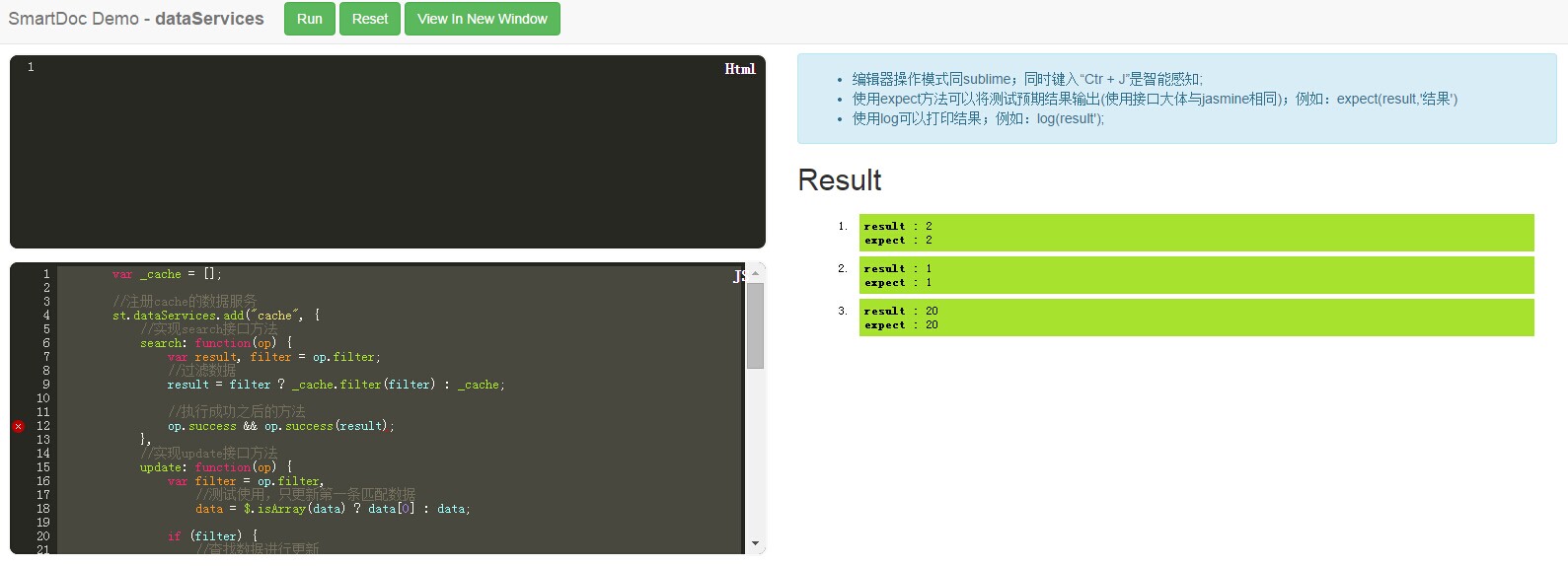
页面中有HTML和Code两个编辑区域和结果的展示区域,代码编辑器使用codemirror,sublime风格,支持智能感知,可以通过配置项来引入样式和脚本库。
提供log和expect公共方法;
log:在结果区输出日志信息
expect :兼容jasmine的expect方法
在example区域中写入html代码时,使用<html>html代码</html>和<script>js代码<script>的格式录入即可;
注1:代码编辑页面必须需要服务器环境才能正常运行,本地文件方式只能使用view demo页面查看结果;
View Demo页面在Example区域点击view demo按钮或者在code edit页面点击view in new window进入;
页面上展示最终结果
单独使用说明在目录中加入docConfig.js文件,详细配置如下:
module.exports = {
    //扫描的文件路径
    paths: ['input/'],

    //文档页面输出路径
    outdir: 'doc/',

    //项目信息配置
    project: {

        //项目名称
        name: 'SmartDoc',

        //项目描述,可以配置html,会生成到document主页
        description: '<h2>SmartDoc</h2> <p>Javascript Document builder base on YUIDoc.</p>',

        //版本信息
        version: '1.1.0',

        //地址信息
        url: 'https://github.com/zhh77/smartjs',
        //logo地址
        logo : 'https://github.com/zhh77/logo.png',
        //导航信息
        navs: [{
            name: "Home",
            url: "https://github.com/zhh77/smartjs"
        }, {
            name: "Document",
            url: ""
        }, {
            name: "About",
            url: "https://github.com/zhh77/smartjs"
        }]
    },

    //demo展示页面配置;需要加载的资源; 资源只能是css和js文件
    demo: {

        //外部资源链接
        link : ['http://code.jquery.com/jquery-1.11.0.min.js'],

        //文件复制路径; 将目下的资源复制到doc生成目录中,并在deom页面引用
        paths : ['input/ui/uicode.js','input/']

        //是否开启在code编辑器中的自动完成功能(会将link和paths的引入加入);默认开启;
        autoComplete : true
    },

    //自定义主题路径
    themedir: 'theme/',

    //自定义helpers
    helpers: ["theme/helpers/helpers.js"]
};
运行如下代码:
npm install -g smartdoc

smartdoc
如果是grunt的话引入grunt-contrib-smartdoc,在grunt配置上述docconfig内容;例如:
// 项目配置

    grunt.initConfig({
        pkg: grunt.file.readJSON('package.json'),
        smartdoc: {
            build: {
                options: {
                    paths: ['src/'],
                    outdir: 'doc/',
                    demo: {
                        paths: ['dest/smart.js','dest/smart-dataManager.js'],
                        link: ['http://code.jquery.com/jquery-1.11.0.min.js']
                    },
                    //项目信息配置
                    project: {
                        name: '<%= pkg.name %>',
                        // description: '<%= pkg.description %>',
                        version: '<%= pkg.version %>',
                        url: 'https://github.com/zhh77/smartjs',
                        navs: [{
                            name: "Home",
                            url: "https://github.com/zhh77/smartjs"
                        }, {
                            name: "Document",
                            url: "http://zhh77.github.io/smartjs/"
                        }, {
                            name: "Blog",
                            url: "http://www.cnblogs.com/zhh8077"
                        }, {
                            name: "SmartDoc",
                            url: "https://github.com/zhh77/smartDoc"
                        }]
                    }
                }
            }
        },
        …………
SmartDoc 第一版重点在对YUIDoc的增强以及主题的美化,后面有时间会对YUIDoc的扫描规则做优化(yuidoc对于module的扫描还存在不少问题);
目前还是使用YUIDoc的注释规则,更多信息可以查看YUIDoc,后面会写两篇介绍如何写注释的经验
此内容由惯性聚合(RSS阅读器)自动聚合整理,仅供阅读参考。 原文来自 — 版权归原作者所有。