
惯性聚合 高效追踪和阅读你感兴趣的博客、新闻、科技资讯
阅读原文 在惯性聚合中打开

推荐订阅源

奇客Solidot–传递最新科技情报
奇客Solidot–传递最新科技情报
J
Java Code Geeks
I
InfoQ
V
Visual Studio Blog
M
MIT News - Artificial intelligence
H
Help Net Security
博客园_首页
Blog — PlanetScale
Blog — PlanetScale
F
Fortinet All Blogs
Apple Machine Learning Research
人人都是产品经理
人人都是产品经理
G
Google Developers Blog
A
About on SuperTechFans
腾讯CDC
让小产品的独立变现更简单 - ezindie.com
Last Week in AI
Last Week in AI
小众软件
小众软件
aimingoo的专栏
aimingoo的专栏
罗磊的独立博客
大猫的无限游戏
大猫的无限游戏
Cyber Security Advisories - MS-ISAC
云风的 BLOG
云风的 BLOG
S
SegmentFault 最新的问题
WordPress大学
WordPress大学

博客园 - 杨丹

AllanCodeMaker 代码生成器 release0.9.0 下载 支持C#,Java,可自订模板 Windows 10和Visual Studio 2015 能给.Net方向的开发从业者带来什么? 重写代码生成器支持模板(多层架构,MVC),多语言c#,java;支持mysql和sqlserver,动态编译 准备再次开始更新文章,做了10年.net,有项目需要转java .net4.0 和win7+iis7.5+vs2010了,配置项目时的问题。 试试live writer写cnblog LMS系统优化 WCF运行错误:“此集合已经包含方案 http 的地址”的解决办法 - 杨丹 中国房地产的实质 十六句经商名言 GridView中的数据导出为Excel【转】,和以前的有变化 [转]解决PowerDesigner中Name与Code同步的问题。 PowerDesigner Name/Code自动调整 [转] sql server 批量修改表和存储过程的所有者。 孤独 Ajax.net 错误 Could not load type 'Microsoft.Web.Extensions.Design.Dll'解决方法. 隐藏横向滚动条不成功的解决方案 - 杨丹 - 博客园 DataTable行列转置,实现横向显示数据记录 用javascript写的类似ModalPopupExtender控件的效果(因为自己没有学会用ModalPopupExtender调用服务器端方法)
在WPF使用FolderBrowserDialog和OpenFileDialog。
杨丹 · 2010-11-19 · via 博客园 - 杨丹

相信习惯以前winform开发的朋友们都对FolderBrowserDialog和OpenFileDialog这两个东东不陌生,但是在我最近做的WPF项目中

才发现这两个东东在WPF中却不是默认存在的,郁闷,好歹WPF也出来几年了,咋个微软的同志不与时俱进呢。

好了,说说具体怎么用吧。

OpenFileDialog

用这个东东需要引用Microsoft.Win32类库。还是老玩意可靠。

Microsoft.Win32.OpenFileDialog op = new Microsoft.Win32.OpenFileDialog();
         op.InitialDirectory = @"c:\";
          op.RestoreDirectory = true;
          op.Filter = "文本文件(*.txt)|*.txt|所有文件(*.*)|*.*";
          op.ShowDialog();
          txtPath.Text = op.FileName;

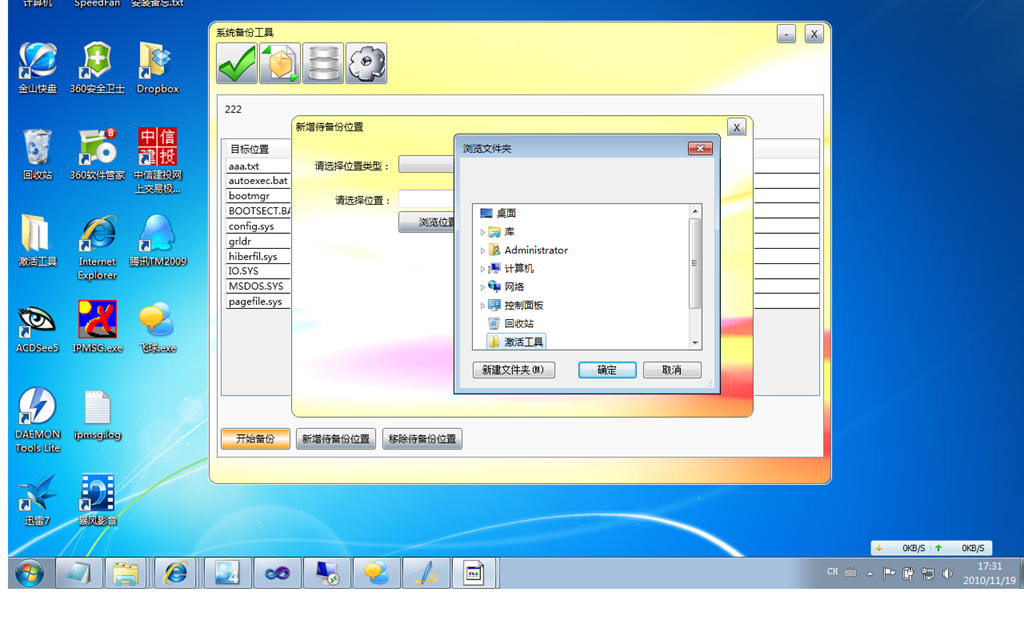
FolderBrowserDialog

这个要麻烦点点,先建一个类,比如命名为OldWindow.cs

public class OldWindow : System.Windows.Forms.IWin32Window
  {
      IntPtr _handle;
      public OldWindow(IntPtr handle)
      {
          _handle = handle;
      }

      #region IWin32Window Members
      IntPtr System.Windows.Forms.IWin32Window.Handle
      {
          get { return _handle; }
      }
      #endregion
  }

然后在你要使用的地方这样写

System.Windows.Forms.FolderBrowserDialog dlg = new System.Windows.Forms.FolderBrowserDialog();
         System.Windows.Interop.HwndSource source = PresentationSource.FromVisual(this) as System.Windows.Interop.HwndSource;
         System.Windows.Forms.IWin32Window win = new {上面那个类所在的命名空间名称}.OldWindow(source.Handle);
         System.Windows.Forms.DialogResult result = dlg.ShowDialog(win);

         txtPath.Text = dlg.SelectedPath;

BTW:需要在项目中引用System.Windows.Forms.dll
无标题