NOTICE: 本文是The Anatomy Of Basic Data Structure, 基本数据结构解析的一部分
不知道泛型是什么? 看 [Programming IL]泛型, Generic Types , Understanding Generic Type, 理解泛型 , 比较ArrayList和泛型的性能
和前面的数据结构比较
相同点: 相同方法访问方式基本一致,例如Capaclity, Clear, Cone, Remove, Contains 等
不同点: 1. 泛型在CLR 2.0 中的特殊支持使之在性能上较之ArrayList有优势, 何谓特殊支持? 文中有介绍 :)
2. 泛型类型确定,比ArrayList安全
3. 很多快速访问的方法,例如ForEach, BinarySearch, Sort 等
默认容量(_defaultCapacity): 4
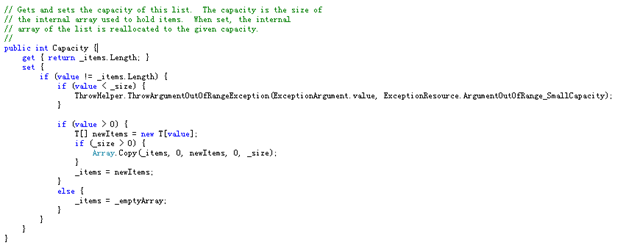
Capacity: 与ArrayList一样,可以设置,如果大于默认大小,则会分配新的内存
基本属性: IsFixedSize = false; IsReadOnly = false; IsSynchornized = false;
查看: 试探讨泛型实现过程
可能您需要了解的
Predict, Converter: 他们都是泛型代理
ConvertAll<TOutput>(Converter<T,TOutput> converter) 利用传过来的代理参数,转换为对应的类型。
Find(Predicate<T> match) 按索引顺序查找,如果没有则返回default(T),一旦找到一个,立即返回
FindAll(Predicate<T> match) 按索引顺序找到符合条件的集合
FindIndex(int startIndex, int count, Predicate<T> match) 按照顺序从索引参数起查找符合条件的第一个项索引
FindLast(Predicate<T> match) 与Find(Predicate<T>)一致,不同的是从末尾开始查找
FindLastIndex(int startIndex, int count, Predicate<T> match) 与FindIndex对应,从末尾开始查找
ForEach(Action<T> action) 对每一个元素进行操作
GetRange(int index, int count) 利用Array.Copy复制到一个新的List中
IndexOf(T item) 利用Array.IndexOf利用查找索引

而后根据如下的类型找到对应Comparer进行IndexOf操作,
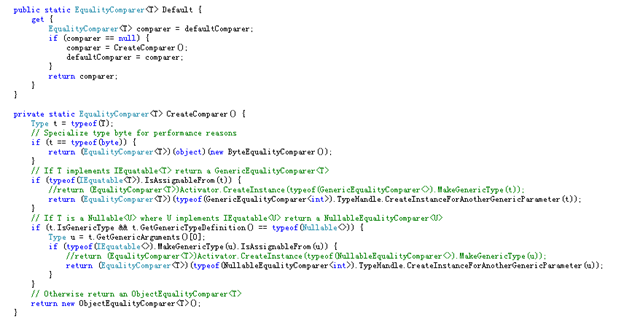
我们看一个GenericEqualityComparer<T>的查找方式就可以举一反三查看其他的了

想详细了解? clr/src/system/collections/generic/equalitycomparer.cs
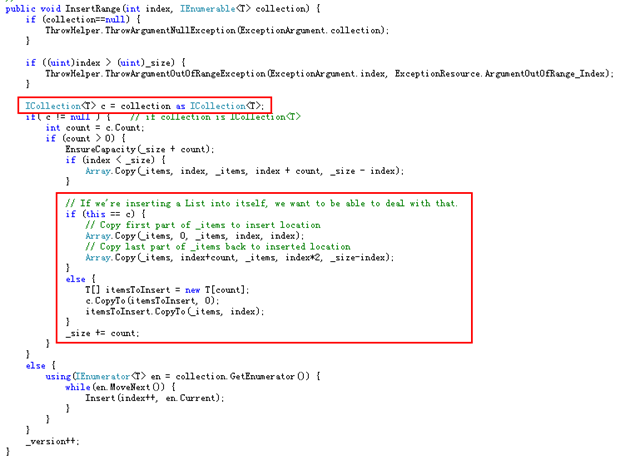
InsertRange(int index, IEnumerable<T> collection)
两种方式 a. 如果是ICollection 则先讲本身List大小扩容,而后将对应集合的数据Copy到对应的Index上去
b. 如果不是,常规的按MoveNext -> Insert 单个插入
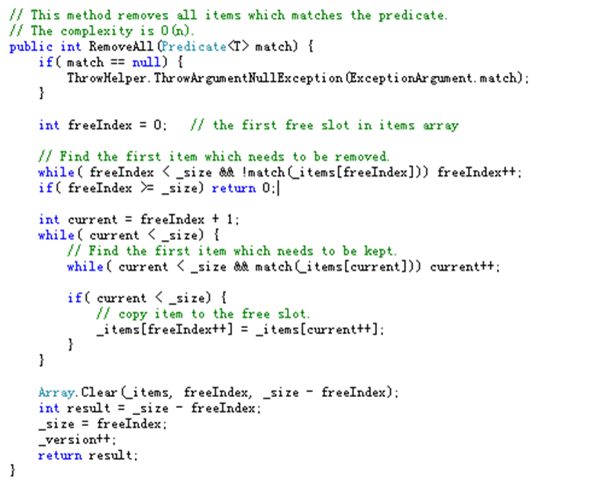
RemoveAll(Predicate<T> match) 算法实现的比较有意思, 可以欣赏下 :)
RemoveRange(int index, int count) 按顺序删除
Reverse(int index, int count) 常规的回文算法,交换头和尾
Sort(int index, int count, IComparer<T> comparer) 跟之前ArrayList的Sort一样
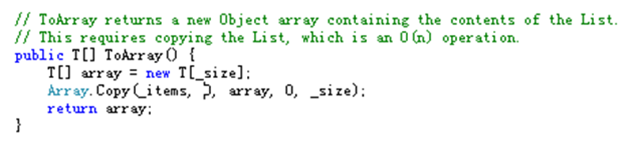
ToArray() 返回一个新的Array实例
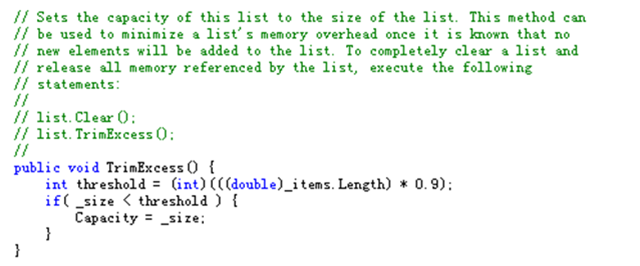
TrimExcess() 如果大小不对,通过设置容量大小则会进行新的内存操作, 请参考前面的ArrayList的部分
TrueForAll(Predicate<T> match) 判定所有的元素是否满足match条件
后记
主要是把SSCLI中List的操作方式走了一遍,把自己觉得重要的部分抽取出来作一次标注。似乎意义不大,当学习笔记好了 :)
此内容由惯性聚合(RSS阅读器)自动聚合整理,仅供阅读参考。 原文来自 — 版权归原作者所有。