








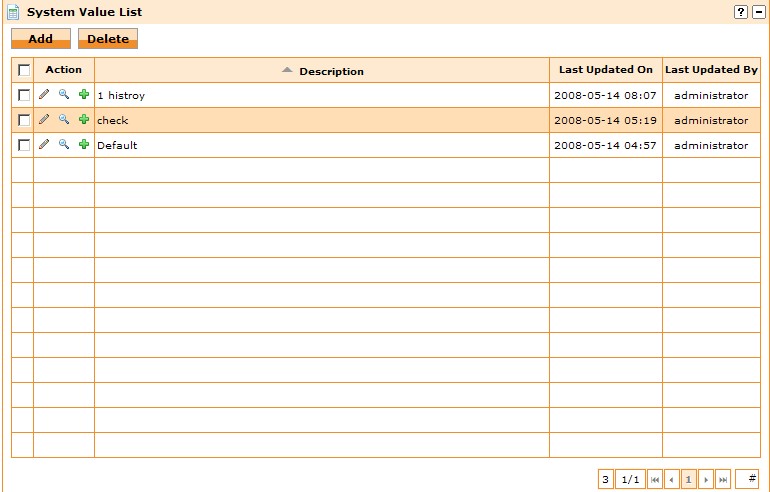
当我们用复选框来删除记录的时候,由于是多条删除
所以要在客户端记录删除记录的ID跟Name,然后在提交表单的时候,
把JS的变量值赋予隐藏文本框,然后提交到服务端进行删除,那为什么要传输
名称,是要告诉客户,如果有些数据删除不了,告诉客户是那些记录的名称。
HashTable15.js代码如下:(在同事之前的js代码进行修改的)
1 Array.prototype.Delete=function(n) {
2 //n表示第几项,从0开始算起。
3//prototype为对象原型,注意这里为对象增加自定义方法的方法。
4 if(n<0) //如果n<0,则不进行任何操作。
5 return this;
6 else
7 return this.slice(0,n).concat(this.slice(n+1,this.length));
8 /*
/*
9 concat方法:返回一个新数组,这个新数组是由两个或更多数组组合而成的。
10 这里就是返回this.slice(0,n)/this.slice(n+1,this.length)
11 组成的新数组,这中间,刚好少了第n项。
12 slice方法: 返回一个数组的一段,两个参数,分别指定开始和结束的位置。
13 */
*/
14 }
}
15/*
16数据添加一个数据
17*/
18 Array.prototype.Add = function (value)
19{
20 this[this.length] = value;
21}
22
23//----------------- Hashtable Start -----------------
24//利用二维数组实现Hashtable
25function Hashtable()
26{
27 this.has = new Array();
28}
29//Add
30//Hashtable.prototype.Add = function(key, sValue,status)
31//arguments可以传入可变量参数(lhz)
32Hashtable.prototype.Add = function()
33{
34 if(arguments.length > 0)
35 {
36 var key = arguments[0];
37 if(this.has.length > 0)
38 {
39 for(var i =0; i < this.has.length;i++)
40 {
41 if(this.has[i][0] == key)
42 {
43 for(var j=1;j<arguments.length;j++)
44 {
45 this.has[i][j] = arguments[j];
46 }
47 return;
48 }
49 }
50 }
51 arrayValue = new Array();
52 for(var i=0;i<arguments.length;i++)
53 {
54 arrayValue[i] = arguments[i];
55 }
56 //this.has.push(new Array(key, sValue,status));
57 this.has.push(arrayValue);
58 }
59}
60
61//Remove
62Hashtable.prototype.Remove = function(key)
63{
64 if(this.has.length > 0)
65 {
66 var delIndex = -1;
67 for(var i =0 ;i < this.has.length;i++)
68 {
69 if(this.has[i][0] == key)
70 {
71 delIndex = i;
72 }
73 }
74 if(delIndex != -1)
75 {
76 this.has = this.has.Delete(delIndex);
77 }
78 }
79}
80
81//Get
82Hashtable.prototype.GetValue = function(key)
83{
84 if(this.has.length > 0)
85 {
86 for(var i =0 ;i < this.has.length;i++)
87 {
88 if(this.has[i][0] == key)
89 {
90 return this.has[i][1];
91 }
92 }
93 }
94 return null;
95}
96//Set
97Hashtable.prototype.SetValue = function(key,value)
98{
99 if(this.has.length > 0)
100 {
101 for(var i =0 ;i < this.has.length;i++)
102 {
103 if(this.has[i][0] == key)
104 {
105 this.has[i][1] = value;
106 }
107 }
108 }
109}
110//GetKey
111Hashtable.prototype.GetKey = function()
112{
113 if(this.has.length > 0)
114 {
115 for(var i =0 ;i < this.has.length;i++)
116 {
117 return this.has[i][0];
118 }
119 }
120 return null;
121}
122//Count
123Hashtable.prototype.Count = function()
124{
125 return this.has.length;
126}
127//Items
128Hashtable.prototype.Items = function()
129{
130 return this.has;
131}
132//ToKeyString
133Hashtable.prototype.ToKeyString = function()
134{
135 return this.ToStringByIndex(0);
136}
137//ToValueString
138Hashtable.prototype.ToValueString = function()
139{
140 return this.ToStringByIndex(1);
141}
142//ToStatusString
143Hashtable.prototype.ToStatusString = function()
144{
145 return this.ToStringByIndex(2);
146}
147//通过索引获取String
148Hashtable.prototype.ToStringByIndex = function(index)
149{
150 var values='';
151 var len = this.Count();
152 if(len>0)
153 {
154 for(var i=0;i<len;i++)
155 {
156 values +=this.Items()[i][parseInt(index)]+",";
157 }
158 }
159 values=values.substring(0,values.length-1);
160 return values;
161}
162//------------------------ Hashtable End ---------------------
调用方法如下:
1<script type="text/javascript" src="/JS/HashTable15.js"></script>
2<script type="text/javascript">
3 var selectedIDList = new Hashtable();
4
5 function CheckBoxOnClick(obj,id,name)
6 {
7
8 if(obj.checked)
9 {
10 selectedIDList.Add(id,name);
11 }
12 else
13 {
14 selectedIDList.Remove(id);
15 }
16
17 }
18 function SubmitForm()
19 {
20 var ids = selectedIDList.ToKeyString();
21 var names = selectedIDList.ToValueString();
22 document.getElementById("txtSelectedID").value = ids;
23 }
24</script>
此内容由惯性聚合(RSS阅读器)自动聚合整理,仅供阅读参考。 原文来自 — 版权归原作者所有。