







System.Net.Http 是微软推出的最新的 HTTP 应用程序的编程接口, 微软称之为“现代化的 HTTP 编程接口”, 旨在提供如下内容:
命名空间 System.Net.Http 以及 System.Net.Http.Headers 提供了如下内容:
System.Net.Http 能够处理多种类型的 RFC 2616 定义的 HTTP 实体正文, 如下图所示:
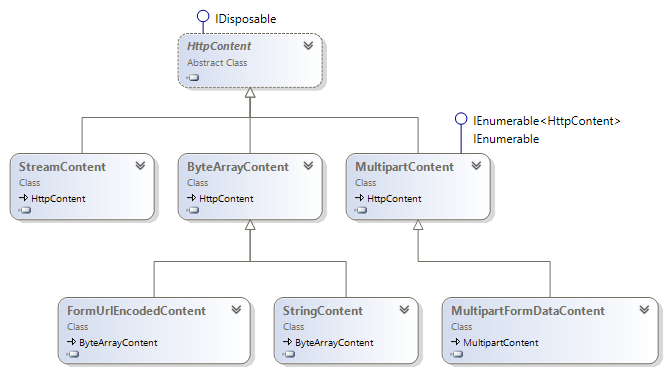
此外, System.Net.Http 对 HTTP 消息的处理采用了职责链模式, 这里有一遍不错的介绍, 这里就不再多说了。
System.Net.Http 最早和 Asp.Net Mvc4 同时出现, 可以在 .Net 4.0 中使用。 随着 .Net 4.5 的发布, System.Net.Http 正式成为 .Net 基础类库, 目前已经可以在 .Net 4.0/4.5 、 Windows Phone 、 以及 Windows Store App 中使用, 唯独没有发布 Silverlight 版本的 System.Net.Http。 更加悲催的是, 随着 Xamarin 2.0 的发布, Xamarin.Android 和 Xamarin.iOS 居然也开始支持 System.Net.Http , 真是让做 Silverlight 开发的码农心寒。
幸好, .Net 有开源的实现, 那就是 Mono , 其中有大量开源的 .Net 基础类实现, 在 Mono 3.x 版本中, 就有开源的 System.Net.Http , Xamarin 发布的 Android 和 iOS 版本的 System.Net.Http 就是源自 Mono 的, 既然 Android 和 iOS 可以, 相信 Silverlight 也肯定可以, 抱着试试看的态度, 下载了 Mono 下的 System.Net.Http 源代码, 并整理成了一个 Silverlight 项目。 经过一番努力, Silverlight 版本的 System.Net.Http 终于可以使用了, GitHub 项目地址: https://github.com/beginor/System_Net_Http , 欢迎围观。
由于 Silverlight 平台对 HTTP 的限制, 移除了部分功能, 例如 Proxy 、 AllowAutoRedirect 、 PreAuthenticate 以及 KeepAlive 设置等, 这些都是 Silverlight 不支持的。
对于 Silverlight 的 BrowserHttp , 仅仅支持 GET 和 POST 方法, 示例代码如下:
HttpClient client = new HttpClient {
   BaseAddress = new Uri("http://localhost:8080/HttpTestWeb/api/")
};

// Get string from server
client.GetStringAsync("browserhttp/").ContinueWith(t => {
   if (t.IsFaulted) {
      // report error here
      //Application.Current.ReportError(t.Exception.GetBaseException());
   } else {
      string txt = t.Result;
      //Assert.IsFalse(string.IsNullOrEmpty(txt));
   }
});

// Post form data to server
var param = new Dictionary<string, string> {
   {"Name", "Client Post"},
   {"Age", "1"},
   {"Birthday", DateTime.Today.ToString("s")}
};
client.PostAsync("browserhttp/", new FormUrlEncodedContent(param)).ContinueWith(t => {
   if (t.IsFaulted) {
      // report error here
      // Application.Current.ReportError(t.Exception.GetBaseException());
   } else {
      HttpResponseMessage response = t.Result;
      //Assert.IsTrue(response.EnsureSuccessStatusCode);
   }
});
对于 ClientHttp , 除了 GET 和 POST 之外, 还支持 PUT 和 DELETE (其它的 HTTP 方法也可能支持, 未测试), 示例代码如下:
// PUT to update
var param = new Dictionary<string, string> {
   {"Id", "1" },
   {"Name", "Client Post"},
   {"Age", "1"},
   {"Birthday", DateTime.Today.ToString("s")}
};
client.PutAsync("clienthttp/1", new FormUrlEncodedContent(param)).ContinueWith(t => {
   if (t.IsFaulted) {
      // report error here
      // Application.Current.ReportError(t.Exception.GetBaseException());
   } else {
      HttpResponseMessage response = t.Result;
      //Assert.IsTrue(response.EnsureSuccessStatusCode);
   }
});

// DELETE
client.DeleteAsync("clienthttp/1").ContinueWith(t => {
   if (t.IsFaulted) {
      // report error here
      // Application.Current.ReportError(t.Exception.GetBaseException());
   } else {
      HttpResponseMessage response = t.Result;
      //Assert.IsTrue(response.EnsureSuccessStatusCode);
   }
});
支持职责链模式的 MessageProcessingHandler , 如下面的代码所示:
public class CustomProcessingHandler : MessageProcessingHandler {

   protected override HttpRequestMessage ProcessRequest(HttpRequestMessage request, CancellationToken cancellationToken) {
      if (request.Method != HttpMethod.Get && request.Method != HttpMethod.Post) {
         request.Headers.TryAddWithoutValidation("RequestMethod", request.Method.Method);
         request.Method = HttpMethod.Post;
      }
      return request;
   }

   protected override HttpResponseMessage ProcessResponse(HttpResponseMessage response, CancellationToken cancellationToken) {
      var request = response.RequestMessage;
      if (request.Headers.Contains("RequestMethod")) {
         IEnumerable<string> values;
         if (request.Headers.TryGetValues("RequestMethod", out values)) {
            request.Method = new HttpMethod(values.First());
         }
      }
      return response;
   }
}
使用起来也是非常简单的:
var customHandler = new CustomProcessingHandler {
    InnerHandler = new HttpClientHandler()
};
var client = new HttpClient(customHandler, true) {
    BaseAddress = new Uri("http://localhost:8080/HttpTestWeb/api/")
};此内容由惯性聚合(RSS阅读器)自动聚合整理,仅供阅读参考。 原文来自 — 版权归原作者所有。