



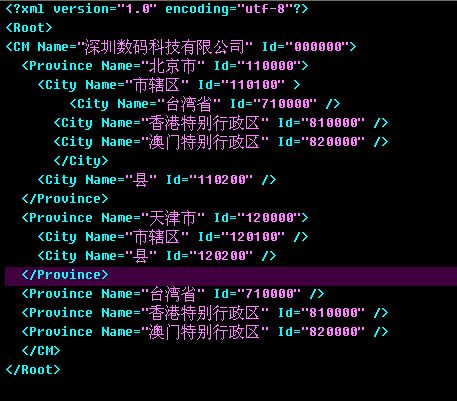
vs2005 的TreeView树控件入门非常简单,花费很少时间就可以构造一颗树形目录来,是新手的不错选择,但是它缺少灵活性,要改变它的图标除了它本身的模板外,就有点麻烦了,还有它的点击回发事件,特别烦。如果选择父节点同时选择子节点,就很麻烦了,因为它的结构是div+table的,我们要扩展它也要花不少时间。我发现很多高手都没有用到它,都是自己写的,这样可以灵活扩展,和修改相关属性,下面是我用javascript+css+xml写的一颗树,只要xml文件的格式不变,你可以随便增加、删除目录,很容易就可以得到相应的树目录了,你可以在原有的基础上扩展更多的属性、和相关的操作。当然刚刚写出来的东西不是很好,还有BUG,没有时间测试,如果大家有什么建议或发现bug请提出来。大家一起讨论。
 <!DOCTYPE HTML PUBLIC "-//W3C//DTD HTML 4.0 Transitional//EN">
<html>
<head>
<title>Untitled</title>
 <Style>
 /* .on
 {
{
background:#5eeDBE url(images/menu_head_bg.gif) repeat-x;
text-decoration:none;
border: 1px solid #2a4dab;
font:bold 12px/22px "lucida Grande", verdana, lucida, Arial, helvetica, "宋体", sans-serif;
 }*/
}*/
.list{margin:0;padding:0;}
.list ul
{
/*background:#5eeDBE url(images/menu_head_bg.gif) repeat-x;背景样式依次为:颜色,图片路径,横向重复*/
list-style-type:none;
margin:0,0,0,9;
padding:0;
padding-left:1px;
}
.list li
{
font:bold 12px/22px "lucida Grande", verdana, lucida, Arial, helvetica, "宋体", sans-serif;/*文字样式依次为:粗体 大小/行高 字族*/
list-style-type:none;
margin:0;
padding:0;
padding-left:12px;
cursor:hand;
background:#008080
}
A:link {font-size:12px;text-decoration:none;color: #FFFFFF}
A:visited {font-size:12px;text-decoration:none;color: #FFFFFF}
A:active {font-size:12px;text-decoration: none;color: ##FFFFFF}
A:hover {font-size:12px;text-decoration:none;color: #ff00ff;border: 1px solid #2a4dab;/*边框颜色*/ }
 </Style>
<script language='javascript'>
function GetName()
{
alert("88888");
}
var closeImgPath="C:\\Documents and Settings\\kevin.long\\桌面\\Web\\books_close.gif"; //关闭图标
var openImgPath="C:\\Documents and Settings\\kevin.long\\桌面\\Web\\books_open.gif"; //打开图标
var plusImgPath="C:\\Documents and Settings\\kevin.long\\桌面\\Web\\plus.gif"; //+号图标
var minusImgPath="C:\\Documents and Settings\\kevin.long\\桌面\\Web\\minus.gif"; //-号图标
var fileImgPath="C:\\Documents and Settings\\kevin.long\\桌面\\Web\\icon_text.gif"; //默认图标
var xmlPath="C:\\Documents and Settings\\kevin.long\\桌面\\Web\\Tree.xml";
function show(thisobj)
{
alert(thisobj);
}
</script>
<script language='javascript'>
var xmlDoc;
function CreateXmlObj()
{
if(window.ActiveXObject)
{
xmlDoc=new ActiveXObject("Microsoft.XMLDOM");
}
else
{
xmlDoc==document.implementation.createDocument("","",null);
}
//xmlDoc.async=false;
xmlDoc.load(xmlPath);
if(xmlDoc.parseError.errorCode!=0)
{
var xmlErr=xmlDoc.parseError;
alert("出错:"+xmlErr.reason);
}
}
//父节点事件
var bgObj=null;
function showhide(thisobj,id)
{
if(bgObj==null)
{
bgObj=thisobj;
}
else
{
bgObj.style.background=""
bgObj=thisobj;
}
bgObj.style.background="red"
//alert(thisobj.outerHTML);
var obj=document.getElementById(id);
//alert(thisobj.previousSibling.previousSibling.getAttribute("src"));
if(obj.style.display=="")
{
obj.style.display="none";
//thisobj.innerText="+"+thisobj.innerText.substring(1);
thisobj.previousSibling.previousSibling.setAttribute("src",closeImgPath);
thisobj.previousSibling.previousSibling.previousSibling.setAttribute("src",plusImgPath)
}
else
{
obj.style.display="";
//thisobj.innerText="-"+thisobj.innerText.substring(1);
thisobj.previousSibling.previousSibling.setAttribute("src",openImgPath)
thisobj.previousSibling.previousSibling.previousSibling.setAttribute("src",minusImgPath)
}
}
//打开、关闭文件夹图标事件
function showImgHide(thisobj,id)
{
var obj=document.getElementById(id);
if(obj.style.display=="")
{
obj.style.display="none";
thisobj.setAttribute("src",closeImgPath);
thisobj.previousSibling.setAttribute("src",plusImgPath)
}
else
{
obj.style.display="";
thisobj.setAttribute("src",openImgPath)
thisobj.previousSibling.setAttribute("src",minusImgPath)
}
}
//+、-符号事件
function showMinusHide(thisobj,id)
{
var obj=document.getElementById(id);
if(obj.style.display=="")
{
obj.style.display="none";
thisobj.setAttribute("src",plusImgPath);
thisobj.nextSibling.setAttribute("src",closeImgPath)
}
else
{
obj.style.display="";
thisobj.setAttribute("src",minusImgPath)
thisobj.nextSibling.setAttribute("src",openImgPath)
}
}
//checkbox 全选事件
function checkAll(e)
{
var bool=e.checked;
var childObj=document.getElementById(e.id+"-1");
setCheckBox(bool,childObj);
}
function setCheckBox(bool,chk)
{
if(chk!=null)
{
//alert(chk.childNodes.length);
if(chk.childNodes.length>0)
{
for(var i=0;i<chk.childNodes.length;i++)
{
//alert(chk.childNodes[i].type);
if(chk.childNodes[i].type=="checkbox")
{
chk.childNodes[i].setAttribute("checked",bool);
}
if(chk.childNodes[i].childNodes.length>0)
{
setCheckBox(bool,chk.childNodes[i]);
}
}
}
}
}
//设置节点背景颜色
function setNodeBgColor(e,id)
{
if(bgObj==null)
{
bgObj=e;
}
else
{
bgObj.style.background=""
bgObj=e;
}
bgObj.style.background="#804000"
}
var str="<div class=\"list\" id=\"menu1_child\" title=\"菜单功能区\">";
function CreateTreeNode(root)
{
if(root.hasChildNodes)
{
var uid=root.getAttribute("Id")+"-1";
str+="<ul id=\""+uid+"\">"
for(var i=0;i<root.childNodes.length;i++)
{
var node=root.childNodes[i];
var id=node.getAttribute("Id");
var name=node.getAttribute("Name");
if(node.hasChildNodes)
{//父节点
str+="<li id=\""+id+"\"><img onclick=\"showMinusHide(this,'"+id+"-1')\" src=\""+minusImgPath+"\"/><img onclick=\"showImgHide(this,'"+id+"-1')\" src=\""+openImgPath+"\"/><input onclick=\"checkAll(this)\" type=\"checkbox\" id=\""+id+"\" /><SPAN id=\"S"+id+"\" onclick=\"showhide(this,'"+id+"-1')\"><a >"+name+"</a></SPAN>"
CreateTreeNode(node)
str+="</li>";
}
else
{//子节点
str+="<li id=\""+id+"\" style=\"margin-left:18px;\" ><img src=\""+fileImgPath+"\"/><input type=\"checkbox\" id=\""+id+"\" /><a onclick=\"setNodeBgColor(this,'"+id+"')\" href=\"javascript:\">"+name+"</a></li>"
}
}
str+="</ul>"
// alert(root.childNodes.length);
}
}
//打开全部
function showAll()
{
//var root=document.getElementById("idmenu").firstChild.firstChild.firstChild;//0级
var root=document.getElementById("idmenu").firstChild.firstChild.firstChild.childNodes[4];//1级
getULNode(root,true);
}
//关闭全部
function closeAll()
{
//var root=document.getElementById("idmenu").firstChild.firstChild.firstChild;//0级
var root=document.getElementById("idmenu").firstChild.firstChild.firstChild.childNodes[4];//1级
getULNode(root,false);
}
function getULNode(rootNode,bool)
{
for(var i=0;i<rootNode.childNodes.length;i++)
{
if(rootNode.childNodes[i].hasChildNodes)
{
if(rootNode.childNodes[i].tagName=="UL")
{
if(bool)
{
openUL(rootNode.childNodes[i].previousSibling,rootNode.childNodes[i].id);
}
else
{
closeUL(rootNode.childNodes[i].previousSibling,rootNode.childNodes[i].id);
}
}
getULNode(rootNode.childNodes[i],bool);
}
}
}
function closeUL(thisobj,id)
{
var obj=document.getElementById(id);
if(obj!=null)
{
obj.style.display="none";
thisobj.previousSibling.previousSibling.setAttribute("src",closeImgPath);
thisobj.previousSibling.previousSibling.previousSibling.setAttribute("src",plusImgPath)
}
}
function openUL(thisobj,id)
{
var obj=document.getElementById(id);
if(obj!=null)
{
obj.style.display="";
thisobj.previousSibling.previousSibling.setAttribute("src",openImgPath);
thisobj.previousSibling.previousSibling.previousSibling.setAttribute("src",minusImgPath)
}
}
function Test()
{
CreateXmlObj();
//alert(xmlDoc.documentElement.firstChild.getAttribute("Name"));
var root=xmlDoc.documentElement;
//alert(root.xml);
CreateTreeNode(root);
str+="</div>";
//alert(str);
document.getElementById("codeText").value=str
idmenu.innerHTML=str;
}
</script>
</head>
<body onload="Test()">
<input type="button" onclick="showAll()" value="全部展開">
<input type="button" onclick="closeAll()" value="全部關閉">
<input type="button" onclick="Test()" value="测试">
<input id="codeText" type="text" value="">
<div id="idmenu">555</div>
</body>
</html>

此内容由惯性聚合(RSS阅读器)自动聚合整理,仅供阅读参考。 原文来自 — 版权归原作者所有。