


1. 首先,在SharePoint服务器上安装ASP.NET 2.0 AJAX Extensions.
2. 修改SP站点web.config,在c:\inetpub\wwwroot\wss\virtualdirectories\下会有对应站点占用端口号的文件夹,web.config就在这里:
1) 在<configSections>下添加

2) <SafeControls>下添加:
 <SafeControl Assembly="System.Web.Extensions, Version=1.0.61025.0, Culture=neutral, PublicKeyToken=31bf3856ad364e35" Namespace="System.Web.UI" TypeName="*" Safe="True" />
3) 在 <httpHandlers>下添加:
4) 在<httpModules>下添加:
<add name="ScriptModule" type="System.Web.Handlers.ScriptModule, System.Web.Extensions, Version=1.0.61025.0, Culture=neutral, PublicKeyToken=31bf3856ad364e35" />
5) 在<assemblies>下添加:
<add assembly="System.Web.Extensions, Version=1.0.61025.0, Culture=neutral, PublicKeyToken=31bf3856ad364e35" />
6) 在<pages>下添加:
<controls> <add tagPrefix="asp" namespace="System.Web.UI" assembly="System.Web.Extensions, Version=1.0.61025.0, Culture=neutral, PublicKeyToken=31bf3856ad364e35" /> </controls>
7) 在<configuration>下的最后添加:
<system.web.extensions> <scripting> <webServices> <!-- Uncomment this line to enable the authentication service. Include requireSSL="true" if appropriate. --> <!-- <authenticationService enabled="true" requireSSL = "true|false"/> --> <!-- Uncomment these lines to enable the profile service. To allow profile properties to be retrieved and modified in ASP.NET AJAX applications, you need to add each property name to the readAccessProperties and writeAccessProperties attributes. --> <!-- <profileService enabled="true" readAccessProperties="propertyname1,propertyname2" writeAccessProperties="propertyname1,propertyname2" /> --> </webServices> <!-- <scriptResourceHandler enableCompression="true" enableCaching="true" /> --> </scripting> </system.web.extensions> <system.webServer> <validation validateIntegratedModeConfiguration="false" /> <modules> <add name="ScriptModule" preCondition="integratedMode" type="System.Web.Handlers.ScriptModule, System.Web.Extensions, Version=1.0.61025.0, Culture=neutral, PublicKeyToken=31bf3856ad364e35" /> </modules> <handlers> <remove name="WebServiceHandlerFactory-Integrated" /> <add name="ScriptHandlerFactory" verb="*" path="*.asmx" preCondition="integratedMode" type="System.Web.Script.Services.ScriptHandlerFactory, System.Web.Extensions, Version=1.0.61025.0, Culture=neutral, PublicKeyToken=31bf3856ad364e35" /> <add name="ScriptHandlerFactoryAppServices" verb="*" path="*_AppService.axd" preCondition="integratedMode" type="System.Web.Script.Services.ScriptHandlerFactory, System.Web.Extensions, Version=1.0.61025.0, Culture=neutral, PublicKeyToken=31bf3856ad364e35" /> <add name="ScriptResource" preCondition="integratedMode" verb="GET,HEAD" path="ScriptResource.axd" type="System.Web.Handlers.ScriptResourceHandler, System.Web.Extensions, Version=1.0.61025.0, Culture=neutral, PublicKeyToken=31bf3856ad364e35" /> </handlers> </system.webServer>
3. 在webpart中就使用ScriptManager和UpdatePanel
1) 添加 System.Web.Extensions引用
2) 添加代码如下:
此代码来自十一。
3) 在CreateChildControls()方法里添加UpdatePanel:
UpdatePanel up = new UpdatePanel(); up.ID = "UpdatePanel2"; up.ChildrenAsTriggers = true; up.UpdateMode = UpdatePanelUpdateMode.Always; this.Controls.Add(up); Button button = new Button(); button.Text = "Groups"; button.Click += new EventHandler(HandleButtonClick); up.ContentTemplateContainer.Controls.Add(button); listbox1 = new ListBox(); listbox2 = new ListBox(); up.ContentTemplateContainer.Controls.Add(listbox1); up.ContentTemplateContainer.Controls.Add(listbox2);
Button事件:
private void HandleButtonClick(object sender, EventArgs eventArgs) {
{ SPWeb currentWeb = SPContext.Current.Web; foreach (SPGroup group in currentWeb.CurrentUser.Groups)
 { listbox1.Items.Add(group.Name);
 } foreach (SPGroup group in currentWeb.CurrentUser.OwnedGroups) { listbox2.Items.Add(group.Name); }
 }
}
1. 将AjaxControlToolkit.dll添加到GAC.
将AjaxControlToolkit.dll拖拽到C:\Windows\Assembly下就可以了.
2. 继续修改WSS站点web.config
在<assemblies>下添加:
<add assembly="AjaxControlToolkit, Version=1.0.10618.0, Culture=neutral, PublicKeyToken=28f01b0e84b6d53e" />
在<controls>下添加:
<add tagPrefix="ajaxToolkit" namespace="AjaxControlToolkit" assembly="AjaxControlToolkit, Version=1.0.10618.0, Culture=neutral, PublicKeyToken=28f01b0e84b6d53e" />
这样,在WebPart中就可以使用Toolkit里面的控件了。
添加AjaxControlToolkit引用;
在上面代码基础上添加代码:
this.textBox = new TextBox(); this.textBox.ID = "TextBox"; up.ContentTemplateContainer.Controls.Add(this.textBox); c = new AjaxControlToolkit.CalendarExtender(); c.TargetControlID = "TextBox"; up.ContentTemplateContainer.Controls.Add(c);
我们也可以在webpart中加载包含Toolkit 控件的UC。
Control ctl = Page.LoadControl("~\\wpresources\\MyJAJXCalendar.ascx"); Controls.Add(ctl);
当然,UC也可以用Feature去加载到页面上。
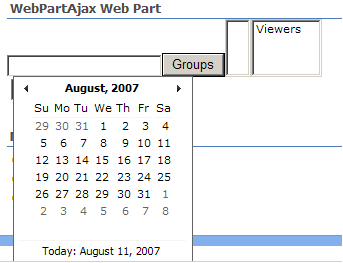
效果如下:
此内容由惯性聚合(RSS阅读器)自动聚合整理,仅供阅读参考。 原文来自 — 版权归原作者所有。