







设定hbase的数据目录,修改conf/hbase-site.xml
<configuration>
    <property>
        <name>hbase.cluster.distributed</name>
        <value>true</value>
        <description>The mode the clusterwill be in. Possible values are
            false: standalone and pseudo-distributedsetups with managed Zookeeper
            true: fully-distributed with unmanagedZookeeper Quorum (see hbase-env.sh)
        </description>
    </property>
    <property>
        <name>hbase.rootdir</name>
        <value>hdfs://Master:9000/hbase</value>
        <description>The directory shared byRegionServers.
        </description>
    </property>
    <property>
        <name>hbase.zookeeper.property.clientPort</name>
        <value>2222</value>
        <description>Property fromZooKeeper's config zoo.cfg.
        The port at which the clients willconnect.
        </description>
    </property>
    <property>
        <name>hbase.zookeeper.quorum</name>
        <value>Master</value><!--有多台就填多台主机名-->
        <description>Comma separated listof servers in the ZooKeeper Quorum.
        For example,"host1.mydomain.com,host2.mydomain.com,host3.mydomain.com".
        By default this is set to localhost forlocal and pseudo-distributed modes
        of operation. For a fully-distributedsetup, this should be set to a full
        list of ZooKeeper quorum servers. IfHBASE_MANAGES_ZK is set in hbase-env.sh
        this is the list of servers which we willstart/stop ZooKeeper on.
        </description>
    </property>
    <property>
        <name>hbase.zookeeper.property.dataDir</name>
        <value>/usr/local/hbase/zookeeper</value>
        <description>Property fromZooKeeper's config zoo.cfg.
        The directory where the snapshot isstored.
        </description>
    </property>
</configuration>
修改conf/regionservers,和hadoop的slaves一样的操作,我还是要把localhost干掉的。一样的,要配多个就放多个。
替换hbase安装目录下的lib中使用的hadoop的jar包,改成一致的。
原先hadoop相关的包为
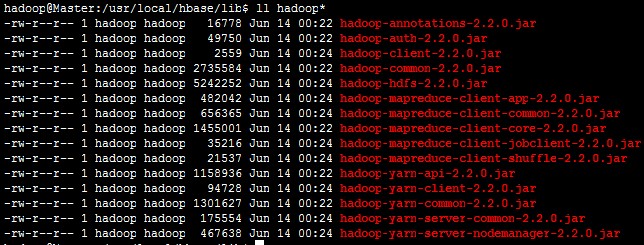
在hbase中lib目录下建立一个sh(省得直接用命令把杂七杂八的全部复制过来了),然后跑一下,把必须的那些jar包从hadoop安装目录导过来。
find -name "hadoop*jar" | sed 's/2.2.0/2.4.1/g' | sed 's/.\///g' > f.log
rm ./hadoop*jar
cat ./f.log | while read Line
do
find /usr/local/hadoop/share/hadoop -name "$Line" | xargs -i cp {} ./
done
rm ./f.log
lib包下面有个slf4j-log4j12-XXX.jar,在机器有装hadoop时,由于classpath中会有hadoop中的这个jar包,会有冲突,直接删除掉,没有就不用删除了。在HBase的shell运行时,就能看到信息了,当然,查日志也行。
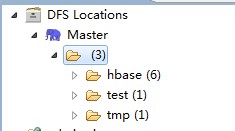
完了直接启动hbase,hadoop的dfs那边会有反应了:
剩下的随便折腾了。
此内容由惯性聚合(RSS阅读器)自动聚合整理,仅供阅读参考。 原文来自 — 版权归原作者所有。