


上一节,我们将Models加入了实体对象模型(Entity Frmaework模型)接下来我们要完成控制层的代码编写:
1.在Controllers(控制器)目录点右建,添加一个控制器:

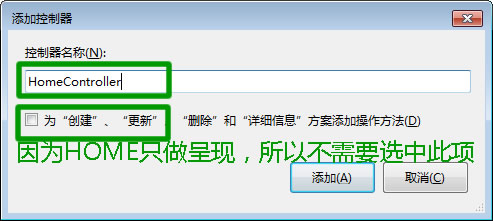
2.添加Home控制器:
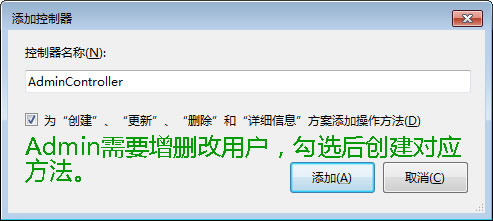
3.添加Admin控制器:
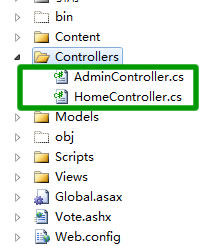
4.创建完成后,在Controllers目录中会增加以下两个.cs文件:
5.HomeControllers.cs中的代码如下:
- public class HomeController : Controller
- {
- //
- // GET: /Home/
- public ActionResult Index()
- {
- Models.VoteEntities mv = new Models.VoteEntities();//创建实体对象
- return View(mv.Users.ToList()); //将查询结果向视图层输出
- }
- }
6.AdminControllers.cs中代码如下:
- public class AdminController : Controller
- {
- //
- // GET: /Admin/
- public ActionResult Index()
- {
- Models.VoteEntities mv = new Models.VoteEntities(); //创建数据实体
- List<Models.Users> list = mv.Users.ToList(); //得到users表中所有信息
- ViewModel.List = list; //将表中信息赋值给ViewModel.List,注意List为动态表达式,是自命名的。
- return View();
- }
- //
- // GET: /Admin/Details/5
- public ActionResult Details(int id)
- {
- return View();
- }
- //
- // GET: /Admin/Create
- public ActionResult Create()
- {
- return View();
- }
- //
- // POST: /Admin/Create
- [HttpPost]
- public ActionResult Create(Models.Users mu)
- {
- try
- {
- string picname = Path.GetFileName(Request.Files["up"].FileName);//得到文件的名字
- string filepath = Server.MapPath("/Content/") + picname; //得到要保存在服务器上的路径
- Request.Files["up"].SaveAs(filepath);
- mu.UserPicPath = picname; //在数据加保存文件的相对路径(文件名称)就可以了
- Models.VoteEntities mv = new Models.VoteEntities();
- mv.AddToUsers(mu);
- mv.SaveChanges();
- return RedirectToAction("Index");
- }
- catch
- {
- return View();
- }
- }
- //
- // GET: /Admin/Edit/5
- public ActionResult Edit(int id)
- {
- return View();
- }
- //
- // POST: /Admin/Edit/5
- [HttpPost]
- public ActionResult Edit(int id, Models.Users mu)
- {
- try
- {
- Models.VoteEntities mv = new Models.VoteEntities();
- mv.Users.Single(m => m.id == id).UserName = mu.UserName; //查询出指定用户名并更新为新用户
- mv.Users.Single(m => m.id == id).VoteCount = mu.VoteCount; //查询出指定票数并更新为新票数
- mv.SaveChanges(); //保存更改
- return RedirectToAction("Index");
- }
- catch
- {
- return View();
- }
- }
- //
- // GET: /Admin/Delete/5
- public ActionResult Delete(int id)
- {
- Models.VoteEntities mv = new Models.VoteEntities();
- mv.DeleteObject(mv.Users.Single(m => m.id == id));//查询出指定ID的唯一值并执行删除操作
- mv.SaveChanges();
- return RedirectToAction("Index");
- }
- // POST: /Admin/Delete/5
- [HttpPost]
- public ActionResult Delete(int id, FormCollection collection)
- {
- try
- {
- return RedirectToAction("Index");
- }
- catch
- {
- return View();
- }
- }
- }
以上为两个控制器类中的代码,下一节,我们为控制器添加指定的视图层界面。
未完待续......
此内容由惯性聚合(RSS阅读器)自动聚合整理,仅供阅读参考。 原文来自 — 版权归原作者所有。