








本篇文章参考了msdn的DataSourceControl相关帮助。
上一章我们一起讨论了,DataSourceControl、IDataSource的基础,那我们今天来看如何把一个文本文件里的数据显示出来,数据的Insert、Update、Delete我们将在下章中进行讲解。
所有继承于DataBoundControl 类绑定到数据显示控件(如DataGrid)时,它会根据数据显示控件的DataSource和DataMember为我们生成一个数据的View(也就是去执行DataSourceControl.GetView()方法),生成这个View就是我们显示数据的核心,它有点类似于DataView,当一个DataTable绑定到DataGrid上的时候,.NET会自动为我们生成一个View,也就是DefaultView,把这个呈现到DataGrid上用于显示。
既然知道View是我们显示数据的核心(同时Insert、Update、Delete也是在其View上完成的),那又如何在定义DataSourceCotrol的View呢?其实也很简单,只要我们为自己的DataSourceControl定义的View继承于DataSourceView即可,我们来看看DataSourceView的主要成员:
CanDelete DataSourceControl 对象关联的 DataSourceView 对象是否支持 ExecuteDelete 操作。
CanInsert DataSourceControl 对象关联的 DataSourceView 对象是否支持 ExecuteInsert 操作。
CanPage 当前 DataSourceControl 对象相关联的 DataSourceView 对象是否支持对通过 ExecuteSelect 方法检索到的数据进行分页。
CanUpdate DataSourceControl 对象关联的 DataSourceView 对象是否支持 ExecuteUpdate 操作。
ExecuteDelete() 对DataSourceView 对象所表示的数据列表执行删除操作。
ExecuteInsert () 对 DataSourceView 对象所表示的数据列表执行插入操作。
ExecuteSelect () 从基础数据存储获取数据列表。
ExecuteUpdate() 对 DataSourceView 对象所表示的数据列表执行更新操作。
以上的成员我们将会讲到,其余的成员请大家自己去查询msdn
 using System;using System.Collections;using System.Data;using System.IO;using System.Security.Permissions;using System.Web;using System.Web.UI;using System.Web.UI.WebControls;using System.ComponentModel;using System.Windows.Forms.Design;using System.Drawing.Design;using System.Windows.Forms;namespace TextDataSourceLib
 {
{ [AspNetHostingPermission(SecurityAction.Demand, Level = AspNetHostingPermissionLevel.Minimal)] public class TextDataSource : DataSourceControl
 { public TextDataSource() : base() { } private string _fileName = string.Empty; [Editor(typeof(FileNameEditor), typeof(UITypeEditor))] public string FileName // 文件名称。 { get { return _fileName; } set { _fileName = value; }
 } private string _separator = string.Empty; // 分隔字符串。 public string Separator { get { return _separator; } set { _separator = value; } } // 根据名称得到DataSourceView protected override DataSourceView GetView(string viewName) { // 返回一个TextDataSourceView的时候,在TextDataSourceView里会自动去执行ExecuteSelect()方法。 return new TextDataSourceView(this, _fileName); } protected override ICollection GetViewNames() { return new string[] { _fileName }; } } // UITypeEditor的用法请参考:http://mapserver.cnblogs.com/archive/2006/03/08/345244.html public class FileNameEditor : UITypeEditor { [System.Security.Permissions.PermissionSet(System.Security.Permissions.SecurityAction.Demand)] public override System.Drawing.Design.UITypeEditorEditStyle GetEditStyle(System.ComponentModel.ITypeDescriptorContext context) { return UITypeEditorEditStyle.Modal; } [System.Security.Permissions.PermissionSet(System.Security.Permissions.SecurityAction.Demand)] public override object EditValue(System.ComponentModel.ITypeDescriptorContext context, System.IServiceProvider provider, object value) { IWindowsFormsEditorService editorService = (IWindowsFormsEditorService)provider.GetService(typeof(IWindowsFormsEditorService)); OpenFileDialog dialog = new OpenFileDialog(); dialog.Multiselect = false; dialog.Filter = "Text Files(*.txt)|*.txt|All Files(*.*)|*.*"; dialog.ShowDialog(); return dialog.FileName; } } // 只要继承与DataSourceView即可。 public class TextDataSourceView : DataSourceView { private string _fileName; private TextDataSource _owner; private string _separator; public TextDataSourceView(IDataSource owner, string fileName) : base(owner, fileName) { _owner = (TextDataSource)owner; _fileName = fileName; _separator = (_owner.Separator == string.Empty ? "," : _owner.Separator); } // 数据显示、Update之前和Update完成之后也会去自动执行此方法,同理Insert、Delete也一样。 protected override IEnumerable ExecuteSelect(DataSourceSelectArguments selectArgs) { IEnumerable dataList = null; if (File.Exists(this._fileName)) { DataTable table = new DataTable(); using (StreamReader sr = File.OpenText(this._fileName)) { string s = ""; string[] dataValues; DataColumn column; dataValues = sr.ReadLine().Split(_separator.ToCharArray()); foreach (string value in dataValues) { column = new DataColumn(value, typeof(string)); table.Columns.Add(column); } while ((s = sr.ReadLine()) != null) { dataValues = s.Split(_separator.ToCharArray()); table.Rows.Add(CopyRowData(dataValues, table.NewRow())); } } table.AcceptChanges(); // 把table里的数据的状态置为默认。 DataView dataView = new DataView(table); // 创建table的DataView用于显示。 dataList = dataView; } return dataList; } private DataRow CopyRowData(string[] source, DataRow target) { try { for (int i = 0; i < source.Length; i++) { target[i] = source[i]; } } catch (System.IndexOutOfRangeException) { return target; } return target; } }
 }
}
显示效果如下: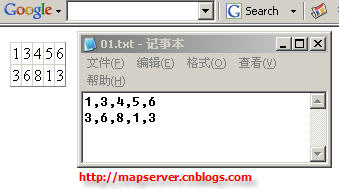
此内容由惯性聚合(RSS阅读器)自动聚合整理,仅供阅读参考。 原文来自 — 版权归原作者所有。