


在前面的讲解中,控件的属性的类型都是基本类型、字符串等简单类型,这些类型我们不用做任何的额外工作,就可以把控件的属性持久化到控件的标签中(保存在aspx[Source]里),但是我们开发的控件的属性不可能全部是这样的简单类型,比如有时也会遇到属性为Size这样的复杂属性,为了使这样的属性持久化,我们还必须做其它的工作,就这是我们这章主要内容。
对复杂属性进行持久化,我们有两种方式(可以单独使用,也可以相互配合):
1、 使用TypeConvert把复杂属性转化为简单类型string,以能持久化到控件的标签中。
2、 串行化复杂属性的元数据。
上述的两种方式,并不是Asp.net控件所特有的,而是Component的特性,而Asp.net的服务器控件又是从Component派生下来的。
如果通过串行化复杂属性元数据的方式来持久化复杂属性,又有两种方式:
A、通过“属性名-子属性名”语法来表示,如:
Size-Height,Size就是复杂属性名,Height则是Size的属性,也就是Size的属性的元数据。
B、通过内部属性持久化(Inner property persistence),如:
<cc1:WebCustomControl1 ID="WebCustomControl1_1" runat="server">
<Size Width="30" Height="20" />
</cc1:WebCustomControl1>
在默认情况下,复杂属性的持久化是通过上述的方式A来实现的,下面就是我通过A方式来持久化复杂属性的一个例子:
 using System;using System.Collections.Generic;using System.ComponentModel;using System.Text;using System.Web;using System.Web.UI;using System.Web.UI.WebControls;namespace WebControlLibrary1
 {
{ public class WebCustomControl1 : WebControl
 { // NotifyParentPropertyAttribute:指示当此属性应用到的属性的值被修改时将通知父属性。 // DesignerSerializationVisibilityAttribute:持久性复杂属性的内容。 private SizeInfo1 _size; [DesignerSerializationVisibility(DesignerSerializationVisibility.Content)] [NotifyParentProperty(true)] // 子属性有更改,通知父属性 public SizeInfo1 Size { get { if (_size == null) _size = new SizeInfo1(); return _size;
 } } protected override void RenderContents(HtmlTextWriter output) { output.Write(this.Site.Name); } } // ExpandableObjectConverter:让属性在设计时的属性窗口中支持“展开”结构,就是让属性可以“+”展开,“-”收缩。 [TypeConverter(typeof(ExpandableObjectConverter))] public class SizeInfo1 { private int _width; private int _height; [NotifyParentProperty(true)] // 子属性有更改,通知父属性 public int Width { get { return _width; } set { _width = value; } } [NotifyParentProperty(true)] public int Height { get { return _height; } set { _height = value; } } }
 }
}
效果如图1: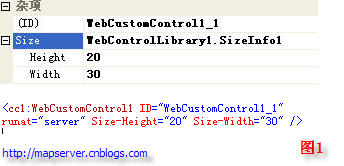
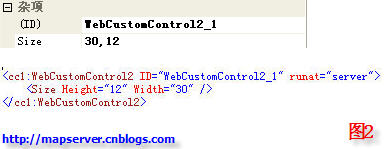
方式B我也举了一个实例,在这个例子中同时包含了TypeConvert的用户,因为TypeConvert也是WebControl从Component上继承下来的,所以其用户和Component的TypeConvert的用法一样,有关TypeConvert的详细讲解请看:http://mapserver.cnblogs.com/archive/2006/03/20/353722.html,效果如上图2。
using System;using System.Collections.Generic;using System.ComponentModel;using System.Text;using System.Web;using System.Web.UI;using System.Web.UI.WebControls;namespace WebControlLibrary1{ // NotifyParentPropertyAttribute:指示当此属性应用到的属性的值被修改时将通知父属性。 // DesignerSerializationVisibilityAttribute:持久性复杂属性的内容。 // PersistenceModeAttribute:制定持久化的模式。 // TypeConverterAttribute:类型转换器。 [ParseChildren(true)] // [PersistChildren(false)] public class WebCustomControl2 : WebControl { private SizeInfo2 _size; [DesignerSerializationVisibility(DesignerSerializationVisibility.Content)] [NotifyParentProperty(true)] [PersistenceMode(PersistenceMode.InnerProperty)] [TypeConverter(typeof(SizeInfo2Converter))] public SizeInfo2 Size { get { return _size; } set { _size = value; } } protected override void RenderContents(HtmlTextWriter output) { output.Write(this.Site.Name); } } [TypeConverter(typeof(ExpandableObjectConverter))] public class SizeInfo2 { private int _width; private int _height; public SizeInfo2() : this(0,0) { } public SizeInfo2(int w, int h) { _width = w; _height = h; } [NotifyParentProperty(true)] public int Width { get { return _width; } set { _width = value; } } [NotifyParentProperty(true)] public int Height { get { return _height; } set { _height = value; } } } public class SizeInfo2Converter : TypeConverter // 我们自定义的Converter必须继承于TypeConverter基类。 { // 是否能用string转换到SizeInfo2类型。 public override bool CanConvertFrom(ITypeDescriptorContext context, Type sourceType) { if (sourceType == typeof(string)) { return true; } else { return false; } } // 从string转到SizeInfo2类型。 public override object ConvertFrom(ITypeDescriptorContext context, System.Globalization.CultureInfo culture, object value) { if (value == null || value.ToString().Length == 0) return new SizeInfo2(); char spliter = culture.TextInfo.ListSeparator[0]; // 得到字符串的分隔符 string[] ss = ((string)value).Split(spliter); Int32Converter intConverter = new Int32Converter(); // 得到类型转换器,.net中为我们定义了一些常见的类型转换器。 return new SizeInfo2((Int32)intConverter.ConvertFromString(context, culture, ss[0]), (Int32)intConverter.ConvertFromString(context, culture, ss[1])); } // 是否能用SizeInfo2转换到string类型。 public override bool CanConvertTo(ITypeDescriptorContext context, Type destinationType) { if (destinationType == typeof(SizeInfo2)) // 如果是Size格式,则允许转成string。 { return true; } else { return false; } } // 在Property窗口中显示为string类型。 public override object ConvertTo(ITypeDescriptorContext context, System.Globalization.CultureInfo culture, object value, Type destinationType) { if (value == null) return string.Empty; if (destinationType == typeof(string)) { SizeInfo2 size = (SizeInfo2)value; TypeConverter intConverter = TypeDescriptor.GetConverter(typeof(Int32)); // 能到类型转换器的另一种方式。 char spliter = culture.TextInfo.ListSeparator[0]; // 得到字符串的分隔符 return string.Join(spliter.ToString(), new string[]{ intConverter.ConvertToString(context, culture, size.Width), intConverter.ConvertToString(context, culture, size.Height)}); } return string.Empty; } }}
如果在本文中发现有什么不妥的地方,请朋友们给与指点,小弟在此先谢过。
此内容由惯性聚合(RSS阅读器)自动聚合整理,仅供阅读参考。 原文来自 — 版权归原作者所有。