





大部分表格,都有显示行号的需求。
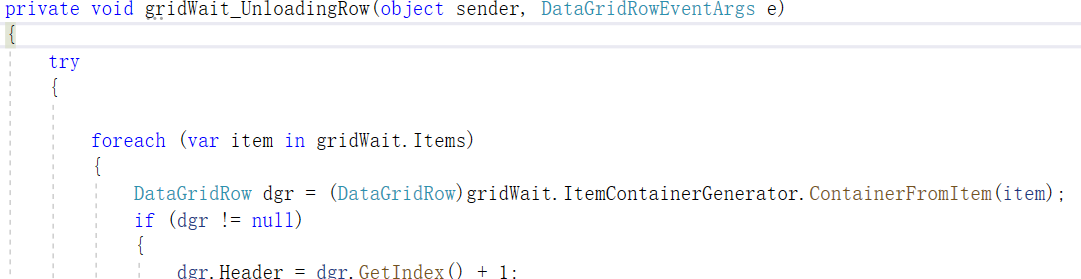
WPF里的DataGrid显示行号,一般如下方式显示:

在后台代码里写上相应的事件处理方法:

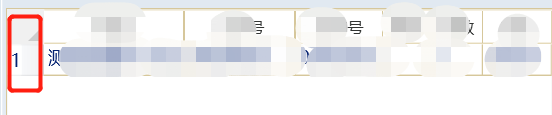
运行效果如下:
但是,这样需要对项目里的所有需要显示行号的DataGrid都要写重复的代码。
十分不优雅。
下面介绍一种通过附加属性的方式,把上面的代码进行一下封装。
然后每次应用的时候,只需要简单的给DataGrid设置一下属性即可。

#region DisplayRowNumber
        public static bool GetDisplayRowNumber(DependencyObject obj)
        {
            return (bool)obj.GetValue(DisplayRowNumberProperty);
        }

        [AttachedPropertyBrowsableForType(typeof(DataGrid))]
        public static void SetDisplayRowNumber(DependencyObject obj, bool value)
        {
            obj.SetValue(DisplayRowNumberProperty, value);
        }

        /// <summary>
        /// 设置是否显示行号
        /// </summary>
        public static readonly DependencyProperty DisplayRowNumberProperty =
            DependencyProperty.RegisterAttached("DisplayRowNumber",
                                                typeof(bool),
                                                typeof(DataGridHelper),
                                                new PropertyMetadata(false, OnDisplayRowNumberChanged));

        private static void OnDisplayRowNumberChanged(DependencyObject d, DependencyPropertyChangedEventArgs e)
        {
            DataGrid grid = d as DataGrid;
            if (grid == null)
            {
                return;
            }

            if ((bool)e.NewValue)
            {
                grid.LoadingRow += OnGridLoadingRow;
                grid.UnloadingRow += OnGridUnloadingRow;
            }
            else
            {
                grid.LoadingRow -= OnGridLoadingRow;
                grid.UnloadingRow -= OnGridUnloadingRow;
            }
        }

        private static void RefreshDataGridRowNumber(object sender)
        {
            DataGrid grid = sender as DataGrid;
            if (grid == null)
            {
                return;
            }

            foreach (var item in grid.Items)
            {
                var row = (DataGridRow)grid.ItemContainerGenerator.ContainerFromItem(item);
                if (row == null)
                {
                    return;
                }
                row.Header = row.GetIndex() + 1;
            }
        }

        private static void OnGridUnloadingRow(object sender, DataGridRowEventArgs e)
        {
            RefreshDataGridRowNumber(sender);
        }

        private static void OnGridLoadingRow(object sender, DataGridRowEventArgs e)
        {
            RefreshDataGridRowNumber(sender);
        }

        #endregion
总结,主要运用了WPF中附加属性的技术。
此内容由惯性聚合(RSS阅读器)自动聚合整理,仅供阅读参考。 原文来自 — 版权归原作者所有。