

惯性聚合 高效追踪和阅读你感兴趣的博客、新闻、科技资讯
阅读原文 在惯性聚合中打开

推荐订阅源

TaoSecurity Blog
TaoSecurity Blog
博客园 - 司徒正美
奇客Solidot–传递最新科技情报
奇客Solidot–传递最新科技情报
博客园 - 【当耐特】
M
MIT News - Artificial intelligence
罗磊的独立博客
让小产品的独立变现更简单 - ezindie.com
Stack Overflow Blog
Stack Overflow Blog
The GitHub Blog
The GitHub Blog
Google DeepMind News
Security Archives - TechRepublic
宝玉的分享
宝玉的分享
N
News and Events Feed by Topic
The Hacker News
The Hacker News
Google DeepMind News
C
CERT Recently Published Vulnerability Notes
F
Full Disclosure
Threat Intelligence Blog | Flashpoint
S
Security @ Cisco Blogs
H
Hacker News: Front Page
L
LangChain Blog
Microsoft Security Blog
Y
Y Combinator Blog
B
Blog RSS Feed
H
Heimdal Security Blog
Google Online Security Blog
Apple Machine Learning Research
博客园 - 三生石上(FineUI控件)
V2EX - 技术
V2EX - 技术
V
Vulnerabilities – Threatpost
Help Net Security
Help Net Security
Hacker News - Newest:
Hacker News - Newest: "LLM"
T
Tailwind CSS Blog
W
WeLiveSecurity
T
Tenable Blog
D
DataBreaches.Net
Martin Fowler
Martin Fowler
Cyberwarzone
Cyberwarzone
Cisco Talos Blog
Cisco Talos Blog
S
Secure Thoughts
O
OpenAI News
L
LINUX DO - 热门话题
Vercel News
Vercel News
阮一峰的网络日志
阮一峰的网络日志
Jina AI
Jina AI
J
Java Code Geeks
Know Your Adversary
Know Your Adversary
IT之家
IT之家
Latest news
Latest news
Cloudbric
Cloudbric

博客园 - 魔幻紫光

HTML5学习笔记4 HTML5学习笔记3 HTML5学习笔记2 HTML5学习笔记1 「2014年間休日カレンダー」のご案内 Excel VBA编程的常用代码 Eclipse的几点使用技巧 2007年下半年系统分析师上午试卷及参考答案 我的漫漫系分路 ActiveX简单介绍 Java程序设计问答大全(二) Java程序设计问答大全(一) 整天工作的人为何当不了富翁 SQL UNION 美丽的新娘,祝你幸福! 快速放松的11种简单方法 职场回顾:面试精华试题大全[转] 李彦宏:十天不用百度你试试 删除怪文件
How To Allow Blocked Content on Internet Explorer
魔幻紫光 · 2014-03-26 · via 博客园 - 魔幻紫光

Follow the steps below if you are tired of having to "Enable Blocked Content" in IE each time you want to view your genealogy report.  This way, you won't get annoyed by the message: "To help protect your security, Internet Explorer has restricted this file from showing active content that could access your computer".

Security message displayed by Internet Explorer to prevent scripts (active content) to run.  You can prevent IE from displaying the following message: "To help protect your security, Internet Explorer has restricted this file from showing active content that could access your computer".

Steps to configure IE to always allow blocked content

  1. From Internet Explorer, select the Tools menu, then the Options...
  2. In the Internet Options dialog, select the Advanced tab...
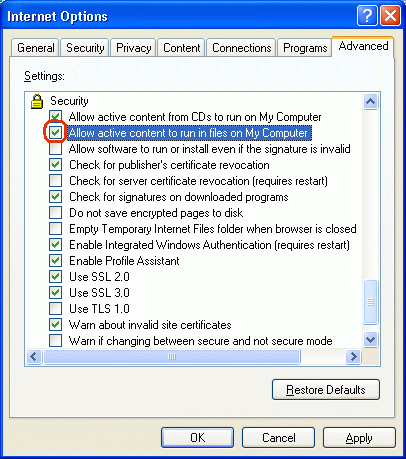
  3. Scroll down until you see the Security options.  Enable the checkbox "Allow active content to run in files on My Computer".

    Click on the checkbox "Allow active content to run in files on My Computer" so you don't have to select "Allow Blocked Content" each time you view an HTML page containing scripts.

  4. Close the dialog, and quit Internet Explorer.  The changes will take effect the next time you start IE.

The Blocked Content is a security feature of Windows XP Service Pack 2.  If you do not have SP2 installed, then you will never see this message.