
惯性聚合 高效追踪和阅读你感兴趣的博客、新闻、科技资讯
阅读原文 在惯性聚合中打开

推荐订阅源

酷 壳 – CoolShell
酷 壳 – CoolShell
aimingoo的专栏
aimingoo的专栏
Microsoft Security Blog
NISL@THU
NISL@THU
T
Threatpost
T
The Exploit Database - CXSecurity.com
T
Threat Research - Cisco Blogs
S
Securelist
Cyber Security Advisories - MS-ISAC
人人都是产品经理
人人都是产品经理
B
Blog RSS Feed
S
Secure Thoughts
MyScale Blog
MyScale Blog
O
OpenAI News
P
Palo Alto Networks Blog
美团技术团队
C
Cyber Attacks, Cyber Crime and Cyber Security
TaoSecurity Blog
TaoSecurity Blog
量子位
L
Lohrmann on Cybersecurity
G
GRAHAM CLULEY
让小产品的独立变现更简单 - ezindie.com
T
Tailwind CSS Blog
Know Your Adversary
Know Your Adversary
Recent Commits to openclaw:main
Simon Willison's Weblog
宝玉的分享
宝玉的分享
PCI Perspectives
PCI Perspectives
Threat Intelligence Blog | Flashpoint
C
Cybersecurity and Infrastructure Security Agency CISA
T
Tenable Blog
I
InfoQ
D
Darknet – Hacking Tools, Hacker News & Cyber Security
Microsoft Azure Blog
Recent Announcements
S
Security @ Cisco Blogs
S
Schneier on Security
B
Blog
cs.CL updates on arXiv.org
The Cloudflare Blog
AWS News Blog
AWS News Blog
IT之家
IT之家
V
Vulnerabilities – Threatpost
The Hacker News
The Hacker News
H
Heimdal Security Blog
I
Intezer
A
Arctic Wolf
K
KPMG report finds enterprise disconnect between AI and its ROI | CIO
H
Help Net Security
W
WeLiveSecurity

TechSpot

Flagship Rematch: Ryzen 7 5800X3D vs. Core i9-12900K Slack chats and internal data from failed startups are finding a second life in AI training A $5 Bluetooth tracker hidden in a postcard exposed a warship's movements Leakers claim PlayStation 6 could offer at least 3x the performance of the PS5 The Mac Mini is no longer a niche product, it's local AI infrastructure IPv6 traffic reaches parity with IPv4 for the first time, Google data shows Xbox expansion cards are now cheaper than SSDs, and PC users are repurposing them Blue Origin prepares to reuse New Glenn booster in bid to challenge SpaceX Nvidia could bring back the 12GB RTX 3060 as supply issues disrupt GPU roadmap What was the first OS you ever used? SNK revives NeoGeo AES with modern upgrades and HDMI support Valve's Proton 11 beta boosts Linux gaming with better performance and classic game support Researchers warn Microsoft Defender vulnerability is already being exploited A four-day Steam freebie turned into $250,000 for an indie game AMD may relaunch Ryzen 7 5800X3D for AM4's 10th anniversary This humanoid robot can almost run as fast as a human sprinter Two New Jersey men jailed for helping North Korean IT workers infiltrate 100+ companies A $7,000 DIY radar project is taking on hardware that usually costs over $100,000 Metro 2039 is going darker than ever, launching this winter on PC and consoles Gemini arrives on macOS with a dedicated desktop app AI infrastructure boom pushes AMD, Intel and Arm to new valuation heights New self-healing material can repair itself over 1,000 times, extend the lifespan of cars and aircraft Japan's bullet train to debut high-tech private cabins, for an added fee Memory card and flash drive pricing surges 120%, with some models spiking 260% Open-source tool decrypts all private data collected by Windows Recall on Copilot PCs The 2026 PC and Console Gaming Report shows most revenue now comes from games outside the Top 20 PureMac is a new open-source macOS cleanup and app removal tool Your Airbnb host might actually be AI Steam might soon display 30-day price history for game deals Intel brings 18A process to budget laptops with new Core Series 3 CPUs How Intel Got Into Trouble: We Test the Last Decade of Intel Flagship CPUs Microsoft counters MacBook Neo with free Game Pass and Office bundle on Windows laptops Popular WordPress plugins backdoored after ownership change, putting thousands of websites at risk Spotify launches physical book sales, expands audiobook features Intel Nova Lake-S is coming after Ryzen APUs with a 16-core iGPU for gamers on a budget Alienware launches $350 QD-OLED monitor with lower brightness to cut costs Recordly brings Screen Studio-style recordings to a free, open-source app Meta doubles down on custom AI chips with Broadcom deal through 2029 Someone finally got an RTX 5090 running on a Mac – no hacks required Will AI agents need to buy their own software licenses? Microsoft sure hopes so Duolingo stops evaluating workers based on how much AI they use Nvidia warranty payouts surged 1,000% last year, not that they can't afford it Nvidia says it's not buying a PC maker, but the idea didn't seem crazy Netgear becomes first router brand exempt from FCC foreign-made ban Google adds Rust to Pixel 10 modem to block attacks at one of Android's weakest points Clicking "reject cookies" might not actually do anything DaVinci Resolve 21 beta adds photo editing and deeper AI integration Malware campaign lures users with fake Windows Update website Apple is testing four smart glasses designs as it prepares to challenge Meta Ray-Bans Amazon purchases Globalstar for $11.6B to expand its low Earth orbit satellite network Capcom's Pragmata earns strong early reviews ahead of release Microsoft is removing 32GB size limit for FAT32 volumes, this time for real Missouri town ousts half of its city council after $6 billion AI data center approval External GPUs were always second best. CopprLink may change that Google will demote websites that hijack your browser's back button Japan finds a way to recover 90% of lithium from old EV batteries Man who vandalized Sam Altman's home claimed AI would end humanity, charged with attempted murder New terahertz technique lets engineers see inside running processors in real time Microsoft just made its Surface laptops a lot more expensive Shipping records suggest Valve will launch the Steam Controller before the Steam Machine This 3D-printed 15-fan side panel drops CPU temps by 20 degrees Rockstar Games hit with ransom demand after third-party data breach Blu-ray lives on as Verbatim and I-O Data pledge support with new drives and discs The software that landed Apollo 11 on the moon is now free online Metal Gear Solid movie is back on track with new directors Anti-data center vote in Wisconsin puts future AI projects on notice Mozilla says Microsoft is using Copilot and Edge to tighten its grip on Windows Gmail encryption goes mobile, but email itself remains the weak link France starts moving government systems from Windows to Linux xAI sues Colorado over AI law, calling it a threat to free speech Florida launches probe into OpenAI as company eyes massive IPO South Korea moves to curb the meteoritic rise of DRAM and PC hardware prices Keychron shares 3D keyboard blueprints on GitHub, opening hardware to modders Nvidia's mythical N1 SoC surfaces on a real motherboard, and it's packing 128GB of LPDDR5X Tesla is working on a smaller, cheaper electric SUV DDR5 prices drop nearly 30%, but memory costs are still far from normal Amazon laid off 30,000 workers while CEO Andy Jassy got a 30% pay bump FBI recovers "deleted" Signal messages through iPhone notifications PC market posts modest growth in early 2026 despite memory shortages and economic strain TikTok star Khaby Lame's $975 million deal is raising serious red flags VeraCrypt, WireGuard among projects disrupted by Microsoft account suspensions Microsoft OneDrive users report mysterious spam files that won't go away Intel tops $300 billion market cap for the first time since the dot-com boom The cables powering the internet are under the ocean – and under threat A version of Windows 10 released a decade ago is now eligible for additional security patches Iran-linked hackers are now targeting industrial controllers in US infrastructure Hackers are turning home routers into tools to spy on Microsoft 365 users A weird macOS bug is blocking new network connections after 49 days of uptime NIH study identifies experimental opioid with strong pain relief and lower addiction risk SanDisk's new 2TB SD card costs $2,000, and it's not even the fastest option Ohio man pleads guilty in first case under federal law banning AI deepfakes John Deere will pay $99 million in right-to-repair lawsuit, but admits nothing Tech layoffs are piling up: 80,000 jobs cut in early 2026, and AI is getting the blame Greece to ban social media for children under 15 starting next year New report revives theory that cryptographer Adam Back could be Bitcoin creator Satoshi Nakamoto Anthropic just lost another round in its fight with the Pentagon Some Windows 3.1 apps were simply "too evil" for Windows 95 to support, says Microsoft veteran AMD confirms Ryzen 9 9950X3D2 priced at $899 German police identify REvil and GandCrab mastermind now living in Russia After Wi-Fi 7's Speed Push, Wi-Fi 8 Is Turning to Reliability
Google Chrome
Julio Franco · 2026-06-17 · via TechSpot

Google Chrome is a fast, simple, and secure web browser, built for the modern web. Chrome combines a minimal design with sophisticated technology to make the web faster, safer, and easier. To install Chrome click your operating system download button, execute the downloaded file and your are ready to go.

Is Chrome the fastest browser?

Chrome, Firefox, Safari, and other major browsers are updated every few weeks, so it's hard to compare them over time which is the fastest. Chrome is known to be a RAM hog, but when used heavily, other browsers are known to be just as resource-consuming.

In general, Chrome remains among the fastest browsers, especially for complex web apps and JavaScript-heavy sites. Web developers always optimize for Chrome's engine because it's the most used browser by far when you account for desktop use, Android phones, and all other browsers that also rely on the Chromium engine.

Is Google Chrome safe and private?

Google Chrome is generally considered safe in terms of protecting users from malicious websites, phishing, and malware, thanks to strong security features like sandboxing and phishing protection, but it's less private because it collects user data for Google services and ads.

Everything you do in Chrome, including every character you type into the address bar, is recorded by Google and linked to you. While using other Google services, all that data may be cross-referenced. More privacy-conscious users may prefer to use Firefox.

What are the best Chrome alternatives?

There are tons of good and free alternatives for browsing the web. If you want a more private browsing, you can opt for Firefox or Brave. If you don't want to use Google services, you can use Ungoogled Chromium.

Opera, Microsoft Edge and Vivaldi are other great options, all three are Chromium-based just like Google Chrome. While most browsers have started to add AI tools, there are newcomers like ChatGPT Atlas and Comet that have free built-in assistants that offer to summarize content or automate tasks.

Why is Chrome using so much CPU and memory, even with only a few tabs open?

Many users notice that Chrome consumes a significant amount of resources, even when only a few tabs are open. This is often due to certain tabs, extensions, or accumulated cache and cookies. To resolve this, open Chrome's Task Manager through the "More Tools" menu to identify and close tabs or extensions that are using the most resources. Disabling unnecessary extensions and regularly clearing your browsing data can also help improve performance and reduce memory usage.

How can I prevent Chrome from automatically translating web pages?

Chrome's automatic translation feature can be frustrating. To stop this behavior, go to the Settings menu, select "Languages," and turn off the option that offers to translate pages not in a language you read. You can also manage individual language preferences there.

Features

Speed

Chrome is designed to be fast in every possible way: It's quick to start up from your desktop, loads web pages in a snap, and runs complex web applications fast. Learn more about Chrome and speed.

Stay organized with tabs

Tabs help you stay organized, keep track of multiple pages, and multi-task. You can group tabs together for better organization or pin tabs to automatically open websites you use the most.

Have Chrome read pages aloud

Chrome can now read web pages aloud. Words on the page are highlighted to help you follow along. Read aloud is best for content like news stories, articles, or even PDFs.

  • To use read aloud, right-click on a page, and select Open in reading mode. This opens the side panel, which has controls you can use for read aloud.
  • Click the Play button.
  • You can adjust the voice , speed, and highlight style in the toolbar next to the Play button.

View two pages in one tab

Split view puts two pages side-by-side in the same tab so you can easily compare options, watch a video while taking notes, and more.

Ways to open a split view:

  • Drag another tab or link to the left or right edge of your browser window.
  • You can also right-click a link and select Open link in split view.

Sign and annotate your PDFs

Skip downloading and printing when it's time to sign a PDF. Use the annotation tool to hand-draw your personal signature, complete forms, and highlight lines.

  • Open a PDF and click Annotations.
  • Choose your pen or highlighter style and color.
  • Draw your annotation or signature, and click Save .

Tip: To make it easier to draw on a small line, Zoom the PDF.

Get your tab groups on the go

Just like your bookmarks and passwords, your tab groups are now available across all your devices. Get started on one device and pick up your project on another device.

To start seeing your tab groups across devices:

  • Sign in and create a tab group on your computer or phone.
  • Your tab group will automatically save to your account.
  • Open your group on a different device.
  • Mobile: go to your open tabs, click the tab group section .
  • Desktop: click the tab group icon in your bookmarks bar (if open) or the Chrome menu.

What's New

The Stable channel has been updated to 149.0.7827.155/.156 for Windows and Mac and 149.0.7827.155 for Linux, which will roll out over the coming days/weeks. A full list of changes in this build is available in the Log.

Security Fixes and Rewards

Note: Access to bug details and links may be kept restricted until a majority of users are updated with a fix. We will also retain restrictions if the bug exists in a third party library that other projects similarly depend on, but haven't yet fixed.

  • This update includes 28 security fixes. Below, we highlight fixes that were contributed by external researchers. Please see the Chrome Security Page for more information.
  • [N/A][516731749] Critical CVE-2026-12007: Use after free Core. Reported by Google on 2026-05-26
  • [N/A][516942828] Critical CVE-2026-12008: Use after free DigitalCredentials. Reported by Google on 2026-05-27
  • [N/A][517332006] Critical CVE-2026-12009: Insufficient validation of untrusted input Accessibility. Reported by Google on 2026-05-28
  • [N/A][517531647] Critical CVE-2026-12010: Heap buffer overflow GPU. Reported by Google on 2026-05-28
  • [N/A][518108291] Critical CVE-2026-12011: Use after free WebMIDI. Reported by Google on 2026-05-30
  • [N/A][499182801] High CVE-2026-12012: Use after free Network. Reported by Google on 2026-04-03
  • [TBD][514229805] High CVE-2026-12013: Use after free Media. Reported by Henock Habte, Independent Security Researcher on 2026-05-18
  • [N/A][514742747] High CVE-2026-12014: Use after free Cast. Reported by Google on 2026-05-19
  • [N/A][515463295] High CVE-2026-12015: Use after free Autofill. Reported by Google on 2026-05-21
  • [N/A][516482138] High CVE-2026-12016: Insufficient validation of untrusted input DevTools. Reported by Google on 2026-05-25
  • [N/A][516797143] High CVE-2026-12017: Insufficient validation of untrusted input Extensions. Reported by Google on 2026-05-26
  • [N/A][516808201] High CVE-2026-12018: Inappropriate implementation Mojo. Reported by Google on 2026-05-26
  • [N/A][516872067] High CVE-2026-12019: Out of bounds write Codecs. Reported by Google on 2026-05-26
  • [N/A][516907083] High CVE-2026-12020: Use after free Autofill. Reported by Google on 2026-05-27
  • [N/A][516929496] High CVE-2026-12022: Race Safe Browsing. Reported by Google on 2026-05-27
  • [N/A][517018374] High CVE-2026-12023: Use after free GPU. Reported by Google on 2026-05-27
  • [N/A][517086161] High CVE-2026-12024: Insufficient policy enforcement DevTools. Reported by Google on 2026-05-27
  • [N/A][517153191] High CVE-2026-12025: Insufficient validation of untrusted input Network. Reported by Google on 2026-05-27
  • [N/A][517347084] High CVE-2026-12026: Out of bounds read Video. Reported by Google on 2026-05-28
  • [N/A][517517155] High CVE-2026-12027: Insufficient policy enforcement Headless. Reported by Google on 2026-05-28
  • [N/A][517555461] High CVE-2026-12028: Use after free GPU. Reported by Google on 2026-05-28
  • [N/A][518002958] High CVE-2026-12029: Use after free Video. Reported by Google on 2026-05-29
  • [N/A][518007423] High CVE-2026-12030: Heap buffer overflow GPU. Reported by Google on 2026-05-29
  • [N/A][518045638] High CVE-2026-12031: Inappropriate implementation Views. Reported by Google on 2026-05-30
  • [N/A][518128953] High CVE-2026-12032: Inappropriate implementation Passwords. Reported by Google on 2026-05-30
  • [N/A][519248779] High CVE-2026-12033: Out of bounds read VideoCapture. Reported by Google on 2026-06-02
  • [N/A][519258799] High CVE-2026-12034: Insufficient validation of untrusted input Linux Toolkit Theming. Reported by Google on 2026-06-02
  • [N/A][520210566] High CVE-2026-12035: Use after free Views. Reported by Google on 2026-06-05

Get more done with new vertical tabs and immersive reading mode in Chrome

Today we are beginning to roll out two new features designed to streamline your browser and help you maximize productivity in Chrome.
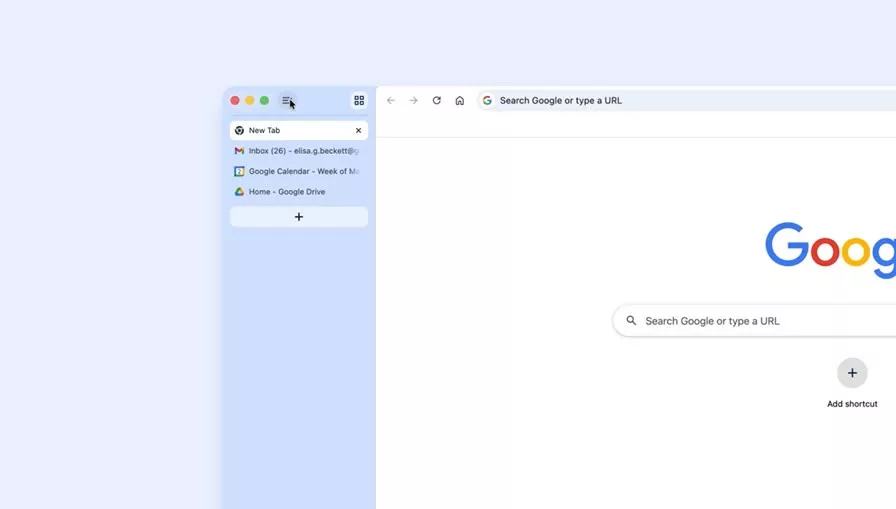
You now have the option to use vertical tabs in Chrome, depending on your preferences. Just right click on any Chrome window and select "Show Tabs Vertically." By moving your tabs to the side of your browser window, you can read full page titles and manage tab groups with ease – even when your tab count hits double digits. This layout is perfect for multitasking, saving you time by making sure you never lose a tab.

And reading mode, a favorite Chrome feature for deep focus, is even better with a new full-page interface. Right-click on any page and select "Open in reading mode" to remove visual distractions and transform a busy webpage into an immersive, text-focused reading experience.

Chrome 146.0.7680.177/178 changelog

The Stable channel has been updated to 146.0.7680.177/178 for Windows/Mac and 146.0.7680.177 for Linux, which will roll out over the coming days/weeks. A full list of changes in this build is available in the Log

Security Fixes and Rewards

Note: Access to bug details and links may be kept restricted until a majority of users are updated with a fix. We will also retain restrictions if the bug exists in a third party library that other projects similarly depend on, but haven't yet fixed.

This update includes 21 security fixes. Please see the Chrome Security Page for more information.

  • [TBD][493952652] High CVE-2026-5273: Use after free in CSS. Reported by Anonymous on 2026-03-18
  • [TBD][491732188] High CVE-2026-5272: Heap buffer overflow in GPU. Reported by inspector-ambitious on 2026-03-11
  • [TBD][488596746] High CVE-2026-5274: Integer overflow in Codecs. Reported by heapracer (@heapracer) on 2026-03-01
  • [TBD][489494022] High CVE-2026-5275: Heap buffer overflow in ANGLE. Reported by c6eed09fc8b174b0f3eebedcceb1e792 on 2026-03-04
  • [TBD][489711638] High CVE-2026-5276: Insufficient policy enforcement in WebUSB. Reported by Ariel Simon on 2026-03-04
  • [TBD][489791424] High CVE-2026-5277: Integer overflow in ANGLE. Reported by c6eed09fc8b174b0f3eebedcceb1e792 on 2026-03-05
  • [TBD][490254128] High CVE-2026-5278: Use after free in Web MIDI. Reported by c6eed09fc8b174b0f3eebedcceb1e792 on 2026-03-06
  • [TBD][490642836] High CVE-2026-5279: Object corruption in V8. Reported by Hyeonjun Ahn (@_deayzl) on 2026-03-08
  • [TBD][491515787] High CVE-2026-5280: Use after free in WebCodecs. Reported by heapracer (@heapracer) on 2026-03-11
  • [TBD][491518608] High CVE-2026-5281: Use after free in Dawn. Reported by 86ac1f1587b71893ed2ad792cd7dde32 on 2026-03-10
  • [TBD][491655161] High CVE-2026-5282: Out of bounds read in WebCodecs. Reported by c6eed09fc8b174b0f3eebedcceb1e792 on 2026-03-11
  • [TBD][492131521] High CVE-2026-5283: Inappropriate implementation in ANGLE. Reported by sweetchip on 2026-03-12
  • [TBD][492139412] High CVE-2026-5284: Use after free in Dawn. Reported by 86ac1f1587b71893ed2ad792cd7dde32 on 2026-03-12
  • [TBD][492228019] High CVE-2026-5285: Use after free in WebGL. Reported by c6eed09fc8b174b0f3eebedcceb1e792 on 2026-03-13
  • [TBD][493900619] High CVE-2026-5286: Use after free in Dawn. Reported by sweetchip on 2026-03-18
  • [TBD][494644471] High CVE-2026-5287: Use after free in PDF. Reported by Syn4pse on 2026-03-21
  • [NA][495507390] High CVE-2026-5288: Use after free in WebView. Reported by Google on 2026-03-23
  • [NA][495931147] High CVE-2026-5289: Use after free in Navigation. Reported by Google on 2026-03-25
  • [NA][496205576] High CVE-2026-5290: Use after free in Compositing. Reported by Google on 2026-03-25
  • [TBD][490118036] Medium CVE-2026-5291: Inappropriate implementation in WebGL. Reported by heapracer (@heapracer) on 2026-03-06
  • [NA][492213293] Medium CVE-2026-5292: Out of bounds read in WebCodecs. Reported by Google on 2026-03-12
  • Google is aware that an exploit for CVE-2026-5281 exists in the wild.

Google Chrome adds split view, PDF annotations, and Drive saves

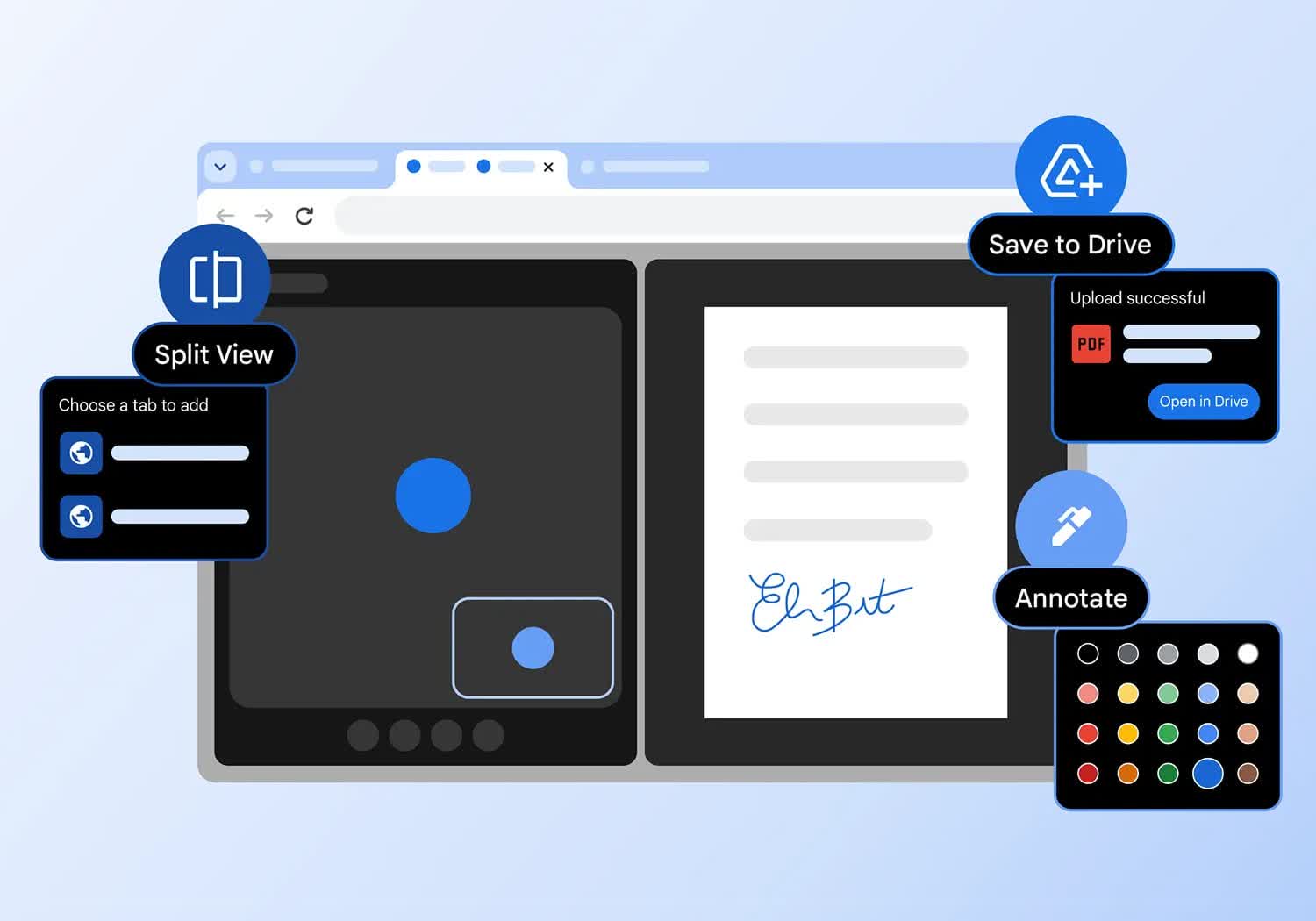
Google is making Chrome a little more work-friendly with a trio of productivity upgrades that are now rolling out on the desktop. The browser's new built-in split view lets you run two tabs side by side without juggling windows, while its PDF viewer can now handle highlights, notes, and even signatures.

There's also a smarter Save to Google Drive option that sends PDFs straight into a dedicated "Saved from Chrome" folder, cutting out the download-and-reupload dance. If you live in your browser all day, the latest Chrome update is worth grabbing.
The Stable channel has been updated to 145.0.7632.109/110 for Windows/Mac and 144.0.7559.109 for Linux, which will roll out over the coming days/weeks. A full list of changes in this build is available in the Log.

Security Fixes and Rewards

Note: Access to bug details and links may be kept restricted until a majority of users are updated with a fix. We will also retain restrictions if the bug exists in a third party library that other projects similarly depend on, but haven't yet fixed.

This update includes 3 security fixes. Please see the Chrome Security Page for more information.

  • [TBD][477033835] High CVE-2026-2648: Heap buffer overflow in PDFium. Reported by soiax on 2026-01-19
  • [TBD][481074858] High CVE-2026-2649: Integer overflow in V8. Reported by JunYoung Park(@candymate) of KAIST Hacking Lab on 2026-02-03
  • [N/A][476461867] Medium CVE-2026-2650: Heap buffer overflow in Media. Reported by Google on 2026-01-18

We would also like to thank all security researchers that worked with us during the development cycle to prevent security bugs from ever reaching the stable channel.

Many of our security bugs are detected using AddressSanitizer, MemorySanitizer, UndefinedBehaviorSanitizer, Control Flow Integrity, libFuzzer, or AFL.

Features

Chrome 144 is rolling out now, and this post shares some of the key features from the release. Highlights from this release:

  • Highlight find-in-page search text with a new pseudo-element.
  • Request permission to use location date with the geolocation element
  • The Temporal API brings a modern date and time API to the web.

The ::search-text pseudo-element

Exposes find-in-page search result styling as the ::search-text pseudo-element, which is a highlight pseudo-element like those used for selection and spelling errors. This lets you change the foreground and background colors or add text decorations. This is especially useful if the browser defaults have insufficient contrast with the page colors or are otherwise unsuitable.