惯性聚合 高效追踪和阅读你感兴趣的博客、新闻、科技资讯
阅读原文 在惯性聚合中打开

推荐订阅源

cs.AI updates on arXiv.org
AWS News Blog
AWS News Blog
V
Vulnerabilities – Threatpost
D
Darknet – Hacking Tools, Hacker News & Cyber Security
量子位
博客园 - 叶小钗
AI
AI
T
Tor Project blog
Forbes - Security
Forbes - Security
W
WeLiveSecurity
博客园_首页
爱范儿
爱范儿
J
Java Code Geeks
B
Blog
G
GRAHAM CLULEY
aimingoo的专栏
aimingoo的专栏
Cloudbric
Cloudbric
C
CXSECURITY Database RSS Feed - CXSecurity.com
TaoSecurity Blog
TaoSecurity Blog
L
LINUX DO - 热门话题
阮一峰的网络日志
阮一峰的网络日志
有赞技术团队
有赞技术团队
Threat Intelligence Blog | Flashpoint
Simon Willison's Weblog
云风的 BLOG
云风的 BLOG
Google DeepMind News
H
Help Net Security
博客园 - 三生石上(FineUI控件)
C
Cisco Blogs
C
Cybersecurity and Infrastructure Security Agency CISA
cs.CV updates on arXiv.org
P
Palo Alto Networks Blog
Cyber Security Advisories - MS-ISAC
Recent Commits to openclaw:main
博客园 - 司徒正美
The Last Watchdog
The Last Watchdog
Blog — PlanetScale
Blog — PlanetScale
T
The Blog of Author Tim Ferriss
S
Secure Thoughts
Spread Privacy
Spread Privacy
F
Fortinet All Blogs
月光博客
月光博客
大猫的无限游戏
大猫的无限游戏
S
SegmentFault 最新的问题
H
Hackread – Cybersecurity News, Data Breaches, AI and More
A
About on SuperTechFans
Security Latest
Security Latest
Webroot Blog
Webroot Blog
Scott Helme
Scott Helme
Hugging Face - Blog
Hugging Face - Blog

TechSpot

Flagship Rematch: Ryzen 7 5800X3D vs. Core i9-12900K Slack chats and internal data from failed startups are finding a second life in AI training A $5 Bluetooth tracker hidden in a postcard exposed a warship's movements Leakers claim PlayStation 6 could offer at least 3x the performance of the PS5 The Mac Mini is no longer a niche product, it's local AI infrastructure IPv6 traffic reaches parity with IPv4 for the first time, Google data shows Xbox expansion cards are now cheaper than SSDs, and PC users are repurposing them Blue Origin prepares to reuse New Glenn booster in bid to challenge SpaceX Nvidia could bring back the 12GB RTX 3060 as supply issues disrupt GPU roadmap What was the first OS you ever used? SNK revives NeoGeo AES with modern upgrades and HDMI support Valve's Proton 11 beta boosts Linux gaming with better performance and classic game support Researchers warn Microsoft Defender vulnerability is already being exploited A four-day Steam freebie turned into $250,000 for an indie game AMD may relaunch Ryzen 7 5800X3D for AM4's 10th anniversary This humanoid robot can almost run as fast as a human sprinter Two New Jersey men jailed for helping North Korean IT workers infiltrate 100+ companies A $7,000 DIY radar project is taking on hardware that usually costs over $100,000 Metro 2039 is going darker than ever, launching this winter on PC and consoles Gemini arrives on macOS with a dedicated desktop app AI infrastructure boom pushes AMD, Intel and Arm to new valuation heights New self-healing material can repair itself over 1,000 times, extend the lifespan of cars and aircraft Japan's bullet train to debut high-tech private cabins, for an added fee Memory card and flash drive pricing surges 120%, with some models spiking 260% Open-source tool decrypts all private data collected by Windows Recall on Copilot PCs The 2026 PC and Console Gaming Report shows most revenue now comes from games outside the Top 20 PureMac is a new open-source macOS cleanup and app removal tool Your Airbnb host might actually be AI Steam might soon display 30-day price history for game deals Intel brings 18A process to budget laptops with new Core Series 3 CPUs How Intel Got Into Trouble: We Test the Last Decade of Intel Flagship CPUs Microsoft counters MacBook Neo with free Game Pass and Office bundle on Windows laptops Popular WordPress plugins backdoored after ownership change, putting thousands of websites at risk Spotify launches physical book sales, expands audiobook features Intel Nova Lake-S is coming after Ryzen APUs with a 16-core iGPU for gamers on a budget Alienware launches $350 QD-OLED monitor with lower brightness to cut costs Recordly brings Screen Studio-style recordings to a free, open-source app Meta doubles down on custom AI chips with Broadcom deal through 2029 Someone finally got an RTX 5090 running on a Mac – no hacks required Will AI agents need to buy their own software licenses? Microsoft sure hopes so Duolingo stops evaluating workers based on how much AI they use Nvidia warranty payouts surged 1,000% last year, not that they can't afford it Nvidia says it's not buying a PC maker, but the idea didn't seem crazy Netgear becomes first router brand exempt from FCC foreign-made ban Google adds Rust to Pixel 10 modem to block attacks at one of Android's weakest points Clicking "reject cookies" might not actually do anything DaVinci Resolve 21 beta adds photo editing and deeper AI integration Malware campaign lures users with fake Windows Update website Apple is testing four smart glasses designs as it prepares to challenge Meta Ray-Bans Amazon purchases Globalstar for $11.6B to expand its low Earth orbit satellite network Capcom's Pragmata earns strong early reviews ahead of release Microsoft is removing 32GB size limit for FAT32 volumes, this time for real Missouri town ousts half of its city council after $6 billion AI data center approval External GPUs were always second best. CopprLink may change that Google will demote websites that hijack your browser's back button Japan finds a way to recover 90% of lithium from old EV batteries Man who vandalized Sam Altman's home claimed AI would end humanity, charged with attempted murder New terahertz technique lets engineers see inside running processors in real time Microsoft just made its Surface laptops a lot more expensive Shipping records suggest Valve will launch the Steam Controller before the Steam Machine This 3D-printed 15-fan side panel drops CPU temps by 20 degrees Rockstar Games hit with ransom demand after third-party data breach Blu-ray lives on as Verbatim and I-O Data pledge support with new drives and discs The software that landed Apollo 11 on the moon is now free online Metal Gear Solid movie is back on track with new directors Anti-data center vote in Wisconsin puts future AI projects on notice Mozilla says Microsoft is using Copilot and Edge to tighten its grip on Windows Gmail encryption goes mobile, but email itself remains the weak link France starts moving government systems from Windows to Linux xAI sues Colorado over AI law, calling it a threat to free speech Florida launches probe into OpenAI as company eyes massive IPO South Korea moves to curb the meteoritic rise of DRAM and PC hardware prices Keychron shares 3D keyboard blueprints on GitHub, opening hardware to modders Nvidia's mythical N1 SoC surfaces on a real motherboard, and it's packing 128GB of LPDDR5X Tesla is working on a smaller, cheaper electric SUV DDR5 prices drop nearly 30%, but memory costs are still far from normal Amazon laid off 30,000 workers while CEO Andy Jassy got a 30% pay bump FBI recovers "deleted" Signal messages through iPhone notifications PC market posts modest growth in early 2026 despite memory shortages and economic strain TikTok star Khaby Lame's $975 million deal is raising serious red flags VeraCrypt, WireGuard among projects disrupted by Microsoft account suspensions Microsoft OneDrive users report mysterious spam files that won't go away Intel tops $300 billion market cap for the first time since the dot-com boom The cables powering the internet are under the ocean – and under threat A version of Windows 10 released a decade ago is now eligible for additional security patches Iran-linked hackers are now targeting industrial controllers in US infrastructure Hackers are turning home routers into tools to spy on Microsoft 365 users A weird macOS bug is blocking new network connections after 49 days of uptime NIH study identifies experimental opioid with strong pain relief and lower addiction risk SanDisk's new 2TB SD card costs $2,000, and it's not even the fastest option Ohio man pleads guilty in first case under federal law banning AI deepfakes John Deere will pay $99 million in right-to-repair lawsuit, but admits nothing Tech layoffs are piling up: 80,000 jobs cut in early 2026, and AI is getting the blame Greece to ban social media for children under 15 starting next year New report revives theory that cryptographer Adam Back could be Bitcoin creator Satoshi Nakamoto Anthropic just lost another round in its fight with the Pentagon Some Windows 3.1 apps were simply "too evil" for Windows 95 to support, says Microsoft veteran AMD confirms Ryzen 9 9950X3D2 priced at $899 German police identify REvil and GandCrab mastermind now living in Russia After Wi-Fi 7's Speed Push, Wi-Fi 8 Is Turning to Reliability
ForkLift
Ivan Franco · 2026-05-14 · via TechSpot

ForkLift combines the power of a robust file manager with versatile file transfer capabilities, seamlessly bridging the gap between your local and remote files. Whether you're dealing with cloud services or more traditional FTP and SFTP servers, ForkLift streamlines your file management and transfers, making them smoother than ever.

ForkLift 4 is your all-in-one solution for efficient file management and seamless file transfers, across multiple platforms and services.
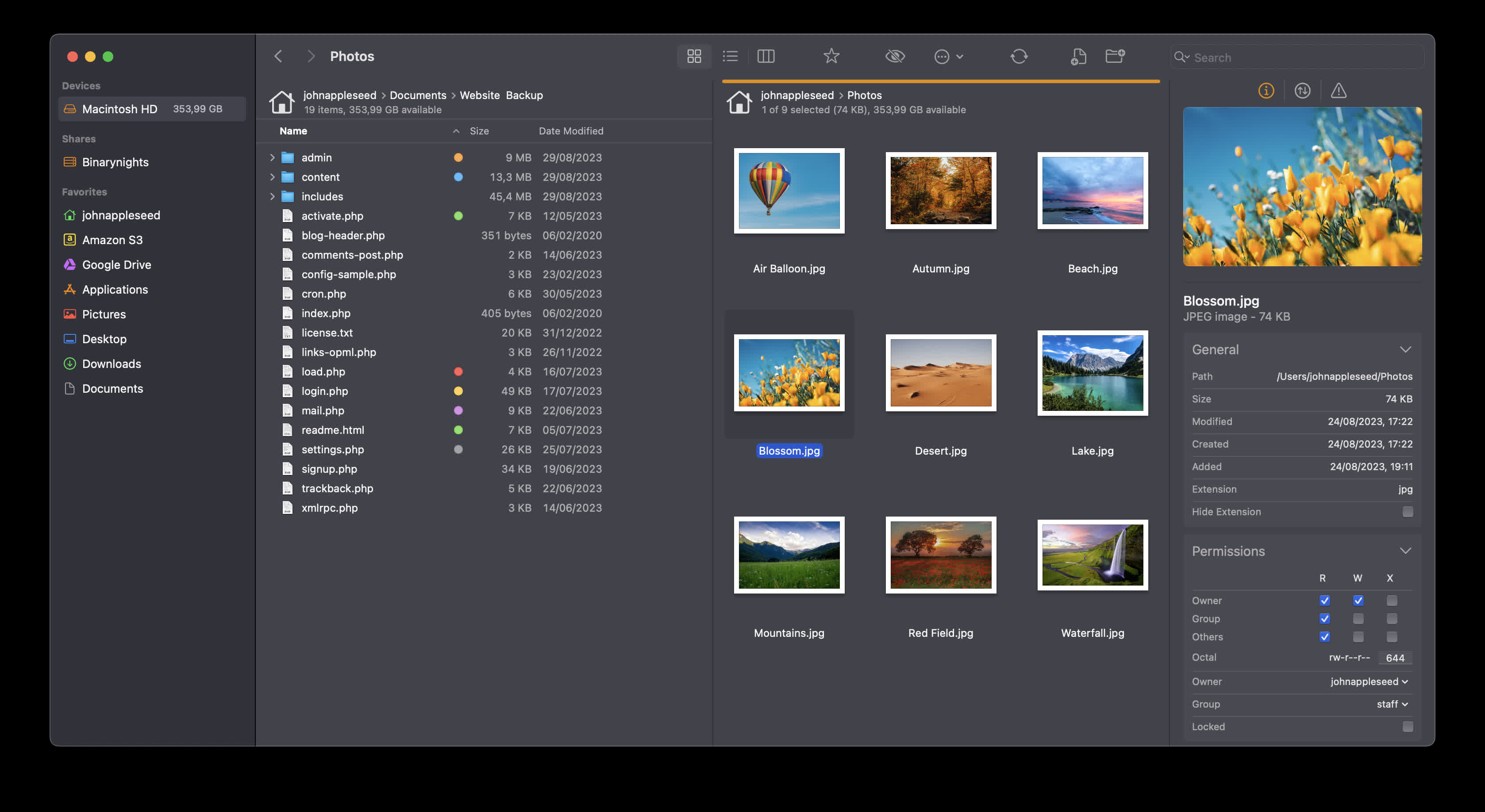
We understand that accessing, organizing, synchronizing, and sharing your files should be hassle-free, especially as the landscape of file sharing evolves with the increasing importance of cloud service providers such as Dropbox, Amazon S3, Google Drive, and OneDrive.

Is ForkLift worth it compared to alternatives like Finder or Nimble Commander?

Many users appreciate its dual-pane layout, batch operations, archives support, and advanced sync features. Compared to rivals, ForkLift offers better transfer management and preview behavior. Still, some feel the interface isn't as lightweight or intuitive as others.

Is it easy to switch from Finder to ForkLift as the default file manager?

Yes. By running a simple defaults write -g NSFileViewer -string com.binarynights.ForkLift command in Terminal, you can set ForkLift as the system default for opening folders.

Which protocols can I connect to ForkLift?

ForkLift will connect to any remote server such as SFTP, FTP, WebDav, Amazon S3, Backblaze B2, Google Drive, OneDrive, Dropbox, Rackspace Cloudfiles, SMB, AFP, and NFS remote volumes. You can manage your files and connect to multiple servers at a time and even copy between them with drag and drop.

Is ForkLift free?

You can download a time limited trial of ForkLift, but you will need to buy a license in order to keep using it.
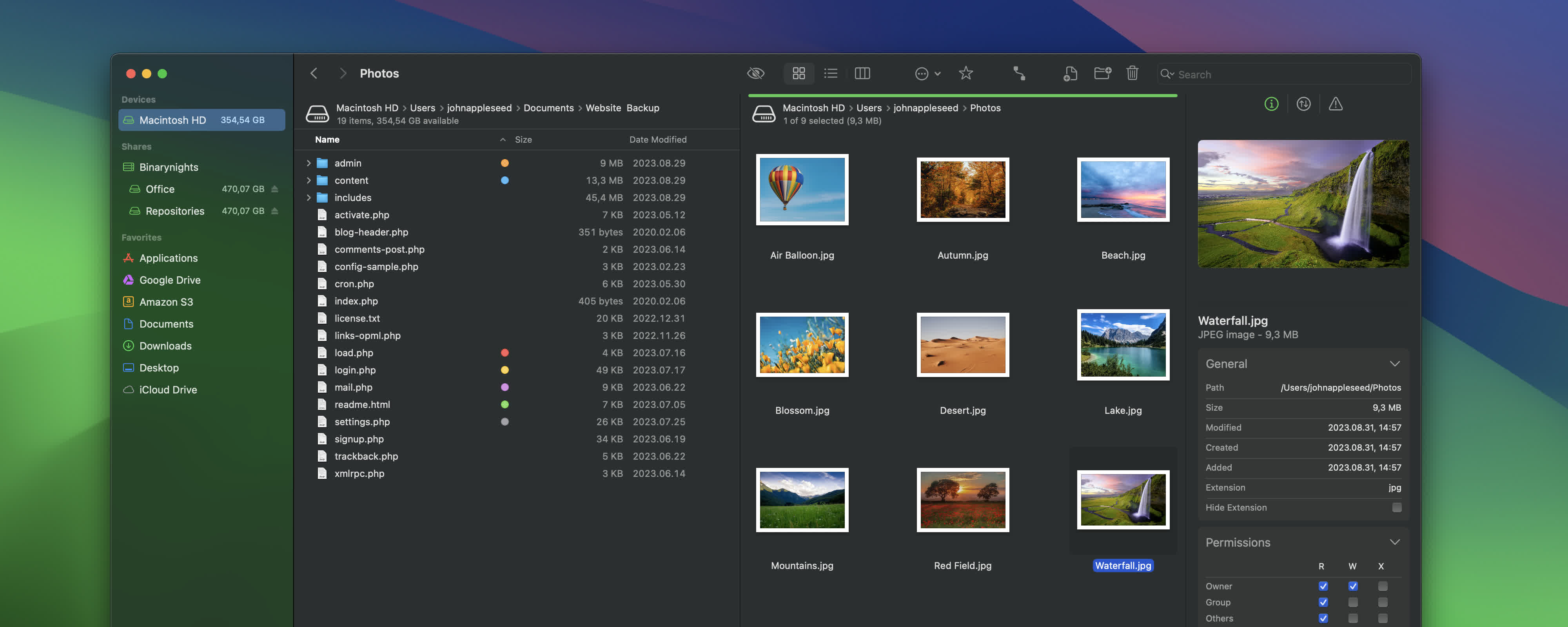
Features

Remote Connections

Connect to SFTP, FTP, WebDav, Amazon S3, Backblaze B2, Google Drive, OneDrive, Dropbox, Rackspace Cloudfiles, SMB, AFP, and NFS remote volumes. Manage your files efficiently across networks: connect to multiple servers simultaneously and even copy between them with drag and drop.

Sync

Compare local or remote source and target folders identifying matching, modified, new and deleted files. Synchronize them one or two-way with a single mouseclick, or save it as a favorite.
Up to 20x faster analyzation than ForkLift 3.

Favorite Paths

Experience enhanced efficiency for remote destinations. Think of it like having favorites within favorites – an organized way to keep track of paths you frequently use and want quick access to.

Preview

The preview panel shows you useful information about the selected file. Playback audio and video files, inspect images, PDFs and other popular document types. Quick edit text files in place, both on local drives and remote servers.

Activity View

Whether you're copying, renaming, deleting, compressing, or handling other tasks, this feature lets you see exactly what's going on. No more guesswork – watch your tasks progress in real-time and stay in control of your file management action.

Quick Open

Easily access your favorites, devices, menu commands, open a selected file with a preferred application, or apply a previously saved Multi Rename preset on selected files or folders.

Log View

Get valuable insights into your file management activities and their results, all in one easy-to-access place.

Favorite Sync

ForkLift will keep all your favorites synchronized across multiple computers via iCloud.

Dropbox Support

Copying Dropbox links to files located in your Dropbox directory is just a right-click away.

Transfers

Reorder transfers, set conflict management rules, error handling, limit download and upload bandwidth.

Tags

Organize your documents and files with tags: add, edit, remove, search, or filter them within ForkLift.

Sync Browsing

Given two identical folder structures. Browse in one pane and let ForkLift do the job for you in the other pane.

Tabs

Open different folders in the same pane, instead of separate windows.

Search

Search and filter by name, extension, kind, tags or content, even on remote servers.

Quick Select

Select files by typing a filename, an extension, or a tag and add them or exclude them from the selection.

Remote Editing

Set your preferred editor in ForkLift to edit remote files and we take care of uploading your changes as you save.

Command Line Tools

Extend ForkLift's capabilities to the max by invoking command line tools and apply them by using shortcuts.

Themes

A seamless way to personalize your interface. Choose from predefined themes that suit your taste, or let your creativity shine by crafting your very own themes.

App Deleter

ForkLift comes with an application deleter to remove the last morsels of an application you want to uninstall.

iCloud Support

Seamlessly access and manage your iCloud files through ForkLift.

Archive Management

Browse local and remote archives as if they were ordinary folders. You can even Quick Look, search and filter.

Keyboard Control

Control every operation straight from the keyboard and customize it to your preferences.

Multilingual

ForkLift speaks English, German and Hungarian. More languages are coming soon!

Workspaces

Save different layouts with opened tabs and locations and load what you need at the moment.

Git Support

ForkLift knows git and will show you the status of individual files. You can add, commit, push, and pull.

Open in Terminal

An absolute must for powerusers. Open a Terminal, iTerm, Hyper, Kitty or Warp window at your current local path.

Hidden Files

Make hidden files and folders visible easily by using a shortcut or pressing a button in the toolbar.

Share

Share gives you an easy way to share all kinds of documents and other files instantly.

Default File Viewer

Set ForkLift as the default file viewer and almost every app will point to ForkLift instead of Finder.

File Compare

Compare two text or images files with Xcode's FileMerge, Kaleiodoscope, Beyond Compare, or Araxis Merge.

What's New

External Drive Tags, comments, and Checksum Improvements
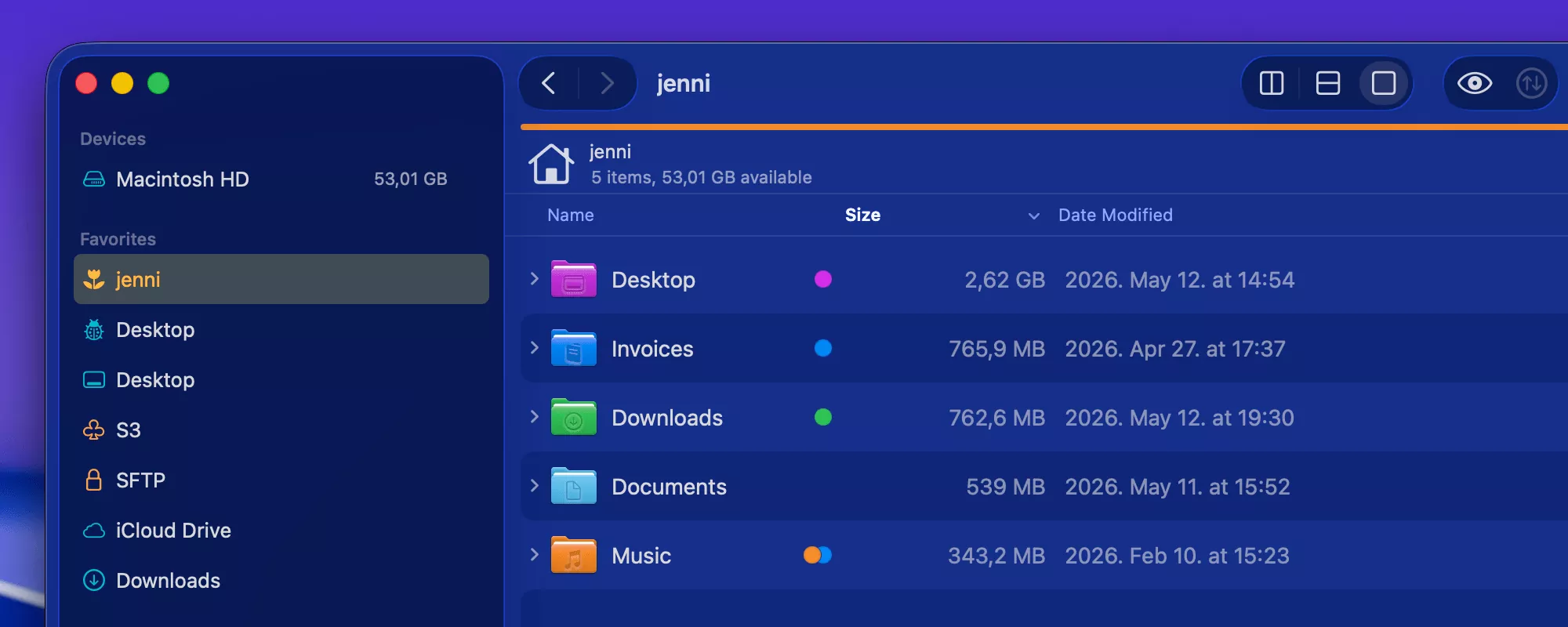
We recently introduced the ability to calculate checksums for files, making it easier to verify that files have not been altered or corrupted during transfers and that two files are truly identical. Checksums can be calculated for multiple files at the same time, with the file names and checksums displayed in a dedicated window.

In ForkLift 4.6.2, we improved the usability of the Checksum Window by adding support for selecting multiple items at once. You can now easily copy selected items or use Command-A and Command-C to copy all entries. The copied content is exported in CSV format, making it easy to paste into spreadsheet applications such as Microsoft Excel or Apple Numbers.

Changes to the Preview API on macOS Sequoia and Tahoe

In version 4.6.1, we introduced a new Preview API to support the new style of folder icon previews. Unfortunately, this API currently has several limitations that cannot be addressed by us directly. We have reported these issues to Apple and hope they will be resolved in future macOS updates.

The new style folder icons are only available on macOS Tahoe, so in ForkLift 4.6.2 we have disabled the new Preview API for users on macOS Sequoia because it caused multiple issues with icon previews on that version of macOS. As a result, users on macOS Sequoia will no longer experience the negative side effects of the new API.

Users on macOS Tahoe will continue using the new API and will still be able to see colored folders and icons added to folders in Finder. However, the API currently does not correctly handle certain folder icon customizations made in System Settings, which means some custom folder appearances may not be represented accurately in ForkLift. Unfortunately, this limitation is outside of our control.

We have also fixed a possible crash introduced in the previous version, along with several other possible crashes and hangs, and some other fixes and improvements.

Full List of changes:

Improvements

  • Displays tags on external drives
  • Comments added in ForkLift now show up in Finder as well
  • Adds an option to select multiple items in the Checksum Window; the copied list is in CSV format, so it can be easily pasted into spreadsheet applications
  • Adds "Edit" and "Hide from Sidebar" options to the context menu of Sync favorites in the Sidebar

Fixes

  • Fixes an issue with the movement of favorites in the sidebar that pointed to the same server
  • Fixes a possible hang caused by recent items in the sidebar
  • Fixes a possible crash in List View
  • Displays a folder icon on remote locations when the folder name contains a dot
  • Displays the Kind of folders correctly when the folder name contains a dot
  • Fixes an issue that made it impossible to delete the last remaining digit from the Time Offset Correction field in the Sync Window
  • Fixes a possible hang after a tab or window was closed during an unfinished search operation
  • Fixes a possible hang after a tab or window was closed during an unfinished search operation
  • Removes the new Preview API on macOS Sequoia introduced in version 4.6.1 due to several issues with icon previews

Previous Release Notes:

ForkLift 4.6.1 is available – Tahoe folder colors, improved memory usage, and restored PDF preview

Folder icon support on macOS Tahoe and performance improvements

Finder on macOS Tahoe introduced a big change by allowing users to customize folder icons. The last applied color tag now determines the folder color, and it is also possible to add icons to folders to make them stand out.
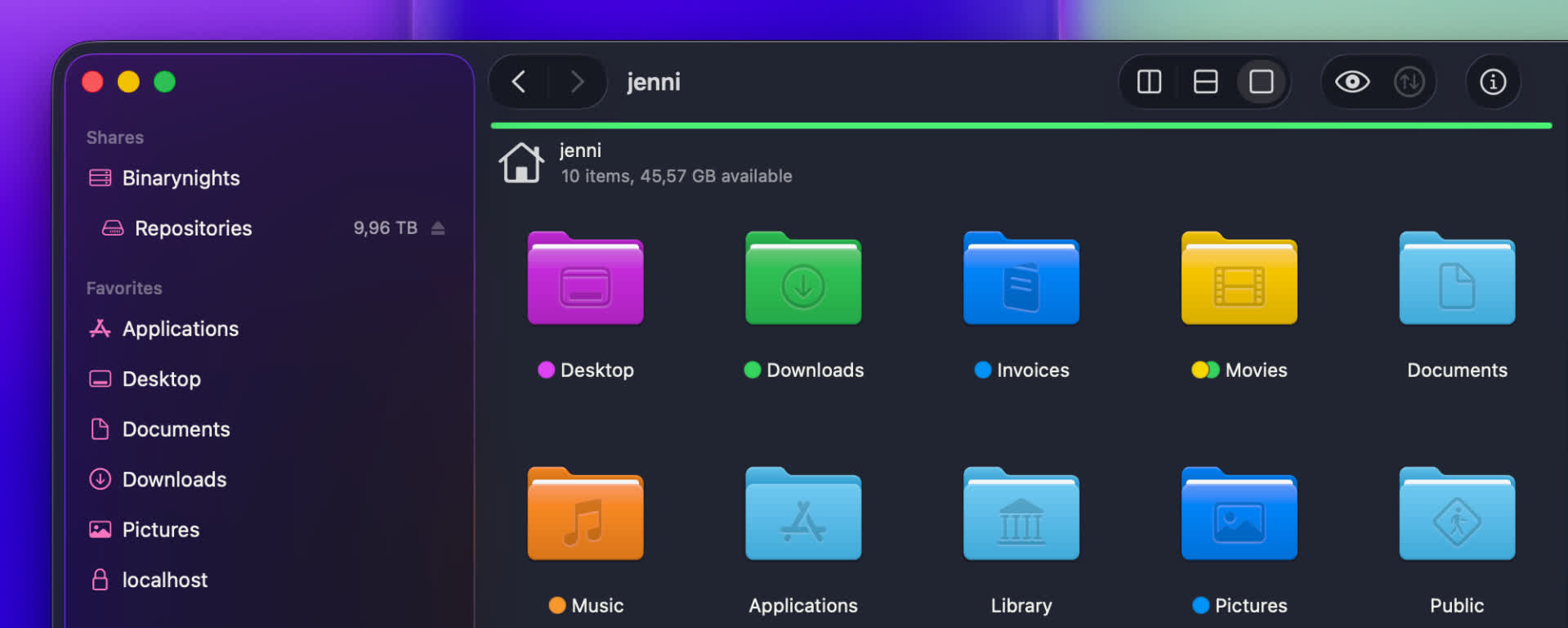
With ForkLift 4.6.1, we have updated how folder icons are handled. ForkLift now inherits folder colors from Finder, and when you assign a color tag in ForkLift, the folder color updates accordingly. ForkLift also displays custom icons that were added in Finder. However, due to missing system APIs, adding custom folder icons directly in ForkLift is not possible at this time.

We have also fixed multiple possible memory leaks and improved overall memory usage. This results in a more stable and efficient experience.

PDF preview fixes and iCloud tag improvements

In addition, this version includes several smaller improvements. You can now edit file favorites directly from the sidebar, use the Tab key to autocomplete tags more reliably, and benefit from improved information display in the Status bar and in the Preview pane.

We were also able to restore the full functionality of the PDF viewer in the Preview pane. It is now again possible to customize preview options through the right-click context menu, and text selection inside PDF previews has been re-enabled.

It is now also possible to remove the last remaining tag on iCloud Drive, and we have resolved an issue where pressing the Tab key during tag autocompletion could cause the tag to disappear.

New

  • ForkLift now colorizes folder icons on macOS Tahoe the same way as Finder, inheriting and applying the assigned colors
  • ForkLift displays customized folder icons set in Finder, however, customizing folder icons directly in ForkLift is not supported

Improvements

  • Improves the display of aggregated date information in the Preview pane when multiple files are selected
  • Adds an alert when iCloud Drive is busy and interaction is not possible, to clarify why an action cannot be executed
  • Adds an option to edit file favorites from the context menu in the Sidebar
  • Improves memory usage

Fixes

  • Fixes an issue that made the file view jump in List View after renaming or deleting files when Group by was enabled
  • Fixes multiple possible memory leaks
  • Fixes an issue that didn't show the lock icon on locked folders when icon preview is enabled (the lock icon doesn't show up on files starting from this version)
  • Fixes an issue in the Status bar, which didn't update the displayed info correctly after folders were expanded and collapsed
  • Fixes an issue of the preview of PDF file in the Preview Pane introduced in version 4.3.5, which made it impossible to select text inside the preview and to use the right-click context menu to customize the preview options. This version restores the previous functionality
  • Fixes an issue that made it impossible to remove the last tag on iCloud Drive when there was only one tag remaining
  • Fixes an issue where pressing the Tab key while autocompleting a tag made the tag disappear

Two powerful new features in ForkLift 4.6

Exciting news! ForkLift 4.6 introduces two major features that power users will love, especially those who rely heavily on tags and those who create custom tools.
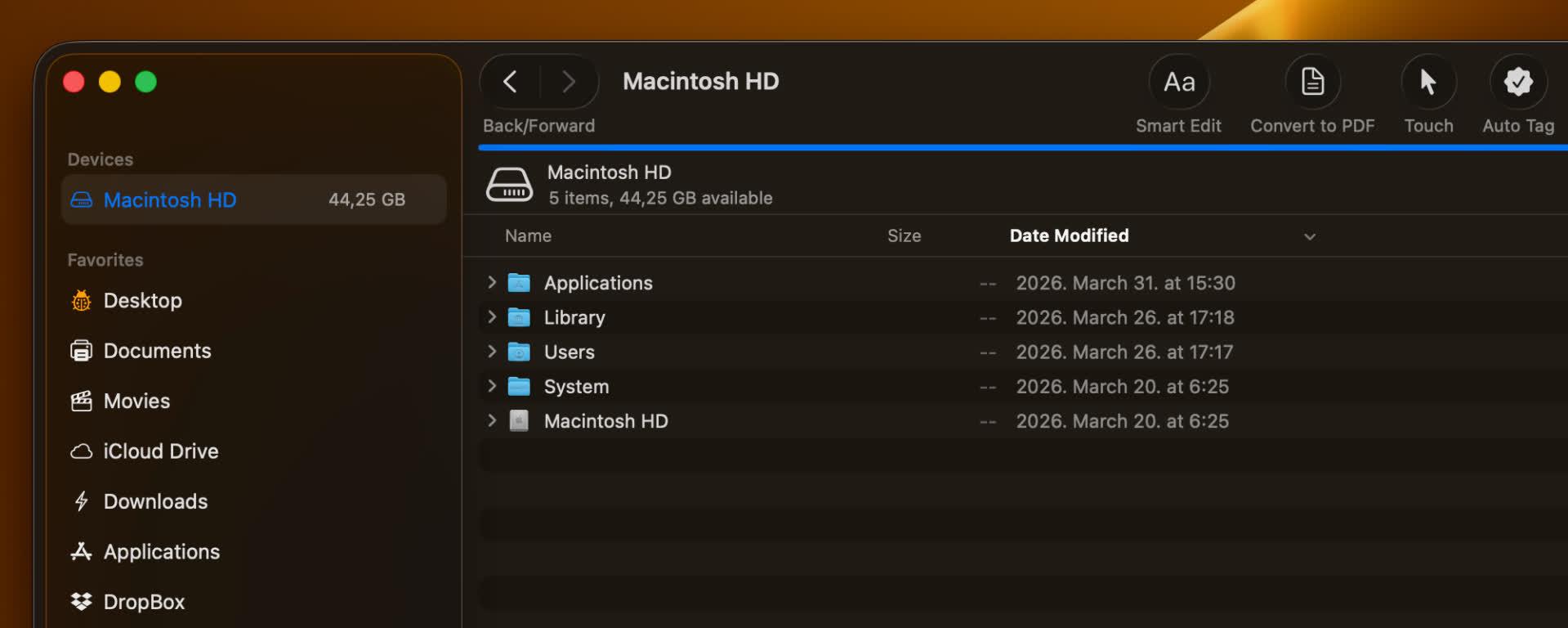
Smarter tagging and autocompletion

The first major improvement in ForkLift 4.6 focuses on tags.

Working with tags in ForkLift has traditionally not been as seamless as in Finder, mainly due to macOS limitations for third-party developers. Unlike Finder, third-party apps cannot access and edit tag data in the same way, which means features like native tag autocompletion are not directly available.

In earlier versions, we introduced the Tags section in the Settings to allow users to add their own tags to the sidebar, making them easily accessible. With ForkLift 4.6, we are expanding this feature and making it more powerful.
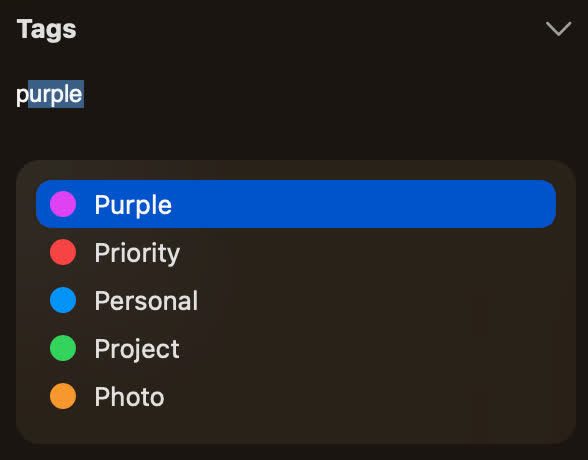
ForkLift now uses the tags listed in the Settings for autocompletion in the Tags section of the Preview Pane or in the info window. As you type, it suggests matching tags from your predefined list.

ForkLift tag autocomplete as you write
To take full advantage of this feature, you should add the tags you use most frequently to the Settings. This ensures they are always available for quick and consistent tagging.

Better control over sidebar tags

Since you may not want to display every tag in the sidebar, we have made it easier to manage their visibility. To hide a tag, right-click it in the Settings and select "Hide from Sidebar". To show it again, right-click and select "Show in Sidebar"

If you want to manage the visibility of multiple tags at once, it is easier to use the Sidebar Editor. Add the tags you want in the Settings, then close the Settings window. From the menu, select View > Show Sidebar Editor. When the Sidebar Editor appears, you can quickly hide tags by unchecking them. Once you are done, you can close the Sidebar Editor again from the View menu.

This gives you full control over which tags are visible without affecting their availability for autocompletion.

Assign tags directly from the sidebar

The sidebar is now more than just a way to filter files. You can still click a tag to view all associated items, but now you can also assign tags directly from the sidebar:

  • Select one or more files or folders
  • Drag them onto a tag in the sidebar
  • Drop them to assign that tag

This makes tagging faster and more intuitive, especially when working with multiple files.

Improved tag input field

We have also improved the tag input field in the sidebar. Not only does it now include a dropdown to suggest matching tags as you type, but it can also expand to display all assigned tags, making them easier to view and manage. Previously, this field had limited space and could not show all tags at once when working with a large number of tags.

Custom tools, now one click away

The second major improvement focuses on tools.

The Tools feature has always been one of the more powerful, yet somewhat hidden, features of ForkLift. It allows you to create your own tools in the settings using zsh scripts, so you can execute complex actions and workflows more easily.

Previously, these tools could only be executed from the Commands menu, and later they became available in the right-click context menu. Now, we are taking this a step further:

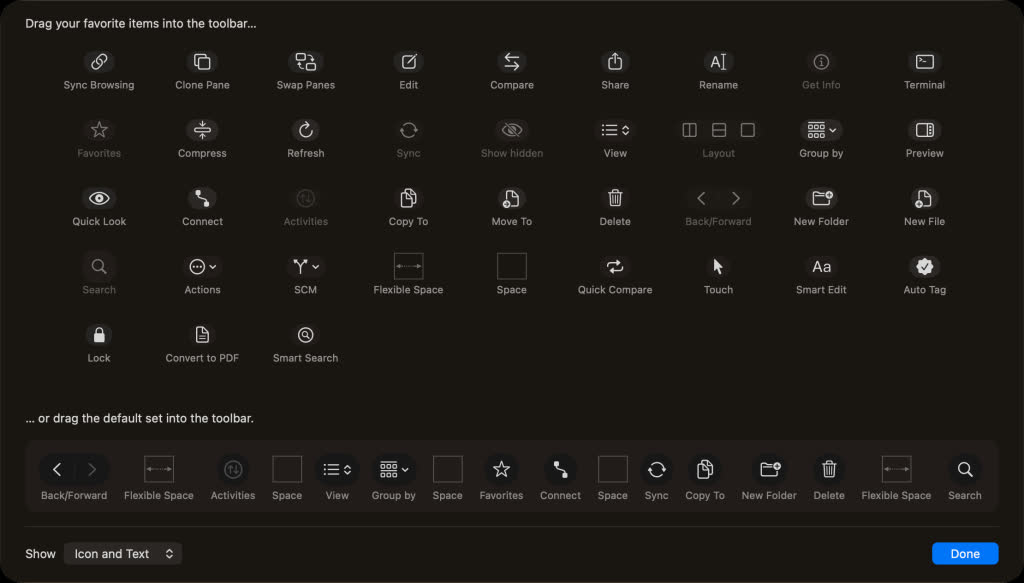
You can add your custom tools directly to the toolbar and execute them with a single click.

Customize your tool icons

When creating or editing a tool, you can assign an icon to represent it both in the Tools section and in the toolbar. By default, new tools use a gear icon, and existing tools are also assigned this icon automatically.

You can easily change it:
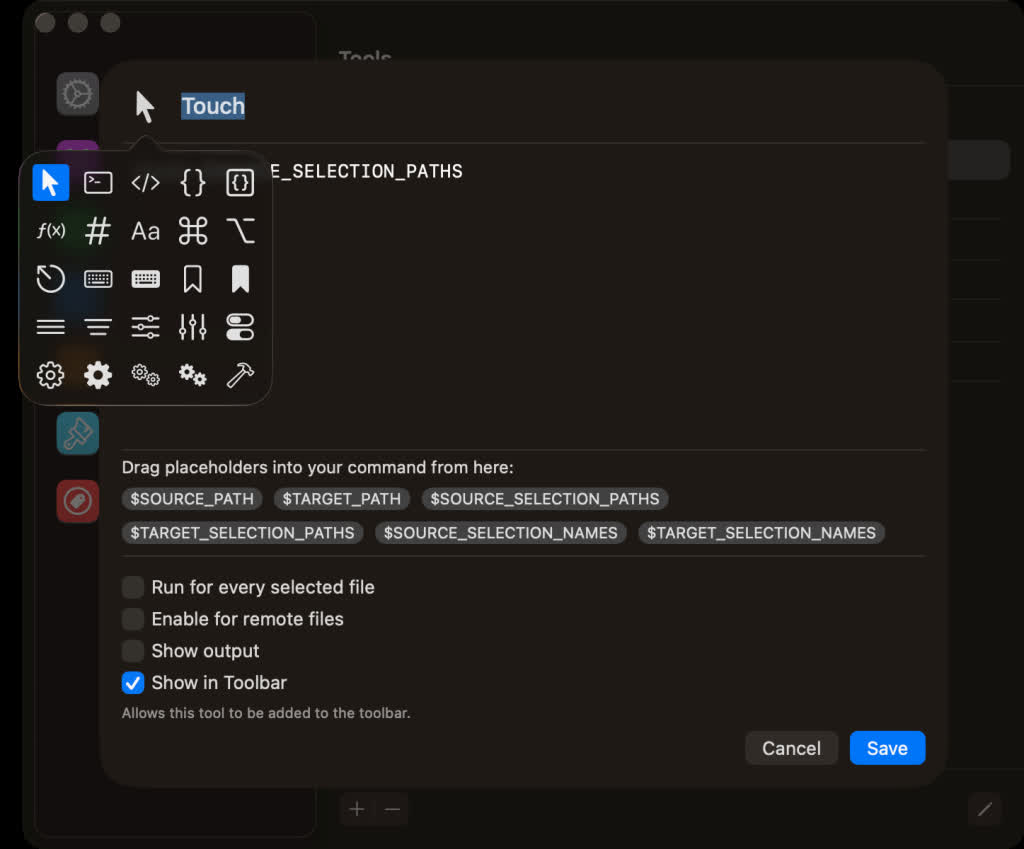
  • Click the icon in the top-left corner while editing or creating a tool
  • Choose a new icon from the pop-up window


This makes it much easier to visually distinguish your tools at a glance.

How to add tools to the toolbar

Adding your tools to the toolbar is simple, but it happens in two steps:

1. Enable the option

  • Go to the Tools tab in the Settings
  • While creating or editing a tool, enable "Show in Toolbar"

2. Add it manually to the toolbar

  • Right-click the toolbar
  • Select "Customize Toolbar…"
  • Find your enabled tool in the customization tray
  • Drag it into the toolbar


Note: Enabling "Show in Toolbar" does not automatically add the tool, it only makes it available for selection.

Full List of changes

New

  • Tags autocompletion feature in the Preview Pane and Info Window based on the list of tags added under ForkLift > Settings > Tags
  • Option to assign a tag to a file by dropping a file onto a tag in the sidebar
  • Option to add custom tools created under ForkLift > Settings > Tools to the toolbar
  • Option to hide and display tags in the sidebar under ForkLift > Settings > Tags through the right-click context menu

Improvements

  • Improved expandable Tags field in the Preview Pane, now able to display all tags
  • Option to exit the Tags field using the Esc key
  • Option to select multiple tools in the Tools section of the Settings

Fixes

  • Fixes an issue that indicated it was possible to add remote files as favorites to the sidebar by drag and drop
  • Fixes an issue in Column View where, after disconnecting from a remote location, the location did not change back to the starting directory
  • Fixes an issue on macOS Tahoe where hitting Esc in the tool editor while adding a new item did not cancel the operation and instead added the new item