
惯性聚合 高效追踪和阅读你感兴趣的博客、新闻、科技资讯
阅读原文 在惯性聚合中打开

推荐订阅源

美团技术团队
罗磊的独立博客
SecWiki News
SecWiki News
The Register - Security
The GitHub Blog
The GitHub Blog
钛媒体:引领未来商业与生活新知
钛媒体:引领未来商业与生活新知
博客园 - 三生石上(FineUI控件)
S
Schneier on Security
IT之家
IT之家
博客园 - 聂微东
T
The Exploit Database - CXSecurity.com
Recorded Future
Recorded Future
大猫的无限游戏
大猫的无限游戏
Know Your Adversary
Know Your Adversary
Latest news
Latest news
Vercel News
Vercel News
G
GRAHAM CLULEY
D
DataBreaches.Net
D
Darknet – Hacking Tools, Hacker News & Cyber Security
S
SegmentFault 最新的问题
博客园_首页
雷峰网
雷峰网
T
Tenable Blog
Spread Privacy
Spread Privacy
让小产品的独立变现更简单 - ezindie.com
酷 壳 – CoolShell
酷 壳 – CoolShell
Cisco Talos Blog
Cisco Talos Blog
V
Visual Studio Blog
J
Java Code Geeks
博客园 - Franky
The Cloudflare Blog
Apple Machine Learning Research
C
CERT Recently Published Vulnerability Notes
T
Threatpost
Google DeepMind News
F
Fortinet All Blogs
P
Privacy International News Feed
T
Threat Research - Cisco Blogs
T
The Blog of Author Tim Ferriss
V
Vulnerabilities – Threatpost
Recent Announcements
Blog — PlanetScale
Blog — PlanetScale
Security Latest
Security Latest
U
Unit 42
M
MIT News - Artificial intelligence
Y
Y Combinator Blog
K
Kaspersky official blog
有赞技术团队
有赞技术团队
B
Blog
腾讯CDC

博客园 - 蜡人张

Reading Materials in Several Minutes 一个批处理文件 - 蜡人张 - 博客园 T-SQL中的ISNULL和IS NULL 随便写写(12) C#向Word文档中插入条形码 随便写写(9) 随便写写(8) Balsamiq Mockups Ext GridPanel 动态生成列 demo Silverlight Dashboard and Gauge Elements Drawed in Expression Blend 野路子实现的轻量级伪OLAP展示 Silverlight形状合并:绘制半圆 随便写写(5) SPAW Editor .NET Edition v.2乱用 Windows Live Writer没有权限设置字体501错误 HowTo (2): 在WebBrowser控件中屏蔽脚本错误 XMLHttpRequest异步时的超级链接调用函数问题 WM Concepts 1: Windows CE Windows Mobile 6 Professional SDK Refresh安装错误“系统管理员设置了系统策略,禁止进行此安装”
SPAW Editor .NET Edition v.2乱用:使用代码调整编辑器高度
蜡人张 · 2009-02-02 · via 博客园 - 蜡人张

    SPAW Editor .NET Edition v.2乱用中介绍了一个HTML Editor,在使用这个Editor进行页面布局的时候可能希望使用代码控制编辑器的大小,例如在用户调整浏览器大小的时候,可能希望其中的Editor大小随着浏览器的变化而变化。SPAW Editor的默认width属性即是100%,所以我们需要考虑的是如何使用代码调整该控件的高度。

    OK,假设页面上有一个ID为spawMain的服务器端SPAW Editor控件,我们如何使用浏览器端Javascript脚本控制该控件的高度呢?如果你有足够的基础和耐心,可以去阅读SPAW Editor .NET的源码;否则的话,还是祭出类似于IE Developer Toolbar之类的可以查看浏览器端HTML DOM的浏览器开发辅助工具吧。通过IE Developer Toolbar,我们可以很清楚地看到(图),无例外地SPAW Editor的编辑器主体也是一个iframe元素,通过观察,还可以发现这个iframe和该控件的工具栏、状态栏均是放置在table元素的单元格中,所以调整编辑器高度的问题就成了调整iframe这个元素的高度的问题了。在HTML页面中调整一个iframe元素的高度,我们需要知道这个iframe元素的id属性值,本例中,我们可以看到该iframe元素的id属性值为spawMain_rEdit,即格式为“[服务器端控件ID属性值]_rEdit”,位于目录spaw2/js/common/editor.js中的如下代码也验证了这一点:
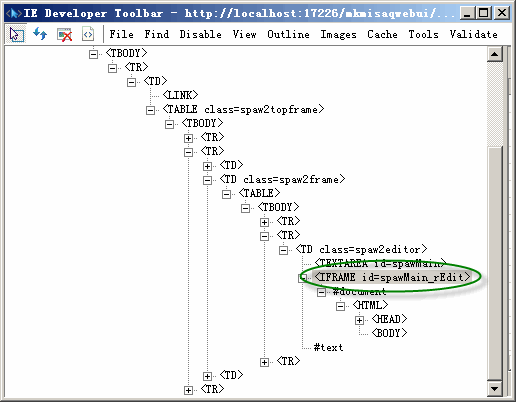
在IE Developer Toolbar中查看的SPAW Editor的DOM树

// returns reference to outer iframe object (differs from getPageIfram in IE only)
SpawEditor.prototype.getPageIframeObject = function(page_name)
{
  
return this.document.getElementById(page_name+'_rEdit');
}

    好了,在浏览器端,我们可以通过以下Javascript代码更改元素的高度:

document.getElementById("[服务器端控件ID属性值]_rEdit").style.height = [要设置高度值];


Life is like a boat, and I'm at sea.