
惯性聚合 高效追踪和阅读你感兴趣的博客、新闻、科技资讯
阅读原文 在惯性聚合中打开

推荐订阅源

J
Java Code Geeks
G
Google Developers Blog
有赞技术团队
有赞技术团队
Cyber Security Advisories - MS-ISAC
Blog — PlanetScale
Blog — PlanetScale
罗磊的独立博客
博客园 - 聂微东
V
Visual Studio Blog
博客园_首页
D
DataBreaches.Net
腾讯CDC
I
InfoQ
F
Fortinet All Blogs
量子位
奇客Solidot–传递最新科技情报
奇客Solidot–传递最新科技情报
酷 壳 – CoolShell
酷 壳 – CoolShell
博客园 - 【当耐特】
Google DeepMind News
人人都是产品经理
人人都是产品经理
云风的 BLOG
云风的 BLOG
月光博客
月光博客
Recent Announcements
MongoDB | Blog
MongoDB | Blog
C
Check Point Blog

Beebom

Fortnite Shattered Live Event Recap: Geno Returns as Epic Pulls Off Biggest Plot Twist Yet Stellar Blade Blood Rain Brings New Protagonist in an Action-Fueled Spiritual Sequel Final Fantasy 7 Revelation Announced, Final Conclusion Set For Spring 2027 Dumpling Squishy Race Codes (June 2026) Anime League Codes (June 2026): How to Get Free Shards How to Get GOALS Skin in Fortnite for Free “You Must Have Exclusive Content,” Xbox CEO Signals Exclusives Are Still Critical to the Platform’s Future Fake Minecraft Mod Malware Infects Over 116,000 Players, Raising Alarms Across the Community When Does Fortnite Chapter 7 Season 3 Begin? Countdown Timer FIFA’s Latest Rival to EAFC Is a Free Netflix Game You Play With Your Phone Onimusha Way of the Sword Demo Felt Too Safe but Its Combat Is the Real Deal Why the Future of Ads and Product Placement Belongs to Video Games GOALS Kicks Off Its Free-to-Play Launch With KSI as a Playable Character Fortnite Shattered Live Event Countdown: How to Join, Start Time and Countdown Timer Elden Ring Tarnished Edition Release Date Announced on Switch 2 with Additional DLC Pack Control Resonant Makes Early Access Exclusive to PS5, Leaves PC and Xbox Users in the Dust Survive the Backrooms Codes (June 2026) Valorant Masters London 2026: All Teams, Schedule, Prize, and More Build a Ring Farm Seeds Tier List (June 2026) Summer Game Fest 2026 Countdown Timer and How to Watch Fortnite Dev Teases Massive Reload Mode Changes Coming to Chapter 7 Season 3 Upcoming Fortnite Battle Bus Feature Will Make Hot Drops Easier Than Ever Before Control Resonant System Requirements (Minimum and Recommended) Nintendo Switch 2 Is Bringing Updated Models With Replaceable Batteries in the EU 8 Ball X Codes (June 2026) Fortnite Leak Reveals Brazilian Football Star Vinicius Jr Joining the Icon Series Soon GTA 6 HQ at Rockstar North Under Maximum Protection After YouTubers Attempt to Break-In Is Wolverine PS5 Open World? Answered NTE Lacrimosa Build: Team, Arc and Cartridge Anime RNG Codes (June 2026)
How to Fix Esp-Dist-001 Error in Fortnite
Pranav Maytray · 2026-06-16 · via Beebom

Fortnite players hate nothing more than sitting down for a game only to be met with an error that stops them from playing. Among these, the Fortnite Esp-Dist-001 error is quite notorious within the community, particularly bothering console players regularly. If you want to learn how you can fix this error, here is everything you need to know.

What is the Fortnite Esp-Dist-001 Error?

Esp-Dist-001 is a network handshake and connectivity error in Fortnite, much like matchmaking error 1. The ESP codes usually refer to a breakdown in communication between the device you’re playing on and the Epic Games servers.
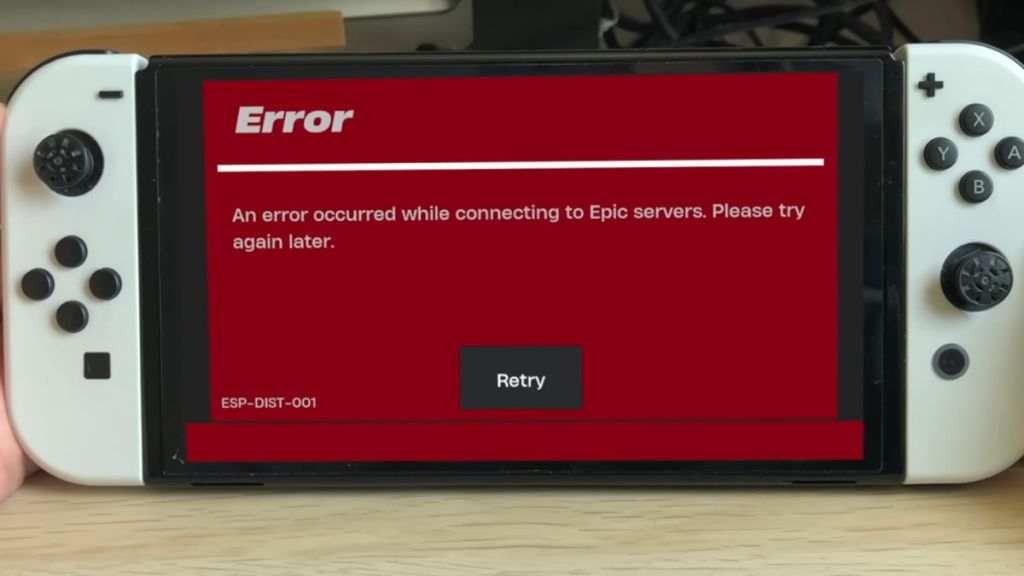
Fortnite Esp-Dist-001 Error
Image Credit: Nintendo

When you launch Fortnite, your system tries to validate your login credentials, retrieve your account data, and sync your inventory, like Fortnite skins and V-Bucks balance. If your console’s temporary memory cache holds any corrupted data, or if your network fails to secure a handshake with the game servers, you will receive the Esp-Dist-001 error and fail to load into the game.

Since this error is usually tied to corrupted local files or network discrepancies, you can typically fix the Fortnite Esp-Dist-001 error without redownloading the entire game.

Clear Your Console Cache

Because local cache corruption is the primary cause behind Esp-Dist-001, clearing it can help the game reset its temporary login data without impacting your Fortnite locker or current Battle Pass progress. The process of clearing your cache is different for each platform.

Nintendo Switch

  • Head to the System Settings from the Nintendo Switch home screen.
  • Scroll down to System, and then select Formatting Options.
  • Select Reset Cache at the very top of the list. Choose the user profile you use to play Fortnite, and confirm by clicking Reset.
  • Hold down the Power Button for 3 seconds. Select Power Options, and then choose Restart.

PlayStation & Xbox

  • Shut down your console completely. Make sure not to put it into Rest/Sleep mode.
  • Unplug the power cable from the back of the console.
  • Wait roughly 60 seconds to drain the internal capacitors completely, which flushes the cache memory.
  • Plug the power cable back in and relaunch Fortnite.

Check Epic Games Server Status

Sometimes the Fortnite Esp-Dist-001 error does not stem from your side of things at all. If Fortnite is down or any other Epic matchmaking services are experiencing an outage, your platform can also throw an ESP error. Before you mess with your home network, you can visit the official Epic Games Server Status page. If Fortnite or Epic Online Services show degraded performance, it is recommended that you wait until Epic deploys an official fix.

Power Cycle Your Internet Router

If all of Epic’s services are functioning properly and clearing the cache didn’t work, your router might be experiencing a DNS or IP glitch. To possibly fix this, follow these steps:

  • Unplug your modem and router.
  • Leave them unplugged for 30 seconds.
  • Plug them back in and wait for the light to stabilize before booting up your console and launching Fortnite.

With these steps, you should be able to fix the notorious Esp-Dist-001 error for Fortnite. Do you think we missed a possible fix? Tell us in the comments below!

What is the Esp-Dist-001 error in Fortnite?

The Esp-Dist-001 error means your platform is having trouble connecting to the game servers.

Is Esp-Dist-001 caused by a ban?

No, Esp-Dist-001 is purely a connectivity issue and not caused by a ban.