


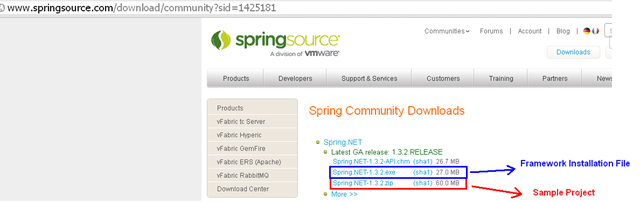
1. Download the file in blue box from website http://www.springsource.com/, then execute the exe file to install it
2. Create a sample porject called DataAccess in C# console program
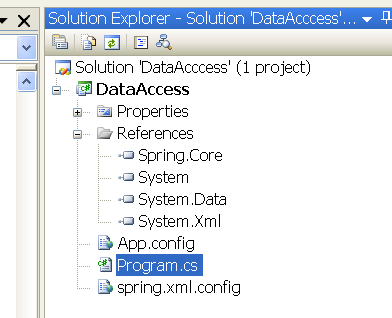
3. Add C:\Program Files\Spring.NET 1.3.2\bin\net\2.0\release\Spring.Core.dll (2.0 means framework 2)
The solution file is like
The code is like below
Program.cs
1: using System;
2: using System.Collections.Generic;
3: using System.Text;
4: using Spring.Context;
5: using Spring.Context.Support;
6: namespace DataAccess
7: {8: class MainApp
9: { 10: static void Main()
11: {12: DataAccessObject daoCategories = new Categories();
13: daoCategories.Run(); 14: 15: DataAccessObject daoProducts = new Products();
16: daoProducts.Run(); 17: 18: IApplicationContext context = ContextRegistry.GetContext(); 19: DataAccessObject DAO = (DataAccessObject)context.GetObject("DataAccessObject");
20: DAO.Run(); 21: 22: // Wait for user
23: Console.ReadKey(); 24: } 25: } 26: 27: abstract class DataAccessObject
28: {29: protected string connectionString;
30: 31: public virtual void Connect()
32: {33: Console.WriteLine("Connect '" + connectionString + "'");
34: } 35: 36: public abstract void Select();
37: public abstract void Process();
38: 39: public virtual void Disconnect()
40: {41: Console.WriteLine("Discount\r\n");
42: } 43: 44: // The 'Template Method'
45: public void Run()
46: { 47: Connect(); 48: Select(); 49: Process(); 50: Disconnect(); 51: } 52: } 53: 54: class Categories : DataAccessObject
55: {56: public override void Select()
57: {58: Console.WriteLine("Get Categories");
59: } 60: 61: public override void Process()
62: {63: Console.WriteLine("Process Categories");
64: } 65: } 66: 67: class Products : DataAccessObject
68: {69: public override void Select()
70: {71: Console.WriteLine("Get Products");
72: } 73: 74: public override void Process()
75: {76: Console.WriteLine("Process Products");
77: } 78: } 79: } App.config
<?xml version="1.0" encoding="utf-8" ?>
<configuration>
  <configSections>
    <sectionGroup name="spring">
      <section name="context" type="Spring.Context.Support.ContextHandler, Spring.Core"/>
    </sectionGroup>
  </configSections>
  <spring>
    <context>
      <resource uri="spring.xml.config"/>
    </context>
  </spring>
</configuration>
spring.xml.config
<?xml version="1.0" encoding="utf-8" ?>
<objects xmlns="http://www.springframework.net">
  <object id="DataAccessObject" type="DataAccess.Products">
    <property name="connectionString" value="C:\db\northwind.mdb"/>
  </object>
</objects>
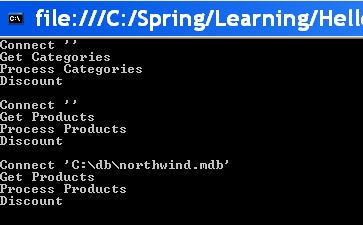
Running the application, the output is like
Now modify the spring.xml.config as below, only change “Products” to “Categories”
<?xml version="1.0" encoding="utf-8" ?>
<objects xmlns="http://www.springframework.net">
  <object id="DataAccessObject" type="DataAccess.Categories">
    <property name="connectionString" value="C:\db\northwind.mdb"/>
  </object>
</objects>
The output will be changed to
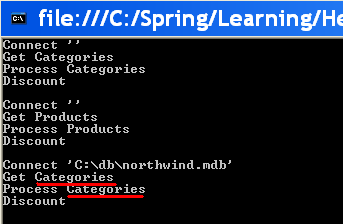
See the red highlight, it has changed the program direction without recompile the exe.
此内容由惯性聚合(RSS阅读器)自动聚合整理,仅供阅读参考。 原文来自 — 版权归原作者所有。