







m4 mac mini已经发布了一段时间,针对这个产品,更多的是关于性价比的讨论,如果抛开各种补贴不论,价位上和以前发布的mini其实差别不大,真要论性价比,各种windows系统的mini主机的价格其实是吊打苹果的。
本次我们针对m4 mac mini的AI性能做个测试,使用目前泛用性最广的AI工作流软件:ComfyUI框架,基于MPS(fp16)模式进行测试。
首先确保本机已经安装好了基于arm架构的Python3.11,之所以使用Python3.11,是因为这个版本性能有一定的优化,又不会像最新的3.13由于版本过新,引发依赖装不上的问题。
Mac版本Python3.11安装包的下载地址:
https://python.org
随后克隆官方项目:
git clone https://github.com/comfyanonymous/ComfyUI.git
接着安装 MPS 版本的 torch
pip3 install --pre torch torchvision torchaudio --extra-index-url https://download.pytorch.org/whl/nightly/cpu
然后安装依赖:
pip3 install -r requirements.txt
依赖安装完毕后,需要升级一下SSL证书:
bash /Applications/Python*/Install\ Certificates.command
接着安装 ComfyUI 的 Manager 项目,用来安装各种节点:
cd custom_nodes
git clone https://github.com/ltdrdata/ComfyUI-Manager.git
至此ComfyUI项目就部署好了。
下载需要的flux-dev模型,由于官方的模型体积太大(23G),这里我们下载GGUF的量化版本:
https://pan.quark.cn/s/2907b57697fe
模型名称分别是:flux1-dev-Q4_1.gguf和t5-v1_1-xxl-encoder-Q5_K_M.gguf,将其分别放到models的UNET目录和clip目录。
随后,回到项目的根目录,输入命令,启动ComfyUI服务:
python3 main.py --force-fp16
这里强制使用fp16精度用来提升性能。
程序返回:
liuyue@mini ComfyUI % python3 main.py --force-fp16
[START] Security scan
[DONE] Security scan
## ComfyUI-Manager: installing dependencies done.
** ComfyUI startup time: 2024-12-08 23:04:08.464703
** Platform: Darwin
** Python version: 3.11.9 (v3.11.9:de54cf5be3, Apr  2 2024, 07:12:50) [Clang 13.0.0 (clang-1300.0.29.30)]
** Python executable: /Library/Frameworks/Python.framework/Versions/3.11/bin/python3
** ComfyUI Path: /Volumes/ssd/work/ComfyUI
** Log path: /Volumes/ssd/work/ComfyUI/comfyui.log

Prestartup times for custom nodes:
   0.7 seconds: /Volumes/ssd/work/ComfyUI/custom_nodes/ComfyUI-Manager

Total VRAM 24576 MB, total RAM 24576 MB
pytorch version: 2.5.1
Forcing FP16.
Set vram state to: SHARED
Device: mps
Using sub quadratic optimization for cross attention, if you have memory or speed issues try using: --use-split-cross-attention
[Prompt Server] web root: /Volumes/ssd/work/ComfyUI/web
### Loading: ComfyUI-Manager (V2.51.9)
### ComfyUI Revision: 2859 [b4526d3f] | Released on '2024-11-24'
[ComfyUI-Manager] default cache updated: https://raw.githubusercontent.com/ltdrdata/ComfyUI-Manager/main/alter-list.json
[ComfyUI-Manager] default cache updated: https://raw.githubusercontent.com/ltdrdata/ComfyUI-Manager/main/model-list.json
[ComfyUI-Manager] default cache updated: https://raw.githubusercontent.com/ltdrdata/ComfyUI-Manager/main/github-stats.json
[ComfyUI-Manager] default cache updated: https://raw.githubusercontent.com/ltdrdata/ComfyUI-Manager/main/custom-node-list.json
Torch version 2.5.1 has not been tested with coremltools. You may run into unexpected errors. Torch 2.4.0 is the most recent version that has been tested.
[ComfyUI-Manager] default cache updated: https://raw.githubusercontent.com/ltdrdata/ComfyUI-Manager/main/extension-node-map.json

Import times for custom nodes:
   0.0 seconds: /Volumes/ssd/work/ComfyUI/custom_nodes/websocket_image_save.py
   0.0 seconds: /Volumes/ssd/work/ComfyUI/custom_nodes/ComfyUI-GGUF
   0.1 seconds: /Volumes/ssd/work/ComfyUI/custom_nodes/ComfyUI-Manager
   2.2 seconds: /Volumes/ssd/work/ComfyUI/custom_nodes/ComfyUI-MLX

Starting server

To see the GUI go to: http://127.0.0.1:8188
代表部署成功,访问:http://127.0.0.1:8188
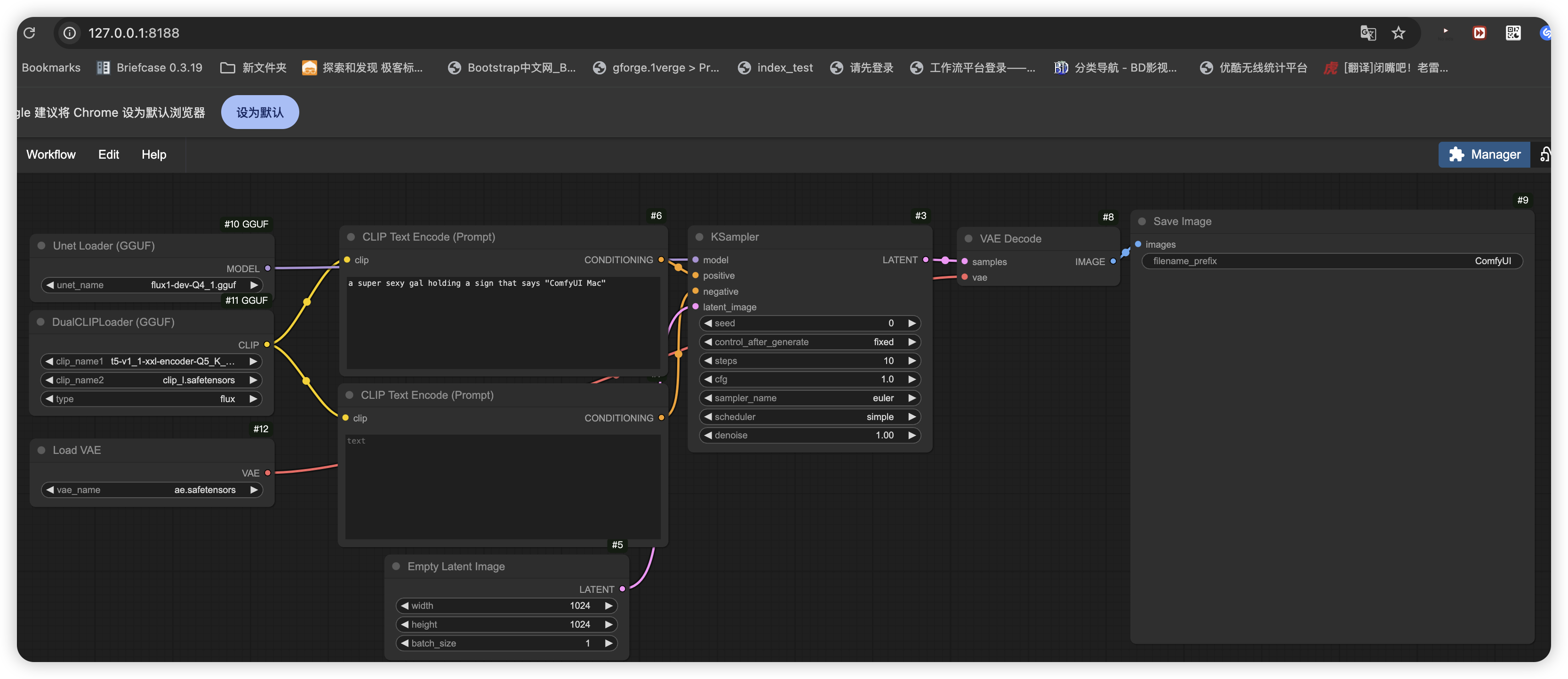
下载基于GGUF的工作流:
https://promptingpixels.com/flux-gguf/
导入工作流后,输入提示词:
a super sexy gal holding a sign that says "ComfyUI Mac"
意思是性感女子举着一个牌子,上面写着 ComfyUI Mac
此时,可以直接执行工作流,程序返回:
ggml_sd_loader:
 13                            144
 0                              50
 14                             25
Requested to load FluxClipModel_
Loading 1 new model
loaded completely 0.0 323.94775390625 True
Requested to load FluxClipModel_
Loading 1 new model

ggml_sd_loader:
 1                             476
 3                             304
model weight dtype torch.bfloat16, manual cast: None
model_type FLUX
Requested to load Flux
Loading 1 new model
loaded completely 0.0 7181.8848876953125 True
 20%|██████████████████▌                                                                          | 2/10 [01:04<04:18, 32.27s/it]
每秒的迭代稳定在30次左右,一张图大概需要3-5分钟左右。
笔者的 m4 mac mini 的配置是丐版升级到24G内存,在出图的过程中,通过活动监视器可知,内存没有被占满:

可以看到,只使用了21G的内存,有网友使用纯丐版16G内存的mini进行测试,16g内存实际刨除系统占用,空闲最多也就10g,超出的部分只能跑SSD的虚拟内存,导致GPU跑不满,所以丐版16G内存是有可能导致出图的效率降低。
最后是10步迭代的出图效果:
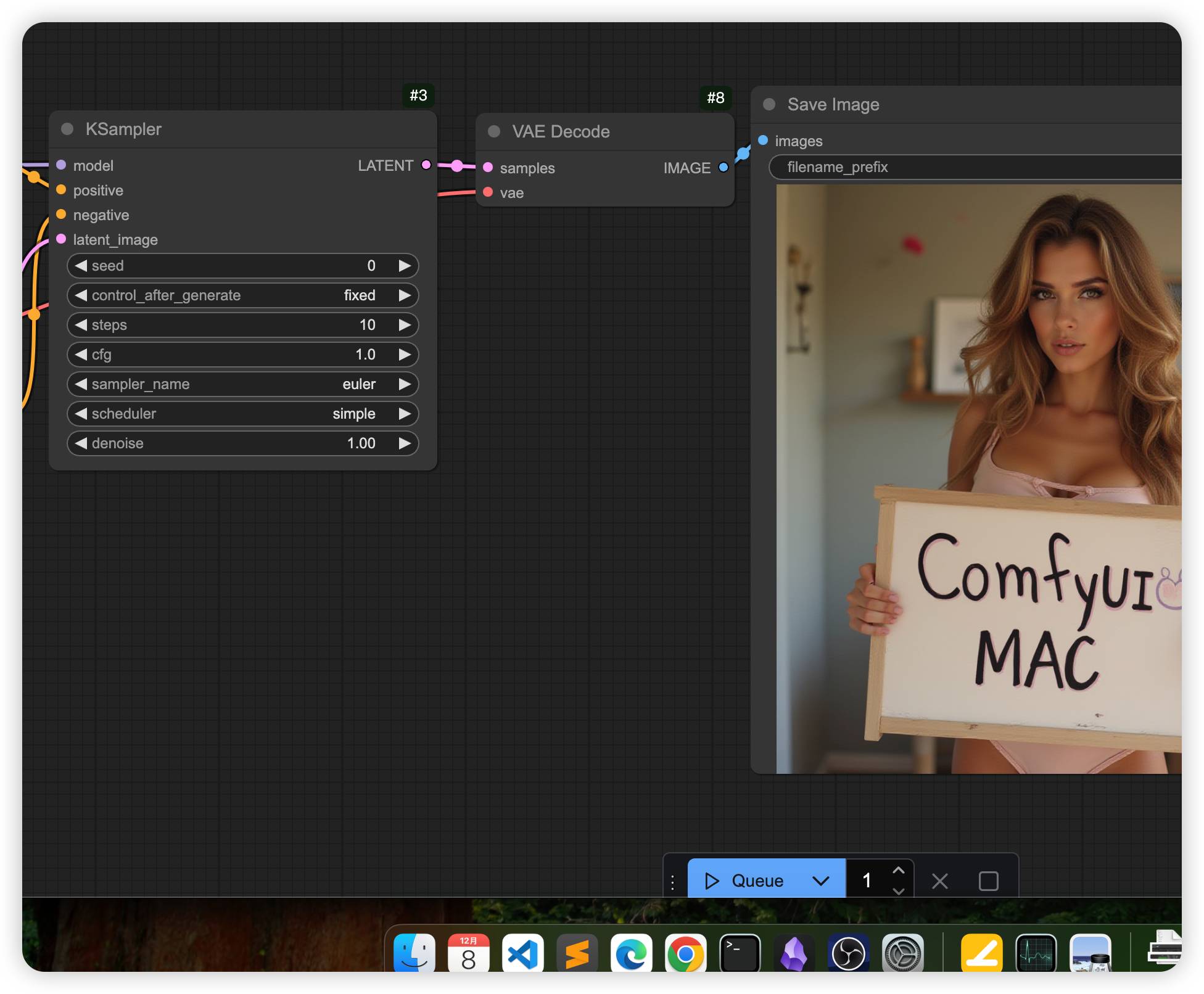
可以看到,精度没有下降太多,主要问题还是出图速度太慢。
m4 mac mini的AI生态还有很大的提升空间,建议AI从业者慎重购买,如果一定要买,也需要避开16G内存的版本,因为如果模型体积过大,16G内存中真正能使用的其实只有10G内存,有可能会导致模型推理效率降低,当然,我们也不能忽视m4 mac mini推理模型的优点,那就是能耗小相对省电,并且使用时的声音很小,不像N卡设备动不动就山呼海啸。
此内容由惯性聚合(RSS阅读器)自动聚合整理,仅供阅读参考。 原文来自 — 版权归原作者所有。