惯性聚合 高效追踪和阅读你感兴趣的博客、新闻、科技资讯
阅读原文 在惯性聚合中打开

推荐订阅源

H
Help Net Security
博客园 - Franky
GbyAI
GbyAI
Threat Intelligence Blog | Flashpoint
爱范儿
爱范儿
IT之家
IT之家
酷 壳 – CoolShell
酷 壳 – CoolShell
aimingoo的专栏
aimingoo的专栏
博客园_首页
MongoDB | Blog
MongoDB | Blog
CTFtime.org: upcoming CTF events
Recent Announcements
Scott Helme
Scott Helme
有赞技术团队
有赞技术团队
M
MIT News - Artificial intelligence
C
CERT Recently Published Vulnerability Notes
K
KPMG report finds enterprise disconnect between AI and its ROI | CIO
Jina AI
Jina AI
F
Fortinet All Blogs
N
Netflix TechBlog - Medium
L
LangChain Blog
L
LINUX DO - 最新话题
OSCHINA 社区最新新闻
OSCHINA 社区最新新闻
cs.AI updates on arXiv.org
H
Hacker News: Front Page
MyScale Blog
MyScale Blog
P
Palo Alto Networks Blog
G
Google Developers Blog
Google DeepMind News
AI
AI
T
Troy Hunt's Blog
Microsoft Azure Blog
阮一峰的网络日志
阮一峰的网络日志
cs.CL updates on arXiv.org
Vercel News
Vercel News
Microsoft Security Blog
罗磊的独立博客
S
Secure Thoughts
大猫的无限游戏
大猫的无限游戏
博客园 - 叶小钗
人人都是产品经理
人人都是产品经理
Blog — PlanetScale
Blog — PlanetScale
博客园 - 司徒正美
Apple Machine Learning Research
钛媒体:引领未来商业与生活新知
钛媒体:引领未来商业与生活新知
博客园 - 三生石上(FineUI控件)
S
Security @ Cisco Blogs
Cloudbric
Cloudbric
E
Exploit-DB.com RSS Feed
Attack and Defense Labs

博客园 - 抱影无眠

CentOS7安装Nginx实现API网关 CentOS7中添加新硬盘 CentOS7 安装oracle 客户端 CentOS7安装RabbitMQ CentOS7安装MongoDB3.6企业版 CentOS 搭建Redis4 环境 Nginx 在Windows下搭建静态Web服务 DevExtreme 搭建Node.js开发环境 MongoDB 搭建Node.js开发环境 MongoDB Windows环境搭建 Oracle 搭建Node.js开发环境 搭建Node.js Redis开发环境 Redis Windows环境搭建 Windows下使用nvm管理多个Node.js 版本 vscode 插件todo-highlight Ionic 解决gradle下载慢的问题 Cmder 简明使用说明 Ionic2 开发环境搭建 Ionic2集成DevExtreme
使用PM2守护Node.js应用
抱影无眠 · 2018-03-22 · via 博客园 - 抱影无眠

PM2简介

PM2是node进程管理工具,可以利用它来简化很多node应用管理的繁琐任务,如性能监控、自动重启、负载均衡等,而且使用非常简单。

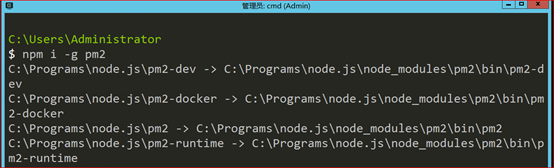
安装PM2

$ npm install pm2 -g

启动Node应用

# 启动app.js应用程序

$ pm2 start app.js

# cluster mode 模式启动4个app.js的应用实例, 4个应用程序会自动进行负载均衡

$ pm2 start app.js -i 4

# 启动应用程序并命名为 "api"

$ pm2 start app.js --name="api"

# 当文件变化时自动重启应用

$ pm2 start app.js --watch

# 启动 bash 脚本

$ pm2 start script.sh

查看Node应用

# 列表 PM2 启动的所有的应用程序

$ pm2 list

# 显示每个应用程序的CPU和内存占用情况

$ pm2 monit

# 显示应用程序的所有信息

$ pm2 show [app-name]

# 显示所有应用程序的日志

$ pm2 logs

# 显示指定应用程序的日志

$ pm2 logs [app-name]

停止/重启Node应用

# 停止所有的应用程序

$ pm2 stop all

# 停止 id为 0的指定应用程序

$ pm2 stop 0

# 重启所有应用

$ pm2 restart all     

# 重启 cluster mode下的所有应用

$ pm2 reload all

# Graceful reload all apps in cluster mode

$ pm2 gracefulReload all

# 关闭并删除所有应用

$ pm2 delete all

# 删除指定应用 id 0

$ pm2 delete 0

# 把名字叫api的应用扩展到10个实例

$ pm2 scale api 10

# 重置重启数量

$ pm2 reset [app-name]

使用启动配置文件

#启动配置文件

$ pm2 start apps.json

范例文件:

{

"apps": [{

"name": "bob_test",

"cwd": "D:\\Practices\\Node\\PM2Demo",

"script": "app.js",

"log_date_format": "YYYY-MM-DD HH:mm Z",

"error_file": "node-app.stderr.log",

"out_file": "node-app.stdout.log",

"pid_file": "node-geo-api.pid",

"instances": 6,

"min_uptime": "200s",

"max_restarts": 10,

"max_memory_restart": "1M",

"cron_restart": "1 0 * * *",

"watch": false,

"merge_logs": true,

"exec_interpreter": "node",

"exec_mode": "fork",

"autorestart": false,

"vizion": false

}]

}

说明:

  • apps:json结构,apps是一个数组,每一个数组成员就是对应一个pm2中运行的应用
  • name:应用程序名称
  • cwd:应用程序所在的目录
  • script:应用程序的脚本路径
  • log_date_format:
  • error_file:自定义应用程序的错误日志文件
  • out_file:自定义应用程序日志文件
  • pid_file:自定义应用程序的pid文件
  • instances:
  • min_uptime:最小运行时间,这里设置的是60s即如果应用程序在60s内退出,pm2会认为程序异常退出,此时触发重启max_restarts设置数量
  • max_restarts:设置应用程序异常退出重启的次数,默认15次(从0开始计数)
  • cron_restart:定时启动,解决重启能解决的问题
  • watch:是否启用监控模式,默认是false。如果设置成true,当应用程序变动时,pm2会自动重载。这里也可以设置你要监控的文件。
  • merge_logs:
  • exec_interpreter:应用程序的脚本类型,这里使用的shell,默认是nodejs
  • exec_mode:应用程序启动模式,这里设置的是cluster_mode(集群),默认是fork
  • autorestart:启用/禁用应用程序崩溃或退出时自动重启
  • vizion:启用/禁用vizion特性(版本控制)