








DevExtreme is a component suite for creating highly responsive web applications for touch devices and traditional desktops.
$ ng new DevExtremeDemo --skip-install --skip-git
$ cnpm install

$ cnpm install --save devextreme devextreme-angular

设置angular-cli.json 文件
"styles": [
"styles.scss",
"../node_modules/devextreme/dist/css/dx.common.css",
"../node_modules/devextreme/dist/css/dx.spa.css",
"../node_modules/devextreme/dist/css/dx.carmine.css"
],
index.html
<!doctype html>
<html lang="en">
<head>
<meta charset="utf-8">
<title>DevExtremeDemo</title>
<base href="/">
<meta name="viewport" content="width=device-width, initial-scale=1">
<link rel="icon" type="image/x-icon" href="favicon.ico">
<link rel="stylesheet" type="text/css" href="assets/css/dx.common.css" />
<link rel="stylesheet" type="text/css" href="assets/css/dx.spa.css" />
<link rel="stylesheet" type="text/css" href="assets/css/dx.carmine.css" />
</head>
<body class="dx-viewport">
<app-root></app-root>
</body>
</html>
app.module.ts
import { BrowserModule } from '@angular/platform-browser';
import { NgModule } from '@angular/core';
import { DxButtonModule } from 'devextreme-angular';
import { AppComponent } from './app.component';
@NgModule({
declarations: [
AppComponent
],
imports: [
DxButtonModule,
BrowserModule
],
providers: [],
bootstrap: [AppComponent]
})
export class AppModule { }
app.component.html
<!--The content below is only a placeholder and can be replaced.-->
<div style="text-align:center">
<h1>
Welcome to DevExtreme!
</h1>
</div>
<dx-button text="Press me" (onClick)="hello()"></dx-button>
<div class="dx-fieldset">
<div class="dx-field">
<div class="dx-field-label">Normal</div>
<div class="dx-field-value">
<dx-button [text]="okButtonOptions.text" [type]="okButtonOptions.type" (onClick)="okButtonOptions.onClick()"></dx-button>
</div>
</div>
<div class="dx-field">
<div class="dx-field-label">Success</div>
<div class="dx-field-value">
<dx-button [text]="applyButtonOptions.text" [type]="applyButtonOptions.type" (onClick)="applyButtonOptions.onClick()"></dx-button>
</div>
</div>
<div class="dx-field">
<div class="dx-field-label">Default</div>
<div class="dx-field-value">
<dx-button [text]="doneButtonOptions.text" [type]="doneButtonOptions.type" (onClick)="doneButtonOptions.onClick()"></dx-button>
</div>
</div>
<div class="dx-field">
<div class="dx-field-label">Danger</div>
<div class="dx-field-value">
<dx-button [text]="deleteButtonOptions.text" [type]="deleteButtonOptions.type" (onClick)="deleteButtonOptions.onClick()"></dx-button>
</div>
</div>
<div class="dx-field">
<div class="dx-field-label">Back</div>
<div class="dx-field-value">
<dx-button [type]="backButtonOptions.type" (onClick)="backButtonOptions.onClick()"></dx-button>
</div>
</div>
</div>
app.component.html
<!--The content below is only a placeholder and can be replaced.-->
<div style="text-align:center">
<h1>
Welcome to DevExtreme!
</h1>
</div>
<dx-button text="Press me" (onClick)="hello()"></dx-button>
<div class="dx-fieldset">
<div class="dx-field">
<div class="dx-field-label">Normal</div>
<div class="dx-field-value">
<dx-button [text]="okButtonOptions.text" [type]="okButtonOptions.type" (onClick)="okButtonOptions.onClick()"></dx-button>
</div>
</div>
<div class="dx-field">
<div class="dx-field-label">Success</div>
<div class="dx-field-value">
<dx-button [text]="applyButtonOptions.text" [type]="applyButtonOptions.type" (onClick)="applyButtonOptions.onClick()"></dx-button>
</div>
</div>
<div class="dx-field">
<div class="dx-field-label">Default</div>
<div class="dx-field-value">
<dx-button [text]="doneButtonOptions.text" [type]="doneButtonOptions.type" (onClick)="doneButtonOptions.onClick()"></dx-button>
</div>
</div>
<div class="dx-field">
<div class="dx-field-label">Danger</div>
<div class="dx-field-value">
<dx-button [text]="deleteButtonOptions.text" [type]="deleteButtonOptions.type" (onClick)="deleteButtonOptions.onClick()"></dx-button>
</div>
</div>
<div class="dx-field">
<div class="dx-field-label">Back</div>
<div class="dx-field-value">
<dx-button [type]="backButtonOptions.type" (onClick)="backButtonOptions.onClick()"></dx-button>
</div>
</div>
</div>
app.component.ts
import { Component } from '@angular/core';
import notify from 'devextreme/ui/notify';
@Component({
selector: 'app-root',
templateUrl: './app.component.html',
styleUrls: ['./app.component.css']
})
export class AppComponent {
title = 'app';
okButtonOptions: any;
applyButtonOptions: any;
doneButtonOptions: any;
deleteButtonOptions: any;
backButtonOptions: any;
constructor(){
this.okButtonOptions = {
text: 'OK',
type: 'normal',
onClick: function (e) {
notify("The OK button was clicked");
}
};
this.applyButtonOptions = {
text: "Apply",
type: "success",
onClick: function (e) {
notify("The Apply button was clicked");
}
};
this.doneButtonOptions = {
text: "Done",
type: "default",
onClick: function (e) {
notify("The Done button was clicked");
}
};
this.deleteButtonOptions = {
text: "Delete",
type: "danger",
onClick: function (e) {
notify("The Delete button was clicked");
}
};
this.backButtonOptions = {
type: "back",
onClick: function (e) {
notify("The Back button was clicked");
}
};
}
hello() {
alert('Hello DevExtreme!');
}
}
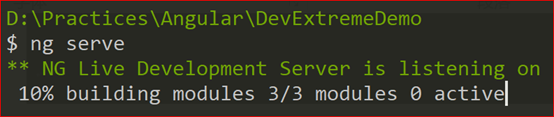
$ ng serve
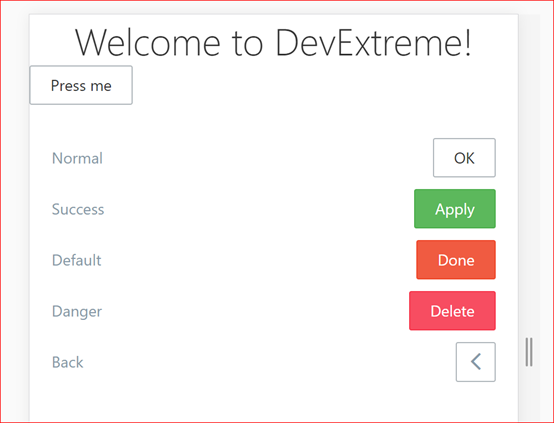
浏览器中打开网址 http://localhost:4200/
此内容由惯性聚合(RSS阅读器)自动聚合整理,仅供阅读参考。 原文来自 — 版权归原作者所有。