








初学Ajax不久,自己写个小东西,以作学习日记
留言板图片如下: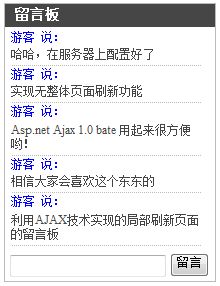
样例地址:http://www.8dao.net/miniguest/
首先,这里用的是Access数据库,便于移动。
数据库很简单,表Guest,字段有ID,Name,Content
要实现Ajax,利用asp.net ajax 1.0 bate是很方便的,在http://ajax.asp.net可以下载到。
安装好后打开VS2005,新建一个ASP.net AJAX Enabled Web Site项目
在里面添加一个WEB用户控件 MiniGB.ascx,控件代码如下:
<%@ Control Language="C#" ClassName="MiniGB" %>
<%@ Import Namespace="System.Data.OleDb" %>
<%@ Import Namespace="System.Data" %>
<script runat="server">
private OleDbConnection conn = new OleDbConnection("provider=microsoft.jet.oledb.4.0;data source="+System.Web.HttpContext.Current.Server.MapPath("guest.mdb"));
private string dname = "游客";
public string Dname
{
get
{
return dname;
}
set
{
dname = value;
}
}
protected void Button1_Click(object sender, EventArgs e)
{
if (TextBox1.Text.Trim() != "")
{
OleDbCommand comm = new OleDbCommand("insert into guest(name,content)values('"+dname+"','" + TextBox1.Text.Trim() + "')", conn);
comm.ExecuteNonQuery();
listupdate();
TextBox1.Text = "";
}
}
private void listupdate()
{
OleDbDataAdapter da = new OleDbDataAdapter("select top 5 * from guest order by id desc", conn);
DataSet ds = new DataSet();
da.Fill(ds);
DataList1.DataSource = ds;
DataList1.DataBind();
}
protected void Page_Load(object sender, EventArgs e)
{
conn.Open();
listupdate();
}
</script>
<style>
.Gtitle
{
width:200px;
background-color:#464646;
color:#FFFFFF;
font-size:14px;
height:20px;
padding: 3px 0 0 10px;
font-weight:bold;
border-style:solid;
border-top-width:1px;
border-bottom-width:0px;
border-left-width:1px;
border-right-width:1px;
border-color:#BBBBBB;
}
.Gbody
{
width:200px;
border-style:solid;
border-top-width:0px;
border-bottom-width:0px;
border-left-width:1px;
border-right-width:1px;
border-color:#BBBBBB;
padding:3px 5px 3px 5px;
}
.Gend
{
width:200px;
border-style:solid;
border-top-width:0px;
border-bottom-width:1px;
border-left-width:1px;
border-right-width:1px;
border-color:#BBBBBB;
padding:3px 5px 3px 5px;
}
.Gname
{
width:190px;
font-size:12px;
color:blue;
}
.Gcontent
{
width:190px;
word-break:break-all;
color:#444444;
font-size:12px;
padding: 3px 0 3px 0;
border-style:dotted;
border-top-width:0px;
border-bottom-width:1px;
border-left-width:0px;
border-right-width:0px;
border-color:#BBBBBB;
}
</style>
<asp:ScriptManagerProxy ID="ScriptManagerProxy1" runat="server">
</asp:ScriptManagerProxy>
<asp:UpdatePanel ID="UpdatePanel1" runat="server">
<ContentTemplate>
<div class="Gtitle"><asp:Label ID="Label1" runat="server" Text="留言板"></asp:Label></div>
<div class="Gbody"><asp:DataList ID="DataList1" runat="server" >
<ItemTemplate>
<div class="Gname"><%# DataBinder.Eval(Container.DataItem, "name") %> 说:</div><div class="Gcontent"><%# DataBinder.Eval(Container.DataItem, "content") %></div>
</ItemTemplate>
</asp:DataList></div>
<div class="Gend"><asp:TextBox ID="TextBox1" runat="server" Width="150px" />
<asp:Button ID="Button1" runat="server" Text="留言" OnClick="Button1_Click" /></div>
</ContentTemplate>
</asp:UpdatePanel>
这样就可以完成这个控件了,然后就是在页面上调用这个控件了,调用这个控件的页面必须有一个ScriptManager控件才能使用。
此控件修改一下可以做为文章评论控件用,加上个:更多。。。,按文章ID显示评论就可以用了。
初学Ajax,做一应用,做为学习日志。还望多指教。
此内容由惯性聚合(RSS阅读器)自动聚合整理,仅供阅读参考。 原文来自 — 版权归原作者所有。