
惯性聚合 高效追踪和阅读你感兴趣的博客、新闻、科技资讯
阅读原文 在惯性聚合中打开

推荐订阅源

H
Help Net Security
博客园 - Franky
GbyAI
GbyAI
Threat Intelligence Blog | Flashpoint
爱范儿
爱范儿
IT之家
IT之家
酷 壳 – CoolShell
酷 壳 – CoolShell
aimingoo的专栏
aimingoo的专栏
博客园_首页
MongoDB | Blog
MongoDB | Blog
CTFtime.org: upcoming CTF events
Recent Announcements
Scott Helme
Scott Helme
有赞技术团队
有赞技术团队
M
MIT News - Artificial intelligence
C
CERT Recently Published Vulnerability Notes
K
KPMG report finds enterprise disconnect between AI and its ROI | CIO
Jina AI
Jina AI
F
Fortinet All Blogs
N
Netflix TechBlog - Medium
L
LangChain Blog
L
LINUX DO - 最新话题
OSCHINA 社区最新新闻
OSCHINA 社区最新新闻
cs.AI updates on arXiv.org
H
Hacker News: Front Page
MyScale Blog
MyScale Blog
P
Palo Alto Networks Blog
G
Google Developers Blog
Google DeepMind News
AI
AI
T
Troy Hunt's Blog
Microsoft Azure Blog
阮一峰的网络日志
阮一峰的网络日志
cs.CL updates on arXiv.org
Vercel News
Vercel News
Microsoft Security Blog
罗磊的独立博客
S
Secure Thoughts
大猫的无限游戏
大猫的无限游戏
博客园 - 叶小钗
人人都是产品经理
人人都是产品经理
Blog — PlanetScale
Blog — PlanetScale
博客园 - 司徒正美
Apple Machine Learning Research
钛媒体:引领未来商业与生活新知
钛媒体:引领未来商业与生活新知
博客园 - 三生石上(FineUI控件)
S
Security @ Cisco Blogs
Cloudbric
Cloudbric
E
Exploit-DB.com RSS Feed
Attack and Defense Labs

博客园 - 横渡

[Linux] - 修改ls/ll显示的时间格式 [MySql] - Windows MySql 8.x 手动zip包安装与外网访问登录权限设定 [Windows] - DNS防污染工具Pcap_DNSProxy [Linux] - 服务器/VPS一键检测带宽、CPU、内存、负载、IO读写 [Linux] - 利用ping给端口加密,限制访问 [Linux] - Windows与Linux网络共享文件夹挂载方法 [Linux] - 网速测试命令 [Linux] - CentOS运行DotNet Web程序 [Linux] - SVN忽略文件夹更新的命令与方法 [Linux] - n2n内网穿透 [Linux] - [转]*** Python版一键安装脚本 - 横渡 [Andriod] - Andriod Studio + 逍遥模拟器 [Linux] - centos使用mount + nfs 远程共享存储 [Linux] - Docker pure-ftp使用 [Linux] - Docker移动数据到其它盘的办法 [Nginx] - PHP+FPM相关的配置 [Nginx] - 负载均衡配置 [Linux] - 定时任务crontab [Linux] - 攻击查看与IP查封 [Linux] - Docker制作nginx+php
[Windows] - Windows/Office纯绿色一键激活工具及方法
横渡 · 2019-06-20 · via 博客园 - 横渡

瘟到死网上有很多一件键激活工具(如KMS),但许多带毒或报毒。这里给出一个纯绿色命令行一键激活,及自已搭建激活服务器的方法。

KMS现在算法都是公开的了,可以自行在网上找到,这里不详述。


使用命令行一键激活

网上有很多别人搭建的KMS服务器(一般用不了多长时间会被封),这里给出个引用地址,可以上去看看:

https://blog.csdn.net/weixin_42588262/article/details/81120403

需要激活Windows,只需要打开命令行工具CMD(使用管理员身份运行),输入下边命令

slmgr.vbs -upk
slmgr.vbs -ipk XXXXX-XXXXX-XXXXX-XXXXX-XXXXX     #不同系统版本这里的激活码不一样,可以在网上找到对应系统的激活码!
slmgr.vbs -skms kms.cangshui.net      #这是Kms域名,如果你自己的已搭建好,可以输入你的域名或者IP
slmgr.vbs -ato
slmgr.vbs -dlv

最后你可以看到如下弹窗界面(表示WIndows已激活):
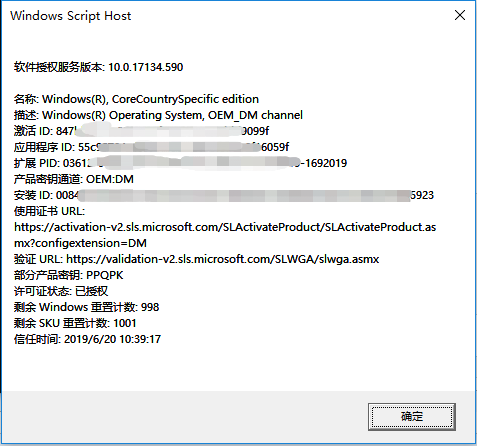
KMS激活,需要3个月一次。只需要再敲以上命令即可。无需任何的软件工具即可完成。


自已搭建KMS服务器

网上有使用VMware虚拟机的方法(境像自己找下),这里介绍使用Docker搭建KMS

非常。。。。。非常。。。。。非常。。。。。简单!!!

参考Docker境像网站:https://hub.docker.com/r/mikolatero/vlmcsd/

只需要找一台Linux主机(可以在本地搭建),安装好docker,键入:

$ docker run -d -p 1688:1688 --restart=always --name vlmcsd mikolatero/vlmcsd

Windows激活命令和上面一样

slmgr.vbs -upk
slmgr.vbs -ipk XXXXX-XXXXX-XXXXX-XXXXX-XXXXX
slmgr.vbs -skms DOCKER_IP
slmgr.vbs -ato
slmgr.vbs -dlv

Office也可以激活

Office x86

cd \Program Files (x86)\Microsoft Office\Office16
cscript ospp.vbs /sethst:DOCKER_IP
cscript ospp.vbs /inpkey:xxxxx-xxxxx-xxxxx-xxxxx-xxxxx
cscript ospp.vbs /act
cscript ospp.vbs /dstatusall

Office x86_64

cd \Program Files\Microsoft Office\Office16
cscript ospp.vbs /sethst:DOCKER_IP
cscript ospp.vbs /inpkey:xxxxx-xxxxx-xxxxx-xxxxx-xxxxx
cscript ospp.vbs /act
cscript ospp.vbs /dstatusall

若Office激活不了,可以使用此工具Office Tool Plus(包激活,激活不了自己找它):

https://otp.landian.vip


 看到这里,以上是如何激活Windows的方法,如果你系统是Windows 10,恭喜你,现可以进入疯狂模式了。继续往下

Windows 10升级为企业G版

确保你的系统Windows 10的版本号是在1703+以上。(可以在开始->运行->输入“dxdiag”中查看到系统版本)

下载一键安装脚本:

https://github.com/kkkgo/EnterpriseGconvert

也可以在本博客中下载:

https://files.cnblogs.com/files/HD/EnterpriseGconvert-master.zip

右键以管理员方式运行文件:EnterpriseGconvert.cmd,回车回车,然后重启系统即可完成。

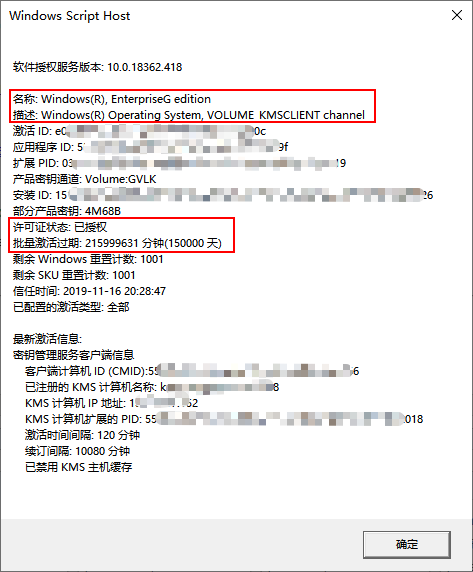
升级成为windows 10企业G版,将拥有400年的使用期限 。oh your god.....

如图:

另附上一些有用链接

正版Windows/Office的安装包下载地址:

http://msdn.itellyou.cn/

VMWare安装KMS服务器方法:

https://blog.csdn.net/wwfang/article/details/82931786

Windows 10企业G版作者:

https://03k.org/1803entg.html