惯性聚合 高效追踪和阅读你感兴趣的博客、新闻、科技资讯
阅读原文 在惯性聚合中打开

推荐订阅源

H
Help Net Security
博客园 - Franky
GbyAI
GbyAI
Threat Intelligence Blog | Flashpoint
爱范儿
爱范儿
IT之家
IT之家
酷 壳 – CoolShell
酷 壳 – CoolShell
aimingoo的专栏
aimingoo的专栏
博客园_首页
MongoDB | Blog
MongoDB | Blog
CTFtime.org: upcoming CTF events
Recent Announcements
Scott Helme
Scott Helme
有赞技术团队
有赞技术团队
M
MIT News - Artificial intelligence
C
CERT Recently Published Vulnerability Notes
K
KPMG report finds enterprise disconnect between AI and its ROI | CIO
Jina AI
Jina AI
F
Fortinet All Blogs
N
Netflix TechBlog - Medium
L
LangChain Blog
L
LINUX DO - 最新话题
OSCHINA 社区最新新闻
OSCHINA 社区最新新闻
cs.AI updates on arXiv.org
H
Hacker News: Front Page
MyScale Blog
MyScale Blog
P
Palo Alto Networks Blog
G
Google Developers Blog
Google DeepMind News
AI
AI
T
Troy Hunt's Blog
Microsoft Azure Blog
阮一峰的网络日志
阮一峰的网络日志
cs.CL updates on arXiv.org
Vercel News
Vercel News
Microsoft Security Blog
罗磊的独立博客
S
Secure Thoughts
大猫的无限游戏
大猫的无限游戏
博客园 - 叶小钗
人人都是产品经理
人人都是产品经理
Blog — PlanetScale
Blog — PlanetScale
博客园 - 司徒正美
Apple Machine Learning Research
钛媒体:引领未来商业与生活新知
钛媒体:引领未来商业与生活新知
博客园 - 三生石上(FineUI控件)
S
Security @ Cisco Blogs
Cloudbric
Cloudbric
E
Exploit-DB.com RSS Feed
Attack and Defense Labs

博客园 - allanyan

修改ORACLE RAC的字符集(记录一下) Red Hat Enterprise Linux的一些简单操作(备忘录) 也说腾讯打算开放API Android 开发日志04——CheckBox与ImageButton Android 开发日志01——Say Hi程序 如何用Word 2007写Blog - allanyan - 博客园 AIX平台下使用共享库的示例 男人恋爱绝不做19件事 所谓“没有缘份”仅仅是爱情故事中一个无法处理的异常情况 男人在有了女人之后 婚前婚后 男女间八种没有结果的感情 终于可以用Windows Live Writer 写博客了 苏格拉底与失恋者的对话 人间四月天[转贴] XManager 配置说明 Win32 API下的多线程编程 Linux的一些有用的命令 Windows 下的FTP脚本
Android 开发日志02——您最喜欢哪个品牌的汽车
allanyan · 2010-06-29 · via 博客园 - allanyan

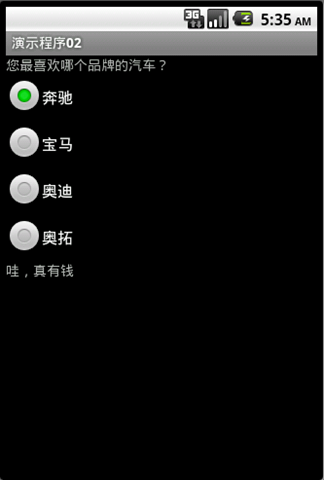
第二个程序也非常简单,先看看效果吧,主要是演示如何使用RadioButton和RadioGroup
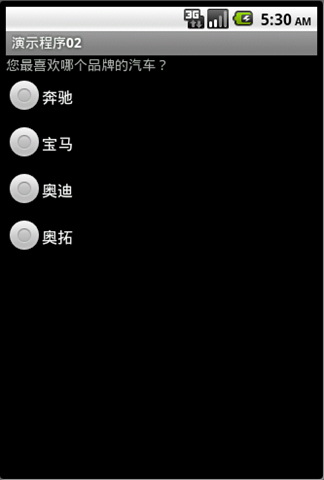
image  image

当你选择不同的品牌的时候会有不平的评论,呵呵。

源码如下:

 1 package com.demo;
 2 
 3 import android.app.Activity;
 4 import android.os.Bundle;
 5 import android.widget.RadioButton;
 6 import android.widget.RadioGroup;
 7 import android.widget.TextView;
 8 import android.widget.RadioGroup.OnCheckedChangeListener;
 9 
10 public class Demo02 extends Activity {
11     
12     // 定义四个RadioButtom
13     RadioButton optionBenz;
14     RadioButton optionBMW;
15     RadioButton optionAudi;
16     RadioButton optionAlto;
17     
18     // 定义评论的文本
19     TextView tvSummary;
20     
21     /** Called when the activity is first created. */
22     @Override
23     public void onCreate(Bundle savedInstanceState) {
24         super.onCreate(savedInstanceState);
25         setContentView(R.layout.main);
26         
27         optionBenz = (RadioButton) this.findViewById(R.id.optBenz);
28         optionBMW = (RadioButton) this.findViewById(R.id.optBMW);
29         optionAudi = (RadioButton) this.findViewById(R.id.optAudi);
30         optionAlto = (RadioButton) this.findViewById(R.id.optAlto);
31         tvSummary = (TextView) this.findViewById(R.id.lbSummary);
32         
33         // 为RadioGroup注册OnCheckedChangeListener事件的处理类
34         RadioGroup rgpAnswer = (RadioGroup) this.findViewById(R.id.rgpAnswer);
35         rgpAnswer.setOnCheckedChangeListener(OnRadioButtonClick);
36     }
37     
38     private OnCheckedChangeListener OnRadioButtonClick = new OnCheckedChangeListener()
39     {
40         // 当选择不同的选项时,会给出不同的评语
41         public void onCheckedChanged(RadioGroup group, int checkedId)
42         {            
43             if(checkedId == optionBenz.getId())
44             {
45                 tvSummary.setText("哇,真有钱");
46             }
47             if(checkedId == optionBMW.getId())
48             {
49                 tvSummary.setText("嗯,有品位");
50             }
51             if(checkedId == optionAudi.getId())
52             {
53                 tvSummary.setText("嗯,有深度");
54             }
55             if(checkedId == optionAlto.getId())
56             {
57                 tvSummary.setText("哎,没追求");
58             }
59         }
60     };
61 }