









When you just installed and configured the MOSS 2007 on your server. You will see a sentence with big red font like below picture.
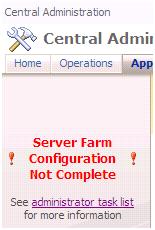
A key step to complete the Server Farm Configuration is creating a SSP for your farm. Then, you may have many questions. What is SSP? What does it do? How to create and configure it? And so on…
Don’t worry. I will publish a series of this topic to introduce the SSP. In this article, I will describe that how to create a new SSP for your farm.
Above all, there are at least 1 server is run the Office SharePoint Server Search service. I recommend you prepare two empty web applications before you begin your work. Please keep in mind that you need to set a domain use as the app pool log on user. Because the SSP will depends on them. Though you can build your SSP based on only one web application or an existing web application. But it’s not safe. Because the other thing in the web application may cause many impact on the SSP. How to create a new web application?
1. Open SharePoint Central Administration
2. On the Central Administration home page, click Application Management
3. On the Application Management page. In the Office SharePoint Server Shared Services section. Click Create or configure this farm's shared services
4. On the Manage this Farm's Shared Services page. Click New SSP Button

5. On the New Shared Services Provider page. In the SSP Name section. Fill your SSP name in the SSP Name textbox.
6. Select one of the empty web application which you prepared before from the Web application drop down list
7. In My Site Location section, Select another one of the empty web application which you prepared before from the Web application drop down list
8. Fill the Relative URL in the textbox for MySite service.

9. In the SSP Service Credentials section. Input the proper credential information in these two textboxes

10. In the SSP Database section. Specific the DB server name and the DB name what you want the SSP database hosted on.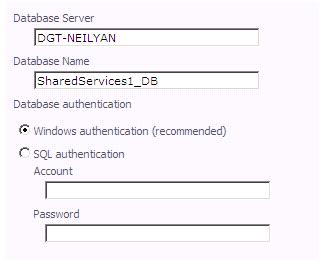
11. In the Search Database section. Specific the DB server name and the DB name what you want the search database hosted on.

12. In the Index Server section. Select the index server and specific the path for your index file.

13. In the SSL for Web Services section. Specific whether the SSL is on or not

14. Click OK. Waiting for the SSP creating.
All the steps are above. In my next article, I will describe how to manage multiple SSP on your farm.
Thanks,
Neil
E-mail: yan0lovesha@gmail.com
此内容由惯性聚合(RSS阅读器)自动聚合整理,仅供阅读参考。 原文来自 — 版权归原作者所有。