
惯性聚合 高效追踪和阅读你感兴趣的博客、新闻、科技资讯
阅读原文 在惯性聚合中打开

推荐订阅源

酷 壳 – CoolShell
酷 壳 – CoolShell
H
Hacker News: Front Page
P
Palo Alto Networks Blog
T
ThreatConnect
Apple Machine Learning Research
博客园_首页
T
True Tiger Recordings
P
Privacy & Cybersecurity Law Blog
B
Blog
IT之家
IT之家
Last Week in AI
Last Week in AI
F
Full Disclosure
Hacker News: Ask HN
Hacker News: Ask HN
C
Comments on: Blog
Microsoft Azure Blog
C
Cybersecurity and Infrastructure Security Agency CISA
Microsoft Security Blog
博客园 - 【当耐特】
N
News and Events Feed by Topic
NISL@THU
NISL@THU
腾讯CDC
雷峰网
雷峰网
Security Latest
Security Latest
李成银的技术随笔
M
Microsoft Research Blog - Microsoft Research
L
LangChain Blog
L
Lohrmann on Cybersecurity
cs.CL updates on arXiv.org
C
Check Point Blog
Y
Y Combinator Blog
Recent Announcements
博客园 - Franky
N
News | PayPal Newsroom
V
V2EX
A
About on SuperTechFans
The Register - Security
月光博客
月光博客
奇客Solidot–传递最新科技情报
奇客Solidot–传递最新科技情报
Google Online Security Blog
MyScale Blog
MyScale Blog
Cisco Talos Blog
Cisco Talos Blog
Vercel News
Vercel News
WordPress大学
WordPress大学
C
Cyber Attacks, Cyber Crime and Cyber Security
The Hacker News
The Hacker News
IntelliJ IDEA : IntelliJ IDEA – the Leading IDE for Professional Development in Java and Kotlin | The JetBrains Blog
爱范儿
爱范儿
A
Arctic Wolf
L
LINUX DO - 最新话题
freeCodeCamp Programming Tutorials: Python, JavaScript, Git & More

博客园 - 让心灵去旅行

在Javascript中用command模式模拟多线程,包含注释 项目小结 sql语句性能提高 oracle的异常 简单的消息发送小程序 XP风格进度条 随机抽取不重复的数据 xmlhttp实现无刷新页面 VS.Net 2005中文版下载地址收藏 在线统计与跟踪(新) 自己做控件小例子 可以双击的DataGrid 权限管理的方案(只有实现思想) - 让心灵去旅行 收藏几段SQL Server语句和存储过程(转载) - 让心灵去旅行 动态添加和删除行 键盘各键对应的键值 只能输入数值的输入框 操作动态表格的控件 - 让心灵去旅行 模仿QQ的菜单滚动效果
简单ocx控件制作方法(原创)
让心灵去旅行 · 2005-09-08 · via 博客园 - 让心灵去旅行

    B/S系统中,客户端javascript的执行效率不高,运算速度慢,很多时候不得不采用ocx控件来实现一些功能。将简单的ocx的控件的制作方法提供给大家,一个参考。这是我做的第一个ocx控件。
    打开Microsoft Visual C++6.0,新建一个MFC ActiveX工程,如下图:
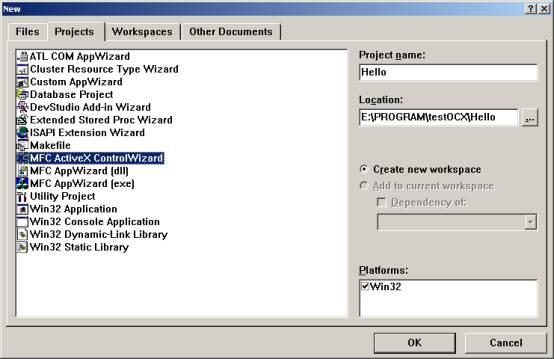
点击确定,出现ActiveX ControlWizard,如下图:
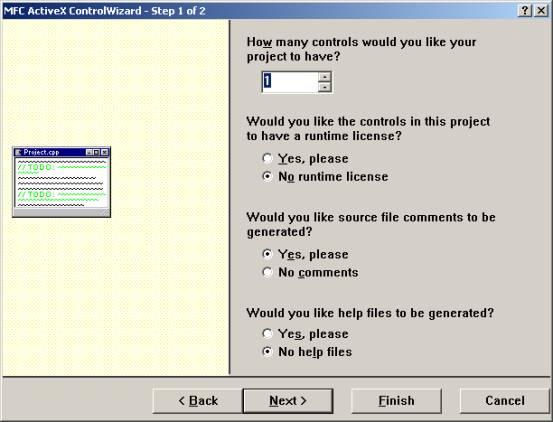
选择Next,出现下图界面:
继续选择Next,创建工程HelloWorld:
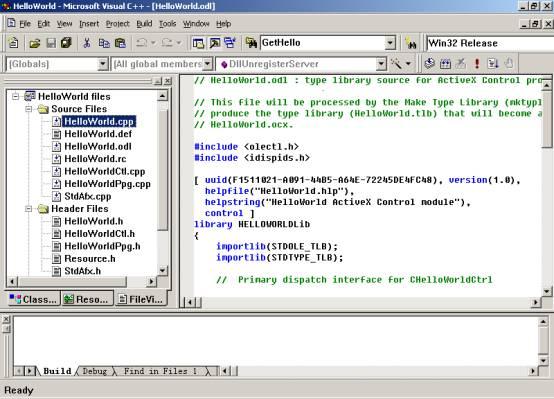
在HelloWorldCtl.cpp中,修改如下地方:
// Dispatch and event IDs
public:
 enum {
 //{{AFX_DISP_ID(CHelloWorldCtrl)
 // NOTE: ClassWizard will add and remove enumeration elements here.
 // DO NOT EDIT what you see in these blocks of generated code ! 
 dispidGetHello = 1L, 
 //}}AFX_DISP_ID
 };
};

然后添加申明
BEGIN_DISPATCH_MAP(CHelloWorldCtrl, COleControl)
//{{AFX_DISPATCH_MAP(CHelloWorldCtrl)
DISP_FUNCTION(CHelloWorldCtrl,"GetHello",GetHello,VT_BSTR, VTS_BSTR)
//}}AFX_DISPATCH_MAP
END_DISPATCH_MAP()

接着添加成员
// Message maps
//{{AFX_MSG(CHelloWorldCtrl)
// NOTE - ClassWizard will add and remove member functions here.
// DO NOT EDIT what you see in these blocks of generated code !
afx_msg BSTR GetHello(LPCTSTR strBatchName);
//}}AFX_MSG

添加方法,这个方法返回"Hello World!"加上输入参数strBatchName。
BSTR CHelloWorldCtrl::GetHello(LPCTSTR strBatchName)
 {
  CString aa = (CString)strBatchName ;
  CString rtnstr = "Hello World!" + aa;
  return rtnstr.AllocSysString();
 }

最后在Build的Configration中选择下图方式,
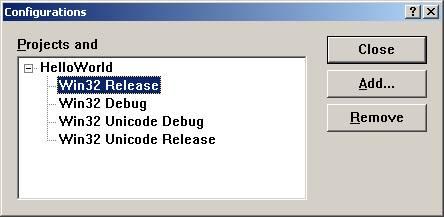
编译完成,在Release文件夹下产生ocx.

接着就是测试了:
 将ocx提取出来,我采用Microsoft Control Pad来编辑,得到ocx控件的classid, 然后创建一个html页面,写入javascrip脚本,调用ocx中的方法。
 将编译通过的release目录的HelloWorld.ocx与Html存放在同一文件夹下,打开html页面,页面将谈出对话框,信息为"Hello World!-- AppleGreen".

PS:因空间限制,不能将完成代码提供给大家,如有需要,留下邮件地址。
     测试效果的下载见:ocx与html下载