惯性聚合 高效追踪和阅读你感兴趣的博客、新闻、科技资讯
阅读原文 在惯性聚合中打开

推荐订阅源

酷 壳 – CoolShell
酷 壳 – CoolShell
H
Hacker News: Front Page
P
Palo Alto Networks Blog
T
ThreatConnect
Apple Machine Learning Research
博客园_首页
T
True Tiger Recordings
P
Privacy & Cybersecurity Law Blog
B
Blog
IT之家
IT之家
Last Week in AI
Last Week in AI
F
Full Disclosure
Hacker News: Ask HN
Hacker News: Ask HN
C
Comments on: Blog
Microsoft Azure Blog
C
Cybersecurity and Infrastructure Security Agency CISA
Microsoft Security Blog
博客园 - 【当耐特】
N
News and Events Feed by Topic
NISL@THU
NISL@THU
腾讯CDC
雷峰网
雷峰网
Security Latest
Security Latest
李成银的技术随笔
M
Microsoft Research Blog - Microsoft Research
L
LangChain Blog
L
Lohrmann on Cybersecurity
cs.CL updates on arXiv.org
C
Check Point Blog
Y
Y Combinator Blog
Recent Announcements
博客园 - Franky
N
News | PayPal Newsroom
V
V2EX
A
About on SuperTechFans
The Register - Security
月光博客
月光博客
奇客Solidot–传递最新科技情报
奇客Solidot–传递最新科技情报
Google Online Security Blog
MyScale Blog
MyScale Blog
Cisco Talos Blog
Cisco Talos Blog
Vercel News
Vercel News
WordPress大学
WordPress大学
C
Cyber Attacks, Cyber Crime and Cyber Security
The Hacker News
The Hacker News
IntelliJ IDEA : IntelliJ IDEA – the Leading IDE for Professional Development in Java and Kotlin | The JetBrains Blog
爱范儿
爱范儿
A
Arctic Wolf
L
LINUX DO - 最新话题
freeCodeCamp Programming Tutorials: Python, JavaScript, Git & More

博客园 - Teddy's Knowledge Base

FluentDataflow - Fluent Style TPL Dataflow - Teddy's Knowledge Base CoreProfiler升级到.NetStandard 2.0 - Teddy's Knowledge Base 老司机实战Windows Server Docker:5 Windows Server Dockerfile葵花宝典 - Teddy's Knowledge Base 老司机实战Windows Server Docker:4 单节点Windows Docker服务器简单运维(下) - Teddy's Knowledge Base 老司机实战Windows Server Docker:3 单节点Windows Docker服务器简单运维(上) - Teddy's Knowledge Base 老司机实战Windows Server Docker:2 docker化现有iis应用的正确姿势 - Teddy's Knowledge Base 老司机实战Windows Server Docker:1 初体验之各种填坑 - Teddy's Knowledge Base 老司机学Xamarin系列总目录 - Teddy's Knowledge Base CoreProfiler/NanoProfiler性能调试监控系列总目录 - Teddy's Knowledge Base 老司机学新平台 - Xamarin开发之我的第一个MvvmCross跨平台插件:SimpleAudioPlayer - Teddy's Knowledge Base 老司机学新平台 - Xamarin Forms开发框架之MvvmCross插件精选 - Teddy's Knowledge Base 老司机学新平台 - Xamarin Forms开发框架二探 (Prism vs MvvmCross) - Teddy's Knowledge Base 老司机学新平台 - Xamarin开发环境及开发框架初探 Elasticsearch Mantanence Lessons Learned Today RabbitMQ Exchange & Queue Design Trade-off Understanding RabbitMQ Exchange & Queue Behind RabbitMQ Exchange Types 七步,搭建基于Windows平台完美Jekyll博客环境 - Teddy's Knowledge Base How to Change RabbitMQ Queue Parameters in Production?
使用CoreProfiler/NanoProfiler实现跨平台&应用的整合性能调试 - Teddy's Knowledge Base
Teddy's Know · 2016-09-29 · via 博客园 - Teddy's Knowledge Base

摘要

NanoProfiler是一个开源.NET性能调试类库,CoreProfiler是其.NET Core版本的实现。在之前的一些文章中,我曾介绍过NanoProfiler的主要使用方式,以及如何为生产环境,基于ELK对应用性能进行调试和监控。不过,对于一般的用户来说,尤其是本机开发和小团队开发,搭建ELK,维护这套这套支持系统的稳定运行,学习曲线还是有点高。而如果只是单个app孤立的使用NanoProfiler,则大大浪费了其原本能发挥的跨应用性能调试监控的能力。

本文演示了3个不同平台的后端应用使用CoreProfiler/NanoProfiler实现跨应用的性能调试和监控。这三个应用包括.Net Core和传统的.NET 4.5 Web项目,演示的技术包括:

  • 如何在.NET Core程序中使用CoreProfiler进行Wcf服务、Http REST服务和EntityFramework数据库调用的性能监控;
  • 如何在传统.NET 4.5 Web项目中使用NanoProfiler进行Wcf服务和Http REST服务调用的性能监控;
  • 如何配置CoreProfiler/NanoProfiler实现自动的跨平台&应用的整合性能调试和监控;

完整的示例源码,可以从下面的地址下载:
https://github.com/teddymacn/cross-app-profiling-demo

示例代码目录结构

  • Core.UI - .Net Core Mvc 应用,用于UI呈现,调用外部Wcf服务和Http REST服务
  • Core.Api - .Net Core WebApi 应用,提供Http REST服务,使用EntityFramework进行数据访问
  • Net45.Api - 传统.Net 4.5 WebApi 应用,提供Wcf服务和Http REST服务,调用自己提供的Wcf服务,调用外部.Net Core Api提供的Http REST服务

示例代码运行步骤

  1. 开发环境要求:Windows 7+,IIS7+,VS2015 Update 3,.Net Core SDK VS Tool v1.0.0+;
  2. 从github上git clone上面的示例repo;
  3. 运行run_api.cmd启动Core.Api服务;
  4. 使用VS2015打开Net45.Api项目,按F5运行,确保页面打开显示正在运行;
  5. 运行run_ui.cmd启动Core.UI服务;
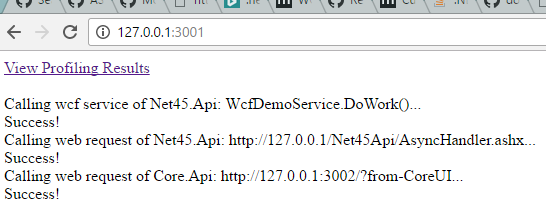
  6. 在任意浏览器中访问Core.UI的首页: http://127.0.0.1:3001;
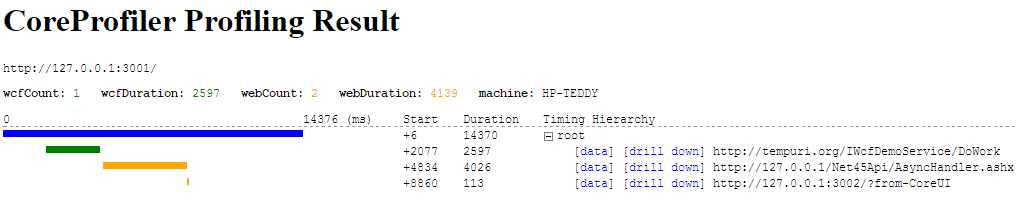
  7. 点击打开页面上的链接,进一步点击链接,查看详细的性能调试的结果;
  8. 点击drill down/drill up链接,查看关联服务调用的性能调试结果;

图示

访问Core.UI首页:

访问Core.UI首页

查看Core.UI首页的性能调试结果:

查看Core.UI首页的性能调试结果

注意上图中的drill down链接,点击这些链接,可以drill down到Core.UI对外发出的Wcf服务和REST服务调用的性能调试结果。比如,如果我们点击http://127.0.0.1/Net45Api/AsyncHandler.ashx旁边的drill down链接:

Core.UI对外发出的Wcf服务和REST服务调用的性能调试结果

在进一步点击http://127.0.0.1:3002/?from-Net45Api旁边的drill down,我们可以看到从Net45.Api应用调用Core.Api的REST服务的性能调试结果:

从Net45.Api应用调用Core.Api的REST服务的性能调试结果

代码解析

Core.UI

Core.UI的project.json中,我们可以看到对CoreProfiler和Wcf相关的nuget package的引用:
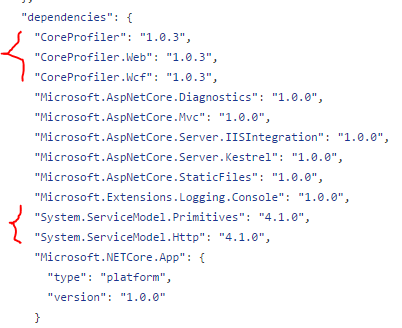
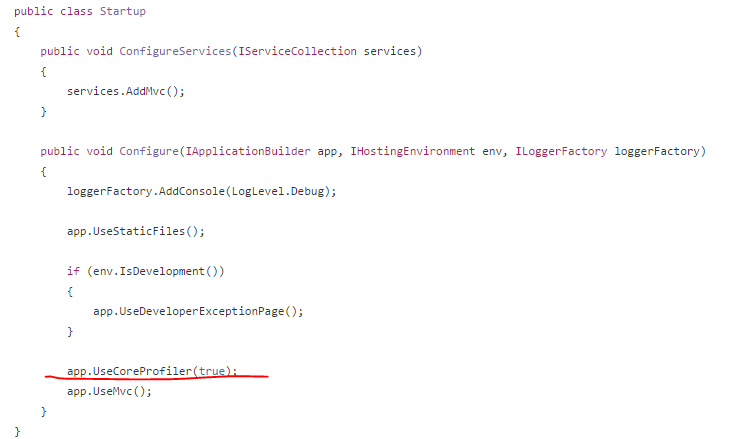
Core.UI的Startup中,我们可以看到,开启CoreProfiler性能调试,只需要添加这一行代码(这里的参数true表示开启跨应用drilldown功能):
Net45ApiServiceConfiguration.cs中为Wcf服务的client添加了开启CoreProfiler的Wcf调试的Behavior:

这个static partial方法,是.Net Core中,为由Wcf Connected Services生成的Wcf client代码进行额外配置的标准方式,这里不做详述。

在Core.UI/Controllers/HomeController.cs中,值得一提的是,对自定义REST请求,为使drilldown功能工作,需要添加一个header,使得两个请求的性能调试结果能够互相关联:

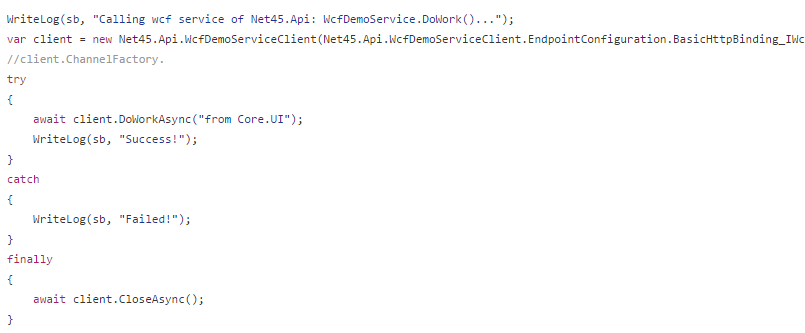
调用Wcf服务,无需特殊处理,因为前面添加的WCF Behavior已经自动添加对应的header:
Core.Api

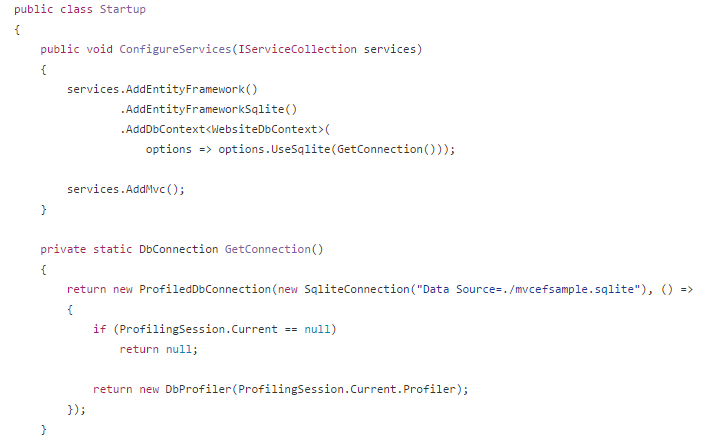
Core.Api因为同样是.Net Core项目,总体配置方式和Core.UI类似,唯一额外的是,为EntityFramework,开启了的CoreProfiler的DB profiling支持:
Net45.Api

Net45.Api是一个传统.Net 4.5项目,在之前的NanoProfiler系列中,已经介绍过NanoProfiler在Web应用中的使用,这里不重复介绍了。这里唯一额外的是,开启了跨应用drilldown功能,和.NetCore项目略有不同,需要左两个步骤。

步骤1,在Web.config中添加NanoProfilerImportModule:

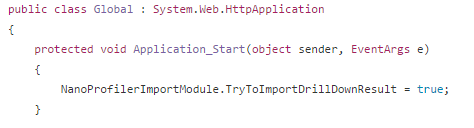
步骤2,在Global.asax.cs中,设置TryToImportDrillDownResult开关为true:
基本上就是这样了,Enjoy!