


PanQi
Ultrapower Software
简介:采用dotNet开发WAP应用,通常会遇到翻页的问题,在dotNet的List控件中虽然提供ItemCount和ItemsPerPage属性来实现翻页,但这种自带的翻页只能实现“上一页”、“下一页”的翻页效果,无法按指定页数来选择性翻页,因此,很有必要开发自己的翻页机制,来完善它的不足之处,本文档将一步一步介绍如何用.Net提供有限的MobileControl来实现按指定页数翻页。
如您要转贴,请保留原出处,并勿做删改。谢谢。
方案一:采用数据绑定,指定数据源(DataTable)实现翻页的方法
第一步,打开VS.Net,新建Asp.Net移动Web应用,我们这里将项目命名为WapPager,如下图:
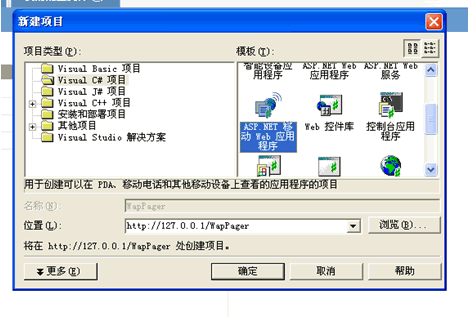
第二步,向
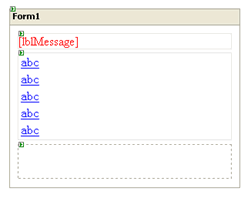
Form里拖入所需控件:Label控件,一个,用于显示提示消息。
List控件,一个,用于绑定数据,显示指定范围内的记录。
Panel控件,一个,用于存放表达式计算出的n个页面的Link页码。
页面布局如下图所示:
第三步,修改控件属性,为编码作准备(具体属性设置请看Demo)。
第四步,编码。(说明:演示数据来自SQL-Server的NorthWind数据库)
为了实现翻页效果,需要用到下面三个方法,分别是:
1、 GetAllData()方法:
GetAllData是获取全部数据,返回DataTable的方法,之所以采用DataTable来存放全部数据,主要是为了后面用DataTable的Select方法来获取其中指定范围内记录;
 private DataTable GetAllData()
  {
{  this.sqlDataAdapter1.Fill(this.dataSet11); return this.dataSet11.Tables["Products"];
  }
}
2、 GetPage()方法:
GetPage是通过数据总数、每页规定显示数量,计算出页数的方法,返回存放全部页码的DataTable,我们为这个DataTable定义了LinkText和LinkUrl两列,这两列的值供页码控件Link绑定数据所用。
private DataTable GetPage() { DataTable dtPage = new DataTable(); DataTable dtAllData = this._dtAllData; int dataCount = dtAllData.Rows.Count; int pageCount = 0; if((dataCount%GlobalConfig.Size) == 0)  { pageCount = dataCount/GlobalConfig.Size;
  } if((dataCount%GlobalConfig.Size) != 0) { pageCount = dataCount/GlobalConfig.Size + 1; } dtPage.Columns.Add("LinkText",typeof(String)); dtPage.Columns.Add("LinkUrl",typeof(String)); for(int i = 0;i < pageCount; i++) { DataRow row = dtPage.NewRow(); row["LinkText"] = i + 1; if(i == 0) { row["LinkUrl"] = "MobileWebForm1.aspx?startID=" + ((i*GlobalConfig.Size)) + "&selectPage=" + i; } else { row["LinkUrl"] = "MobileWebForm1.aspx?startID=" + ((i*GlobalConfig.Size) + 1) + "&selectPage=" + i; } dtPage.Rows.Add(row); } return dtPage; }
3、 SelectTable()方法:
SelectTable方法是利用DataTable自身的Select方法,传入起始值,读取指定行数记录,最终实现翻页效果.
private void SelectTable(int startID) { try { DataTable dtAllData = this._dtAllData; DataTable dtSelectData = new DataTable(); dtSelectData.Columns.Add("ProductID",typeof(String)); dtSelectData.Columns.Add("ProductName",typeof(String)); string strExpr; int endID = startID + GlobalConfig.Size; if(startID == 0) { strExpr = "ProductID >= "+ startID +" and ProductID <= "+ endID +""; } else { strExpr = "ProductID >= "+ startID +" and ProductID < "+ endID +""; } if(dtAllData != null && dtAllData.Rows.Count > 0) { DataRow[] foundRows = dtAllData.Select(strExpr); string flag1 = foundRows.Length.ToString(); for(int i = 0; i < foundRows.Length; i ++) { DataRow row = dtSelectData.NewRow(); row["ProductID"] = foundRows[i][0]; row["ProductName"] = foundRows[i][1]; dtSelectData.Rows.Add(row); } if(dtSelectData != null && dtSelectData.Rows.Count > 0) { this.List.DataSource = dtSelectData; this.List.DataBind(); } try { DataTable dtPage = GetPage(); string selectPage = Page.Request["SelectPage"]; for(int i = 0; i < dtPage.Rows.Count; i++) { Link link = new System.Web.UI.MobileControls.Link(); if(i == Convert.ToInt32(selectPage)) { link.Text = "[本页" + dtPage.Rows[i][0].ToString() + "]"; } else { link.Text = "[" + dtPage.Rows[i][0].ToString() + "]"; } link.NavigateUrl = dtPage.Rows[i][1].ToString(); link.ID = i.ToString(); link.BreakAfter = false; this.Panel.Controls.Add(link); } } catch(Exception exc) { this.lblMessage.Text = exc.Message; this.lblMessage.Visible = true; } } else { this.lblMessage.Text = "没有记录!"; this.lblMessage.Visible = true; } } catch(Exception exc) { this.lblMessage.Text = exc.Message; this.lblMessage.Visible = true; } }
页面最终效果:  注:每页显示最多记录条数可以在Web.Config的GlobalSection属性Record.Page.Size节点自行定义,默认为每页显示10条记录。
如果您有任何意见或建议,请联系作者:Email:PanQi7000(a)126.com,请将(a)替换为@。
Write by MyXQ
此内容由惯性聚合(RSS阅读器)自动聚合整理,仅供阅读参考。 原文来自 — 版权归原作者所有。