


惯性聚合 高效追踪和阅读你感兴趣的博客、新闻、科技资讯
阅读原文 在惯性聚合中打开

推荐订阅源

酷 壳 – CoolShell
酷 壳 – CoolShell
H
Hacker News: Front Page
P
Palo Alto Networks Blog
T
ThreatConnect
Apple Machine Learning Research
博客园_首页
T
True Tiger Recordings
P
Privacy & Cybersecurity Law Blog
B
Blog
IT之家
IT之家
Last Week in AI
Last Week in AI
F
Full Disclosure
Hacker News: Ask HN
Hacker News: Ask HN
C
Comments on: Blog
Microsoft Azure Blog
C
Cybersecurity and Infrastructure Security Agency CISA
Microsoft Security Blog
博客园 - 【当耐特】
N
News and Events Feed by Topic
NISL@THU
NISL@THU
腾讯CDC
雷峰网
雷峰网
Security Latest
Security Latest
李成银的技术随笔
M
Microsoft Research Blog - Microsoft Research
L
LangChain Blog
L
Lohrmann on Cybersecurity
cs.CL updates on arXiv.org
C
Check Point Blog
Y
Y Combinator Blog
Recent Announcements
博客园 - Franky
N
News | PayPal Newsroom
V
V2EX
A
About on SuperTechFans
The Register - Security
月光博客
月光博客
奇客Solidot–传递最新科技情报
奇客Solidot–传递最新科技情报
Google Online Security Blog
MyScale Blog
MyScale Blog
Cisco Talos Blog
Cisco Talos Blog
Vercel News
Vercel News
WordPress大学
WordPress大学
C
Cyber Attacks, Cyber Crime and Cyber Security
The Hacker News
The Hacker News
IntelliJ IDEA : IntelliJ IDEA – the Leading IDE for Professional Development in Java and Kotlin | The JetBrains Blog
爱范儿
爱范儿
A
Arctic Wolf
L
LINUX DO - 最新话题
freeCodeCamp Programming Tutorials: Python, JavaScript, Git & More

博客园 - 观无明

IE9 + django开发版WEB服务器 不响应或Socket报错 google chrome 下django用户登录失败的问题 django 开发多语言网站 不愁男女比例不协调 Word文件如源码一样也可比较和合并 python 的字符编码和中文处理 - 观无明 - 博客园 djang 测试心得 my django development environment (virtualenv+pip+django) nginx+fastcgi+django实践笔记 django 开发 - 小心模板文件的编码格式(utf-8) 汉王电子书D20使用笔记 使用south实现Django的数据库升级迁移 VIM 笔记 (for python ) 在Windows上使用Linux命令 cygwin 仍有人在真心关注这灾难 CruiseControl中使用NUnit中测试WEB服务 Resharper封装(Encapsulate)域Field为属性Property的命名问题 数据库开发的持续集成 - CruiseControl.Net的项目配置 数据库开发的持续集成 - Liquibase的简介和应用
CruiseControl中应用NCover和NCoverExplore
观无明 · 2008-07-22 · via 博客园 - 观无明

曾经想在CruiseControl.Net上加入NCover和NCoverExplorer来输出测试案例覆盖代码的情况,当时因在Ncover.org上发现要$而作罢。

偶然获知其老版依然免费,心里痒痒,再次尝试。感觉CC的帮助写得不够完善,就来涂一篇。

配置CC项目

1 通过NCover调用NUnit做测试,就不需要在项目中其他地方再做一次了。NCover将在baseDirectory中生成Coverage.xml文件。

    <exec executable="D:\Studio\tools\NCover\NCover.console.exe" 
            baseDirectory
="D:\studio\"
 
            buildArgs
="D:\Studio\tools\nunit\nunit-console.exe /noshadow D:\studio\tests\bin\Release\MyTest.dll /xml:D:\studio\nunit-results.xml" />

2 接下来基于Coverage.xml生成NCoverExplore报告(CoverageReport.xml):

    <exec executable="D:\Studio\tools\NCover\NCoverExplorer.Console.exe" 
        baseDirectory
="D:\studio\" 
        buildArgs
="/x /r:4" />
    
</tasks>    

3 将NUnit、NCover和NCoverExplore的输出文件合并到本次集成的日志中(注意: merge节必须放在xmllogger之前):

<publishers>
    
<merge>
        
<files>
            
<file>D:\studio\nunit-results.xml</file>
            
<file>D:\studio\Coverage.xml</file>
            
<file>D:\studio\CoverageReport.xml</file>
        
</files>
    
</merge>            
    
<xmllogger logDir="log" />
</publishers>        

配置Web DashBoard

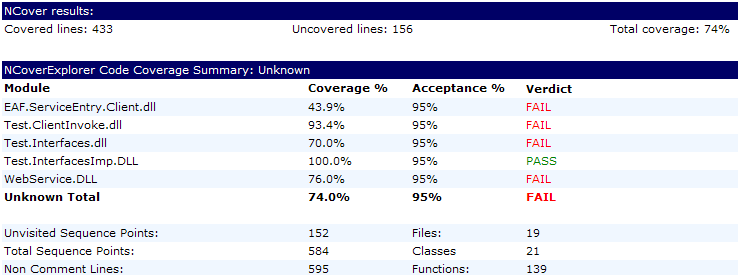
1 在编译的总报告中加入NCoverSummaryNCoverExplorerSummary

    <buildReportBuildPlugin>
    <xslFileNames>
     <xslFile>xsl\header.xsl</xslFile>
     <xslFile>xsl\modifications.xsl</xslFile>
     <xslFile>xsl\compile.xsl</xslFile>
     <xslFile>xsl\compile-msbuild.xsl</xslFile>
     <xslFile>xsl\unittests.xsl</xslFile>
     <xslFile>xsl\fxcop-summary.xsl</xslFile>
     <xslFile>xsl\NCoverSummary.xsl</xslFile>
     <xslFile>xsl\NCoverExplorerSummary.xsl</xslFile>
     <xslFile>xsl\SimianSummary.xsl</xslFile>
    </xslFileNames>
   </buildReportBuildPlugin>  

  其输出如图:
2 加入详细报告NCover.xsl 和 NCoverExplore.xsl

    <xslReportBuildPlugin description="NCover Report" actionName="NCoverBuildReport" xslFileName="xsl\NCover.xsl" />
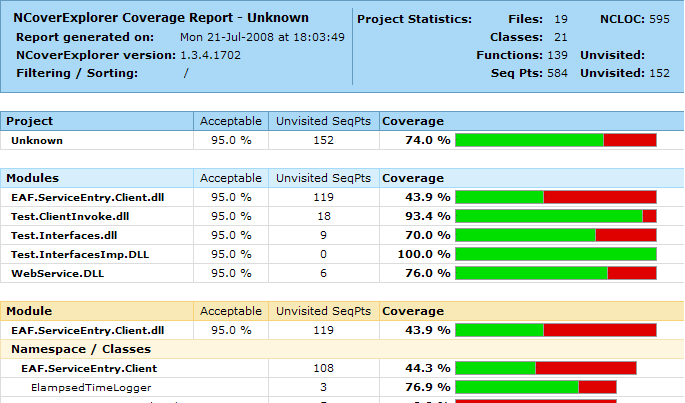
    <xslReportBuildPlugin description="NCover Explore" actionName="NCoverBuildExplore" xslFileName="xsl\NCoverExplorer.xsl" />

    NCover.xsl 展示所有未调及的代码,其报告详细到代码行,爽!

    NCoverExplore.xsl展示一个直观的图形报告,如例:
3 对了,别忘了重启IIS

NCover的使用

* 只有编译出PDB符号文件的库,NCover才能检测

* NCover排除测试案例: //ea NUnit.Framework.TestFixtureAttribute